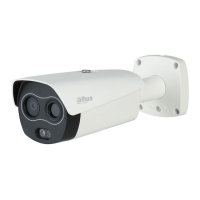
This document outlines the installation and configuration of the Dahua Thermal Body Temperature Measurement System, a solution designed for highly accurate, non-contact body temperature measurement.
Function Description
The Dahua Thermal Body Temperature Measurement System is an advanced solution for measuring human body temperature with high accuracy. It utilizes a thermal camera in conjunction with a blackbody, an AI algorithm, and an IVSS server to provide real-time temperature monitoring, trigger alarms for high temperatures, and generate statistics. The system is designed for multi-person measurement at distances up to 2 meters, ensuring fast and non-contact operation. The primary function is to identify individuals with elevated body temperatures, which can be crucial for public health and safety. The IVSS server acts as the central hub for monitoring, data collection, and alarm management.
Important Technical Specifications
The core components of the system include:
- Thermal Network Value Hybrid Bullet Camera (DH-TPC-BF2221-HTM): This camera is the primary sensor for thermal imaging and temperature detection.
- Blackbody: A constant temperature reference source, typically set to 35°C by default, used for temperature correction of thermal imaging acquisition. This ensures a measurement accuracy of ±0.3°C.
- IVSS7008-1I Server: This intelligent video surveillance server processes the data from the camera, runs the AI algorithm, manages alarms, and stores statistics.
- PoE Switch (5 Port): Provides power and network connectivity to the camera.
- Monitor (DHL32-F600): For displaying the system's interface and real-time monitoring.
- Accessories: Includes 10M Ethernet Cable, HDMI Cable, and 2X Tripods with brackets for mounting the camera and blackbody.
Measurement Accuracy: ±0.3°C (with blackbody).
Measurement Distance: Up to 2 meters.
Detection Area Width: Approximately 0.9 meters at the optimal distance of 2 meters.
Usage Features
Installation and Setup:
- Environment Preparation: The installation area must have sufficient illumination for the visible light channel, avoiding backlight, reflections, strong light changes, and occlusions. It is crucial to avoid high-temperature heat sources (heaters, hot water points, microwave ovens, high-power lamps, radiators) or direct sunlight in the thermal imaging picture to prevent interference and detector damage. The area should be relatively isolated, stable, and free from wind, strong electromagnetic interference, or vibration.
- Physical Setup:
- Blackbody Mounting: The blackbody is mounted on a tripod using a bracket and hex screw.
- Blackbody Settings: Power on the blackbody and set its temperature to 35°C using the upward arrow. Allow 30 minutes for the blackbody to stabilize its temperature.
- Camera Mounting: The camera is attached to a tripod using a bracket and four screws.
- Placement: The camera and blackbody should be positioned 2 meters apart. The blackbody's height should be 1.8 meters from the ground, and the camera's height should be 2 meters from the ground.
- Flow Management: The area needs to be defined with safety barriers to guide people. The flow of people should be such that they do not block the line of sight between the camera and the blackbody during temperature measurement.
- Wiring:
- Connect the camera to port 1 of the PoE switch using an Ethernet cable.
- Connect the IVSS server to port 1 and the PoE switch to port 5 using Ethernet cables.
- Connect the monitor to the IVSS server via an HDMI cable and to a 230V power source.
- Connect the mouse to the IVSS server for control.
- Configuration (IVSS Startup Wizard):
- Startup: The IVSS server guides through initial setup.
- Region and Language: Select the appropriate region and language.
- Terms and Conditions: Agree to the terms.
- Time and Date: Confirm timezone, set time and date.
- Password: Create a strong password (8-32 digits, including letters, numbers, and at least two types of symbols).
- Email/Security Questions: Enter an email for password recovery or set security questions.
- IP Address: Set the IVSS server's network card 1 IP address (e.g., 192.168.1.100), ensuring the camera is in the same IP range (192.168.1.xxx).
- P2P Function: Optional, for push functionality requiring internet connection.
- Camera Addition and Perimeter Configuration:
- Add Camera: Access the "Device" menu in the IVSS, click "+Add," then "Search" to find the connected camera. Initialize the camera.
- Password Confirmation: Confirm the camera's password (same as IVSS).
- IP Assignment: Assign an IP address to the camera within the same range as the IVSS (e.g., 192.168.1.101).
- Channel Confirmation: Verify that the camera is connected and shows two green "status" symbols, indicating a dual sensor thermal camera.
- Monitoring Setup: Drag the camera's view to the window, adjust the original scale, and save the view.
- Event Rules: In the "Event/Thermal sensor / BodyTempDetect/ Blackbody" menu, set rules for measurement.
- Thermal Channel Activation: Click on the camera's thermal channel, enable "BodyTempDetect," and save.
- Detection Area: Define the detection area by dragging corners to the approximate height of the blackbody.
- Filter Settings: Adjust filter size to be slightly smaller than the person's face for average temperature readings.
- Recording and Snapshot: Enable recording and snapshots for the visual sensor.
- Buzzer Alarm: Optional, enable a buzzer for high-temperature detection.
- Blackbody Parameter: Specify the area of the blackbody surface in the "Blackbody para..." settings.
- Mask Detection: Configure "visual channel" and enable face detection for mask detection. A buzzer can be set to trigger an alarm for persons without masks.
- Blackbody Adjustment: The blackbody detection area might need slight adjustment to ensure highest accuracy.
- Testing and Verification:
- Walk through the measurement zone to verify accurate temperature readings and mask detection.
- Simulate a fever (e.g., with a hot cup of water) to observe the system's response and temperature drop back to normal.
- Reporting and Search:
- Statistics: Access "AI reports" from the "Live" menu for statistics.
- Body Temperature Report: Search for measurements by choosing "Body Temperature Report," "Today," and "hours" to view, filter, and export results.
- High Temperature Search: Perform an "AI SEARCH" by specifying "High" temperature and defining a period to find relevant results.
- Export: Export results, including person's pictures, for better overview.
Maintenance Features
- Blackbody Radiation Surface: The blackbody radiation surface is highly sensitive and must NOT be touched or sprayed. Any damage due to human error is not covered by the warranty.
- Cleaning: Devices should only be cleaned carefully using appropriate tools (e.g., air blower for camera lenses).
- System Stability: Once configured, the blackbody or camera must NOT be moved. If moved, they need to be returned to their original location, and the blackbody radiation zone and detection area must be reconfigured to maintain accuracy.
- Environmental Control: Continuously ensure the installation area remains isolated from strong wind, humidity changes, or airflow, as these can affect temperature measurement accuracy.
- Distance Verification: Regularly verify that all distances (camera-blackbody, camera-person) correspond to the given instructions. Any movement of equipment necessitates re-measurement and potential reconfiguration.
- Thermal Imaging Correction: The thermal imaging channel may periodically "get stuck" for a short time. This is normal, as the system sets the blank to zero for correction to ensure image uniformity and temperature measurement accuracy.
- Time Synchronization: If the thermal camera does not measure temperature after initial configuration, check and synchronize the system time in system debugging.

 Need help?
 General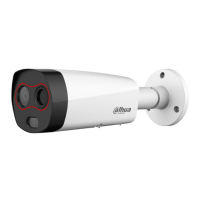

 To Next Page