Need help?
Do you have a question about the Dahua Technology KB1000 and is the answer not in the manual?
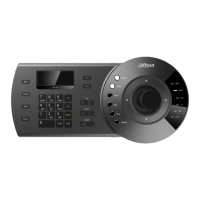
Details the physical layout and components of the keyboard, including the LCD panel, keypad, and joystick.
Outlines the rear interface ports like RS422, RS485, RS232, and DC 12V for different keyboard models.
Explains how to connect the keyboard to PTZ cameras using RS485 and network, detailing device limits.
Details connection methods for DVR/NVRs via RS232, Network, and RS485-RS232 Box, including device limits.
Describes the process of connecting the keyboard to SmartPSS software on a PC via USB for control.
Guides on adding devices to the keyboard's zone list and navigating the menu for zone configuration.
Covers setup and operational controls for PTZ cameras, including RS485 and network connection methods.
Explains setup and operational controls for DVR/NVR devices via network and RS232 connections.
Details how to use the keyboard to control SmartPSS, including screen layouts and camera selection.
 General
| Scanning System | Progressive |
|---|---|
| IR On/Off Control | Auto/ Manual |
| Lens Type | Fixed |
| Focus Control | Fixed |
| HLC | Yes |
| Gain Control | Auto/Manual |
| Noise Reduction | 3D DNR |
| Motion Detection | Yes |
| Streaming Method | Unicast / Multicast |
| Max. User Access | 10 Users |
| Smart Phone | IOS, Android |
| Electronic Shutter Speed | 1/3s~1/100, 000s |
| Video Compression | H.265 / H.264 |
| Day/Night | ICR |
| WDR | DWDR |
| White Balance | Auto/Manual |
| Ethernet | 1x RJ45 10M/100Mbps |
| Protocol | HTTP;TCP;ARP;RTSP;RTP;UDP;RTCP;SMTP;FTP;DHCP;DNS;DDNS;PPPOE;IPv4/v6;QoS;UPnP;NTP;Bonjour;802.1x;Multicast;ICMP;IGMP |
| Interoperability | ONVIF, CGI |
| Edge Storage | Micro SD Card, Max 128GB |
| Management Software | DSS, DMSS |
| Certifications | CE, FCC, RoHS |
| Power Supply | DC12V |
| Bit Rate | 32 Kbps ~ 8 Mbps |


 To Next Page