
 Need help?
Do you have a question about the Dahua DH-PFS3206-4P-96 and is the answer not in the manual?
Essential precautions for device operation and placement to prevent damage or injury.
Safety warnings related to battery usage, power lines, and electrical hazards.
Notes on manual reference, software changes, trademarks, and contact information.
Details common and individual features of the Dahua Dual Optical Port 4-Port PoE Switch.
Illustrates how the switch is used in cascading and ring network topologies.
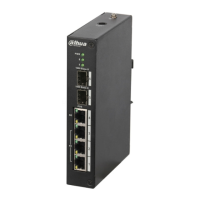
Explains the physical layout, ports, and indicators on the front panel of the switch.
Describes the upper cover of the device and the location of the DC power port.
Details the PoE power supply standards supported and the total output power.
Steps to log in to the switch's web-based management interface.
Explains status indicators and how to view device information through the interface.
Manages system information, network settings, software upgrades, password, and reboot.
Manages ring network configuration, 802.1Q VLAN, and PoE settings.
Configures port mirroring for traffic monitoring and other port-specific settings.
Overview of SNMP support for network monitoring and management.
Instructions for mounting the PoE switch on a DIN rail.
This document describes the Dahua Dual Optical Port 4-Port PoE Switch, a two-layer industrial PoE switch designed for various networking applications, including cascading and ring network modes. It offers a range of features for efficient power supply, network management, and system maintenance.
The Dahua Dual Optical Port 4-Port PoE Switch serves as a central component in network infrastructure, providing power and data connectivity. It conforms to IEEE802.3, IEEE802.3u, IEEE802.3ab/z, and IEEE802.3X standards, ensuring broad compatibility. The switch features MAC auto study and aging with an 8K MAC address list capacity, facilitating efficient data forwarding. All ports are self-adaptive MDI/MDIX, simplifying cable connections.
The switch includes three 10/100M self-adaptive RJ45 ports that support IEEE802.3af and IEEE802.3at standard power supply, suitable for connecting various PoE-powered devices. Additionally, there is one 10/100/1000M self-adaptive RJ45 port that supports Hi-PoE 60W power supply, catering to devices with higher power requirements. For network expansion and redundancy, the switch is equipped with two 1000M SFP optical ports, which can be used for cascading multiple switches or forming looped networks.
A key function of this device is its PoE power consumption management. This feature prevents power failures when the device is overloaded by intelligently managing power distribution to connected devices. The switch also provides visual feedback through indicator lights that display PoE power supply status, power failure, and other operational functions.
The switch is designed for industrial environments, featuring a wide temperature design and a robust metal structure, ensuring reliability and durability in challenging conditions. It supports a DC48-57V power supply.
Depending on the specific model, the switch offers different total PoE output power: DH-PFS3206-4P-96 and DH-PFS4206-4P-96 models provide 96W, while DH-PFS3206-4P-120 and DH-PFS4206-4P-120 models offer 120W. The DH-PFS3206-4P-96 and DH-PFS3206-4P-120 models support dual optical ports for cascading. The DH-PFS4206-4P-96 and DH-PFS4206-4P-120 models support dual ports for forming looped networks with a convergence switch (e.g., DH-PFS5424-24T).
For ring network configurations, the PoE switch supports loop protection and RSTP (Rapid Spanning Tree Protocol) to ensure network stability and quick recovery from link failures. Cascading PoE switches are typically not equipped with network management functions, whereas ring network PoE switches include comprehensive network management capabilities.
The switch can be deployed in two primary modes: cascading mode and ring network mode. In cascading mode, multiple switches are connected sequentially to extend network reach. In ring network mode, switches form a closed loop, providing redundancy and fault tolerance, especially when used with a convergence switch.
Users can interact with the device through a WEB client for system setup, device management, and port management. The WEB client provides an intuitive interface for configuring various network parameters.
The front panel of the switch features several indicators and ports. The FE (Fast Ethernet) ports are 10/100M self-adaptive RJ45 ports for PoE power supply. The GE (Gigabit Ethernet) port is a 10/100/1000M self-adaptive RJ45 port, also for PoE power supply. The 1000 Base-X ports are SFP optical ports, and their status is indicated by Link/Act lights. The PWR (Power) indicator light also displays PoE power supply status, with different flash patterns indicating single port device power on, single port device power off, and unit device consumption overload.
The device's power port is located on the upper cover and supports DC48-57V power supply. The PoE power supply capabilities include support for IEEE802.3af, IEEE802.3at, and HiPoE 60W standards across its RJ45 ports. The total PoE power output varies by model, ensuring compatibility with a range of powered devices.
The WEB client offers extensive features for managing and maintaining the switch.
System Settings:
Device Management:
Port Management:
SNMP Function: The switch supports SNMP (Simple Network Management Protocol) V1 and V2C. SNMP is an industrial standard for network management, enabling network administrators to inquire about device status, search for information at network nodes, and facilitate capacity planning and report generation through a polling mechanism.
Installation: The switch supports DIN rail mounting. Installation involves laying the switch hook on the rail and pressing the switch to engage the buckle into the slide. The 4-port PoE switch supports a slide width of 28mm.
 General
| PoE Ports | 4 |
|---|---|
| Total Power Budget | 96W |
| Switching Capacity | 12 Gbps |
| Operating Humidity | 10% to 90% (non-condensing) |
| Standard | IEEE 802.3, IEEE 802.3u, IEEE 802.3x, IEEE 802.3af, IEEE 802.3at |
| Jumbo Frame | 9KB |
| Power Supply | AC 100-240V |
| Power Consumption | ≤100W |
| Operating Temperature | -10°C to +50°C |
| Storage Temperature | -40°C to +70°C |





 To Next Page