EasyManua.ls Logo

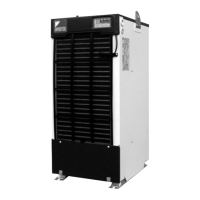
Daikin AKZ8 Series - User Manual

Daikin AKZ8 Series
44 pages
Print Icon
To Next Page IconTo Next Page
Loading...
Built-in breaker
model
Built-in tank
model
Different-voltage
model
CE model
Built-in heater
model
Installation
Models
Oil Cooling Unit and Accessories
4
Precautions for Installation 5
Reference for Pipe Selection 6
Electric Wiring 7
CONTENTS
1
Circulating type
Standard
model
Menu
Series
Built-in
breaker
model (–B)
CE model
(–C)
Built-in
heater
model (–H)
Built-in
tank model
(–T1, –T)
Different-
voltage
model (–E)
AKZ148
AKZ328
AKZ438
AKZ568
AKZ908
Instruction Manual
AKZ8 Series
If the air filter is clogged, the cooling performance deteriorates,
causing excess power consumption.
Clean the air filter periodically to reduce power consumption.
Thank you for purchasing DAIKIN Oil Cooling Unit (“OILCON”).
This instruction manual includes instructions for using the Oil
Cooling Unit.
To ensure proper use of this product, be sure to read through this
instruction manual before using it.
After reading this manual, keep it handy for your future reference.
Monitor Items 23
Timer Operation 24
Additional Setting Functions 25
Setting Additional Function 27
For Temperature Control Improvement 30
Alarm/Warning Output Logic 33
Alarm Settings for Optional Protection
Devices (Installed by User) 33
Handling
Before Operation
12Model Identification and Specifications
14
Part Names and Functions 15
Names and Functions of the Control Panel Parts
16
Checking Initial Operating Conditions 18
Operation Setting 19
Holding Constant Oil Temperature 20
Tuning Oil Temperature to Room Temperature
(or Machine Temperature)
21
Cooling Oil at Constant Capacity (%) 22
Optional Parts
Machine temperature tuning control 34
Returned oil temperature control 35
Communication with main machine 36
Maintenance
37
38
Maintenance/Inspection
• Daily maintenance/inspection
• Periodic maintenance/inspection
To leave the unit unused for a long period
Troubleshooting
When the unit operation seems abnormal
although no alarm is activated
When an alarm is activated
Safety Precautions
Installation
Procedure
Before
Operation
Useful
Functions
Maintenance
Troubleshooting
Optional
Functions
Operating
Procedure
DAIKIN Oil Cooling Unit
(“OILCON”)
Proper use results in power saving
PIM00116C
PIM00116C_EN.fm -1 ペー 00  

Questions and Answers

Summary

Safety Precautions

Installation Safety

Guidelines and warnings for safe installation of the unit, covering qualified personnel and electrical connections.

Usage Safety

Precautions and warnings for safe operation and handling of the unit, including electrical safety and environmental considerations.

Installation Procedure

Oil Cooling Unit and Accessories

Check the Oil Cooling Unit and its included accessories upon receipt.

Installation Place and Oil Piping

Select suitable installation location and manage oil piping for the unit.

Suction Strainer (Line Filter)

Details on installing and maintaining the suction strainer to prevent clogging and ensure flow.

Reference for Pipe Selection

Guidelines for selecting appropriate pipe diameters and lengths based on model and conditions.

Electric Wiring

Instructions for conducting electrical wiring according to local standards and safety regulations.

Starting;Stopping the Oil Cooling Unit

Describes three methods to start and stop the unit: main power, remote control, and control panel.

Mounting a Circuit Breaker

Guidance on mounting an exclusive circuit breaker for the unit, including earth leakage breaker recommendations.

Wiring Procedure

Step-by-step instructions for wiring the unit, including cable size and connection points.

Outline of Electrical Equipment Box

Diagram and explanation of the electrical equipment box layout and terminal blocks.

Connection of Remote Control Input

Procedure for connecting remote control signals for unit operation and setting.

Connection of External Output Contact

How to connect signal cables for outputting operation status and alarm signals.

Electric Wiring Diagram

Detailed wiring diagram illustrating component connections for typical models.

Handling

Model Identification and Specifications (AKZ148;328;438)

Details on identifying models and their technical specifications, including cooling capacity and power requirements.

Model Identification and Specifications (AKZ568;908)

Details on identifying models and their technical specifications, including cooling capacity and power requirements.

Part Names and Functions

Identifies major components and their roles across different unit models.

Before Operation

Operating Environment

Guidelines for the operational environment, including atmosphere, temperature, and humidity.

Installation Checks

Pre-operation checks related to secure installation and ensuring unobstructed air intake/exhaust.

Oil Piping Checks

Checks for oil piping leaks, blockages, and ensuring the correct oil level in the tank.

Applicable Oil

Lists suitable lubrication and hydraulic oils, and specifies oils that cannot be used with the unit.

Control Panel Parts and Functions

Details the buttons, lamps, and displays on the control panel for monitoring and operation.

Checking Initial Operating Conditions

Steps to check and cancel operation lock mode before initial use and confirm operating conditions.

Operation

Operation Modes

Lists and describes the seven available operation modes for the unit.

Operation Settings

Overview of modes for controlling oil temperature and capacity based on system requirements.

Operating Procedure

Holding Constant Oil Temperature

Procedure to set inlet or outlet oil temperature to a constant value.

Tuning Oil Temperature to Room or Machine Temperature

How to set oil temperature based on room or machine temperature using temperature difference.

Cooling Oil at Constant Capacity (%)

Procedure to set cooling operation based on a specified capacity percentage.

Useful Functions

Monitor Items

Lists items that can be monitored in 'Monitor mode', such as temperatures and capacity.

Timer Operation

How to set the ON timer for delayed start-up, useful for machine warm-up.

Additional Setting Functions

Overview of optional functions like auto-tuning, temperature warnings, and communication.

Parameter Setting Procedure

Steps to set parameters for various additional functions using the control panel.

Setting Additional Function-Temperature Range Warning

Details on setting temperature range warnings, conditions, and output logic.

Description on Parameter Settings (Group A)

Explanation of Group A parameters for temperature range warning condition and operation settings.

Description on Parameter Settings (Group B)

Explanation of Group B parameters for temperature range warning temperature and reset settings.

For Temperature Control Improvement-Auto-tuning Mode

Guide to using auto-tuning for better temperature control performance by adjusting gain settings.

Operation Flow

Visual representation of the auto-tuning operation steps and status indicators.

Auto-tuning Notes and Parameters

Important notes and parameter explanations for the auto-tuning process.

Optional Parts

Returned Oil Temperature Control

How to install and use the returned oil temperature control thermistor.

Machine Temperature Tuning Control

Instructions for installing thermistors to monitor machine temperature for control.

Communication with Main Machine

Details on mounting optional boards for unit communication with the main machine.

Maintenance

Daily Maintenance;Inspection

Routine checks for the unit's daily operation and health, focusing on oil and power supply.

Periodic Maintenance;Inspection

Scheduled maintenance tasks like cleaning strainers, air filters, and condensers.

Condenser Cleaning and Exterior Care

Instructions for cleaning the condenser fins and maintaining the unit's exterior.

To Leave the Unit Unused for a Long Period

Procedures for storing the unit when not in use, including protection and power off.

Troubleshooting

When the Unit Operation Seems Abnormal

Troubleshooting steps when the unit operates abnormally without an alarm.

Alarm List

Lists various alarm codes, their causes, and corrective actions for unit malfunctions.

Alarm List (Continued)

Continues the list of alarm codes, their causes, and corrective actions.

Summary

Safety Precautions

Installation Safety

Guidelines and warnings for safe installation of the unit, covering qualified personnel and electrical connections.

Usage Safety

Precautions and warnings for safe operation and handling of the unit, including electrical safety and environmental considerations.

Installation Procedure

Oil Cooling Unit and Accessories

Check the Oil Cooling Unit and its included accessories upon receipt.

Installation Place and Oil Piping

Select suitable installation location and manage oil piping for the unit.

Suction Strainer (Line Filter)

Details on installing and maintaining the suction strainer to prevent clogging and ensure flow.

Reference for Pipe Selection

Guidelines for selecting appropriate pipe diameters and lengths based on model and conditions.

Electric Wiring

Instructions for conducting electrical wiring according to local standards and safety regulations.

Starting;Stopping the Oil Cooling Unit

Describes three methods to start and stop the unit: main power, remote control, and control panel.

Mounting a Circuit Breaker

Guidance on mounting an exclusive circuit breaker for the unit, including earth leakage breaker recommendations.

Wiring Procedure

Step-by-step instructions for wiring the unit, including cable size and connection points.

Outline of Electrical Equipment Box

Diagram and explanation of the electrical equipment box layout and terminal blocks.

Connection of Remote Control Input

Procedure for connecting remote control signals for unit operation and setting.

Connection of External Output Contact

How to connect signal cables for outputting operation status and alarm signals.

Electric Wiring Diagram

Detailed wiring diagram illustrating component connections for typical models.

Handling

Model Identification and Specifications (AKZ148;328;438)

Details on identifying models and their technical specifications, including cooling capacity and power requirements.

Model Identification and Specifications (AKZ568;908)

Details on identifying models and their technical specifications, including cooling capacity and power requirements.

Part Names and Functions

Identifies major components and their roles across different unit models.

Before Operation

Operating Environment

Guidelines for the operational environment, including atmosphere, temperature, and humidity.

Installation Checks

Pre-operation checks related to secure installation and ensuring unobstructed air intake/exhaust.

Oil Piping Checks

Checks for oil piping leaks, blockages, and ensuring the correct oil level in the tank.

Applicable Oil

Lists suitable lubrication and hydraulic oils, and specifies oils that cannot be used with the unit.

Control Panel Parts and Functions

Details the buttons, lamps, and displays on the control panel for monitoring and operation.

Checking Initial Operating Conditions

Steps to check and cancel operation lock mode before initial use and confirm operating conditions.

Operation

Operation Modes

Lists and describes the seven available operation modes for the unit.

Operation Settings

Overview of modes for controlling oil temperature and capacity based on system requirements.

Operating Procedure

Holding Constant Oil Temperature

Procedure to set inlet or outlet oil temperature to a constant value.

Tuning Oil Temperature to Room or Machine Temperature

How to set oil temperature based on room or machine temperature using temperature difference.

Cooling Oil at Constant Capacity (%)

Procedure to set cooling operation based on a specified capacity percentage.

Useful Functions

Monitor Items

Lists items that can be monitored in 'Monitor mode', such as temperatures and capacity.

Timer Operation

How to set the ON timer for delayed start-up, useful for machine warm-up.

Additional Setting Functions

Overview of optional functions like auto-tuning, temperature warnings, and communication.

Parameter Setting Procedure

Steps to set parameters for various additional functions using the control panel.

Setting Additional Function-Temperature Range Warning

Details on setting temperature range warnings, conditions, and output logic.

Description on Parameter Settings (Group A)

Explanation of Group A parameters for temperature range warning condition and operation settings.

Description on Parameter Settings (Group B)

Explanation of Group B parameters for temperature range warning temperature and reset settings.

For Temperature Control Improvement-Auto-tuning Mode

Guide to using auto-tuning for better temperature control performance by adjusting gain settings.

Operation Flow

Visual representation of the auto-tuning operation steps and status indicators.

Auto-tuning Notes and Parameters

Important notes and parameter explanations for the auto-tuning process.

Optional Parts

Returned Oil Temperature Control

How to install and use the returned oil temperature control thermistor.

Machine Temperature Tuning Control

Instructions for installing thermistors to monitor machine temperature for control.

Communication with Main Machine

Details on mounting optional boards for unit communication with the main machine.

Maintenance

Daily Maintenance;Inspection

Routine checks for the unit's daily operation and health, focusing on oil and power supply.

Periodic Maintenance;Inspection

Scheduled maintenance tasks like cleaning strainers, air filters, and condensers.

Condenser Cleaning and Exterior Care

Instructions for cleaning the condenser fins and maintaining the unit's exterior.

To Leave the Unit Unused for a Long Period

Procedures for storing the unit when not in use, including protection and power off.

Troubleshooting

When the Unit Operation Seems Abnormal

Troubleshooting steps when the unit operates abnormally without an alarm.

Alarm List

Lists various alarm codes, their causes, and corrective actions for unit malfunctions.

Alarm List (Continued)

Continues the list of alarm codes, their causes, and corrective actions.

Daikin AKZ8 Series Specifications

General IconGeneral
CategoryAccessories
SeriesAKZ8
Compatible SystemsDaikin VRV, VRF, and SkyAir systems
Display TypeLCD
Control FunctionsTemperature, Fan Speed

Related product manuals