This document serves as a user manual for Daikin Altherma heat pump convector options, covering models EKRTCTRL1, EKRTCTRL2, EKWHCTRL0, EKWHCTRL1, and EKPCBO. It provides comprehensive information on the operation, maintenance, and troubleshooting of these devices.
General Device Description
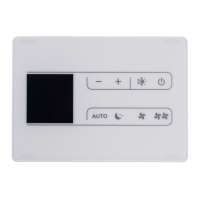
The Daikin Altherma heat pump convectors are designed for home air conditioning, offering advanced technology to provide optimal room temperatures with minimum energy costs. The units are controlled via SMART TOUCH electronic control panels, which come in various configurations: device-side continuous modulation (EKRTCTRL1), wall-mounted with room probe (EKWHCTRL1), and fixed speed modulation (EKRTCTRL2). The EKPCBO model features an on-board speed selector for connection to a standard thermostat. These control panels ensure autonomous room temperature adjustment and include anti-freeze safety features. Settings are retained even if the appliance is switched off or power is interrupted.
Important Technical Specifications
- Compliance: The units comply with European Directives 2014/35/EU (Low voltage) and 2014/30/EU (Electro-magnetic compatibility).
- Temperature Probes:
- EKRTCTRL1 and EKRTCTRL2: A 10 kΩ water temperature probe positioned in the device battery regulates minimum heating (30°C) and maximum cooling (20°C) levels.
- EKWHCTRL1: Features a room temperature probe for controlling one or more fan coils/cooler-radiators in broadcast mode.
- Temperature Adjustment Range:
- EKRTCTRL1 and EKWHCTRL1: From 16 to 28°C in 0.5°C intervals (auto mode), with out-of-range values from 5°C to 40°C accepted for brief periods.
- EKRTCTRL2: From 16 to 28°C in 1°C intervals (auto mode), with out-of-range values from 5°C to 40°C accepted for brief periods.
- Anti-freeze Protection: Guaranteed when the device is in stand-by mode, activating if ambient temperature drops below 5°C by opening solenoid valves on the hot water output and the boiler.
- Power Supply: Requires connection to mains electricity and, for EKPCBO, a room thermostat with a single 230V AC contact.
Usage Features
The control panels feature backlit keys and a display showing operational statuses and alarms.
EKRTCTRL1 (Device-side continuous modulation):
- Activation/Deactivation: Press and hold the ON/Stand-By key for approximately 2 seconds.
- Operating Modes: Select from AUTO, SILENT, NIGHT, and MAX modes.
- AUTO: Automatic ventilation speed adjustment based on the difference between actual and set room temperature.
- SILENT: Limits ventilation speed to a contained maximum value.
- NIGHT-TIME: Limits ventilation speed and automatically adjusts set temperature (decreases by 1°C after one hour, another degree after two hours in heating; increases by 1°C after one hour, another degree after two hours in cooling).
- MAX OPERATION: Activates maximum possible power level for heating or cooling.
- Temperature Selection: Use '+' and '-' keys to set desired room temperature.
- Key Lock: Press '+' and '-' keys simultaneously for 3 seconds to lock/unlock all keys, indicated by "bL" on the display.
- Brightness Reduction: Display brightness reduces after 20 seconds of inactivity. Can be completely switched off by holding '+' key for 5 seconds until "01" is displayed, then changing to "00" with '-'.
- Room Temperature Probe Offset: Adjust the displayed temperature from -9 to +12 K in 0.1 K intervals by holding '-' key for 5 seconds when the display is off.
EKWHCTRL1 (Wall-mounted with room probe):
- Functions are largely identical to EKRTCTRL1, but the control is wall-mounted and manages multiple fan coils. Anomalies on individual connected terminals are not indicated on the wall panel.
EKRTCTRL2 (Fixed speed modulation):
- Activation/Deactivation: Press and hold the ON/Stand-By key for approximately 2 seconds.
- Operating Modes: Select from 4 fixed speeds (automatic, minimum, super silent, maximum) using dedicated keys.
- AUTO: Stepped adjustment of fan to reach set point.
- SUPER SILENT: Powerful dehumidifying in cooling, radiation-only in heating.
- MAXIMUM SPEED: Maximum power level for heating or cooling.
- MINIMUM SPEED: Limited fan revolutions in both heating and cooling.
- Temperature Selection: Use '+' and '-' keys to set desired room temperature in 1°C intervals.
- Key Lock: Press '+' and '-' keys simultaneously for 3 seconds to lock/unlock all keys, indicated by "bL" on the display.
- Brightness Reduction: Similar to EKRTCTRL1, with the option to switch off the display.
- Room Temperature Probe Offset: Adjust the displayed temperature from -9 to +12 K in 1 K intervals by holding '-' key for 5 seconds when the display is off.
EKPCBO (On-board speed selector for standard thermostat):
- Operation: Switches on/off and selects 4 speeds directly from the fan coil via an external thermostat contact.
- LED Indications: 5 LEDs display operational states: Minimum, Medium, Maximum speed selected, Supersilent function selected, and Fan coil off/TA contact open (flashing).
- General On Switch: Requires connection to mains and a room thermostat with a 230V AC contact.
- Ventilation Speed Regulation: Each press of the mode/off button cycles through supersilent, minimum, medium, and maximum speeds.
- Error Status Warnings: Diagnosed via LED combinations (e.g., flashing LED for TERM contact open/closed, 4 flashing LEDs for GRID contact open).
Maintenance Features
- External Cleaning: Disconnect from mains before cleaning. Use a soft damp cloth; avoid abrasive or corrosive detergents. Wait for parts to cool to prevent burns.
- Air Suction Filter Cleaning:
- Removal: Lift the front grill until released, slide it outwards, then pull out the filter.
- Cleaning: Vacuum powder, then wash with running water (no detergents/solvents) and let dry.
- Safety: The appliance has a safety switch that prevents operation if the mobile panel is missing or out of position. Ensure the panel is correctly mounted after cleaning.
- Energy Saving Tips:
- Keep filters clean.
- Keep doors and windows closed in conditioned rooms.
- Limit direct sun exposure (use curtains, shutters).
Error Signals (Common across models where applicable):
- E1: Faulty room temperature (AIR) probe.
- E2: Problem with fan motor (e.g., blockage, faulty rotation sensor).
- E3: Water temperature probe fault (ensure 10 kΩ probe is installed).
- 5r: Engaging of grille microswitch S1 due to filter cleaning operation.
- Flashing of heating/cooling symbols indicates insufficient water temperature, stopping the fan.
Troubleshooting:
The manual includes a detailed troubleshooting table with common effects, causes, and solutions, covering issues like slow ventilation start, no ventilation, water leaks, excessive noise, and rust formation. For serious anomalies, contact an authorized service center.

 Need help?

 To Next Page

 General