CMSQ200+250A7W1B
Air conditioning system
4PW47628-1
Operation manual
3
5. O
PERATION
RANGE
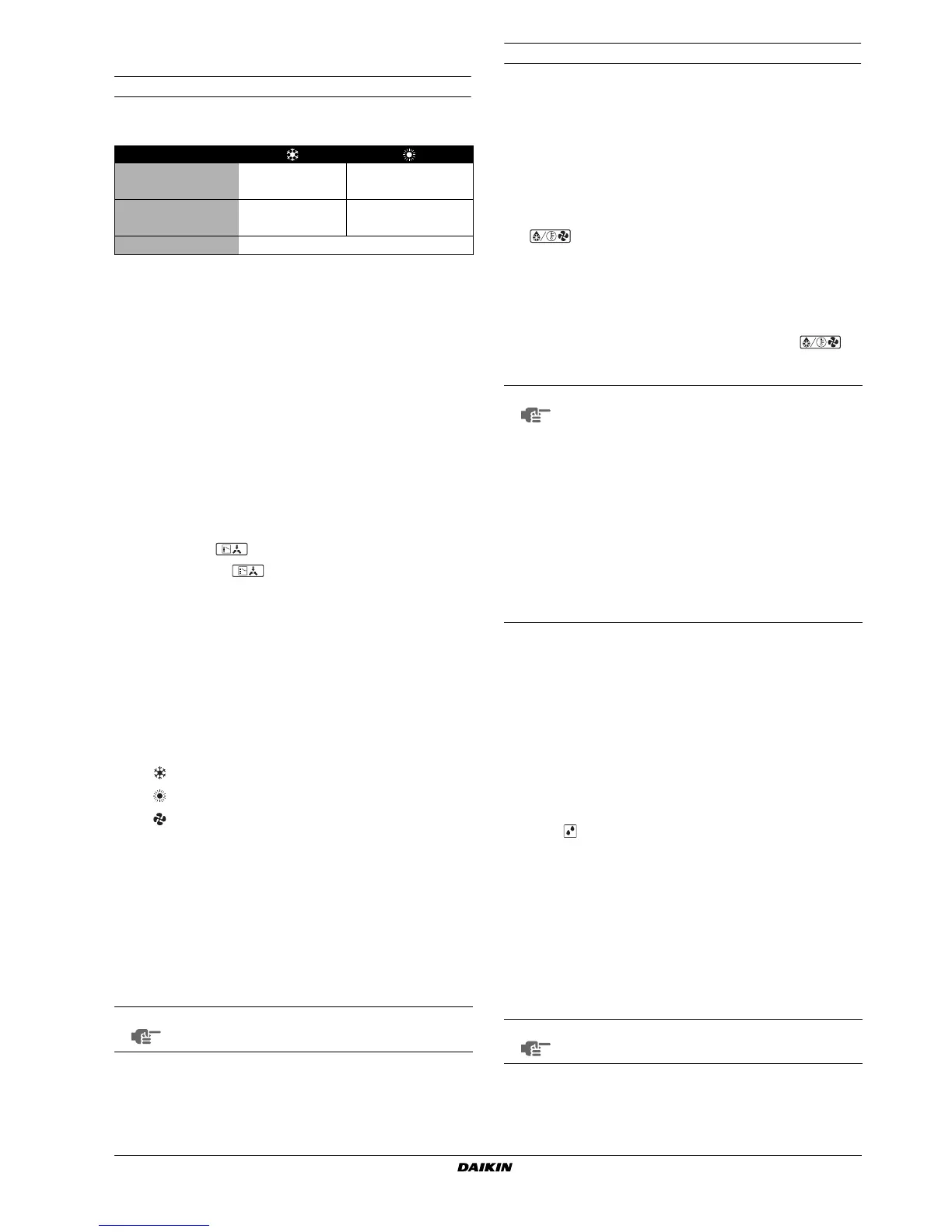
Operation range
Use the system in the following temperature and humidity ranges for
safe and effective operation.
6. O
PERATION
PROCEDURE
■
Operation procedure varies according to the combination of
outdoor unit and remote controller. Read "3. What to do before
operation" on page 2.
■
To protect the unit, turn on the main power switch 6 hours before
operation.
■
If the main power supply is turned off during operation, operation
will restart automatically after the power turns back on again.
6.1. Cooling, heating, and fan only operation
(See figure 3)
■
Changeover cannot be made with a remote controller whose
display shows (change-over under centralized control).
■
When the display (change-over under centralized control)
flashes, refer to "6.4. Setting the master remote controller" on
page 4.
■
The fan may keep on running for about 1 minute after the
heating operation stops.
■
The air flow rate may adjust itself depending on the room
temperature or the fan may stop immediately. This is not a
malfunction.
Starting the system
1
Press the operation mode selector button several times and
select the operation mode of your choice.
2
Press the on/off button.
The operation lamp lights up and the system starts operation.
Adjustment
For programming temperature, fan speed and air flow direction, refer
to the operation manual of the remote controller.
Stopping the system
3
Press the on/off button once again.
The operation lamp goes off and the system stops operation.
Explanation of heating operation
It may take longer to reach the set temperature for general heating
operation than for cooling operation.
The following operation is performed in order to prevent the heating
capacity from dropping or cold air from blowing.
Defrost operation
■
In heating operation, freezing of the outdoor unit coil increases.
Heating capability decreases and the system goes into defrost
operation.
■
The indoor unit fan stops and the remote controller displays
.
■
After maximum 10 minutes of defrost operation, the system
returns to heating operation again.
Hot start
■
In order to prevent cold air from blowing out of an indoor unit at
the start of heating operation, the indoor fan is automatically
stopped. The display of the remote controller shows .
It may take some time before the fan starts. This is not a
malfunction.
6.2. Program dry operation
■
The function of this program is to decrease the humidity in your
room with minimal temperature decrease (minimal room
cooling).
■
The micro computer automatically determines temperature and
fan speed (cannot be set by the remote controller).
■
The system does not go into operation if the room temperature
is low (<20°C).
Starting the system
(See figure 4)
1
Press the operation mode selector button several times and
select (program dry operation).
2
Press the on/off button.
The operation lamp lights up and the system starts operation.
3
Press the air flow direction adjust button. (Only for Multi-flow.)
Refer to "6.3. Adjusting the air flow direction" on page 4 for
details.
Stopping the system
4
Press the on/off button once again.
The operation lamp goes off and the system stops operation.
Outdoor temperature
–5~43°C DB –20~21°C DB
–20~15.5°C WB
Indoor temperature
21~32°C DB 15~27°C DB
14~25°C WB
Indoor humidity
≤
80%
(*)
(*) to avoid condensation and water dripping out the unit.
If the temperature or the humidity is beyond these conditions, safety devices may
work and the air conditioner may not operate.
Cooling operation
Heating operation
Fan only operation
NOTE
Do not turn off power immediately after the unit stops,
but wait for at least 5 minutes.
NOTE
■ The heating capacity drops when the outside
temperature falls. If this happens, use another
heating device together with the unit. (When using
together with appliances that produce open fire,
ventilate the room constantly.)
Do not place appliances that produce open fire in
places exposed to the air flow from the unit or
under the unit.
■ It takes some time to heat up the room from the
time the unit is started since the unit uses a hot-air
circulating system to heat the entire room.
■ If the hot air rises to the ceiling, leaving the area
above the floor cold, we recommend that you use
the circulator (the indoor fan for circulating air).
Contact your dealer for details.
NOTE
Do not turn off power immediately after the unit stops,
but wait for at least 5 minutes.



 To Next Page