37
Care and Cleaning
■
Titanium apatite photocatalytic air-purifying fi lter
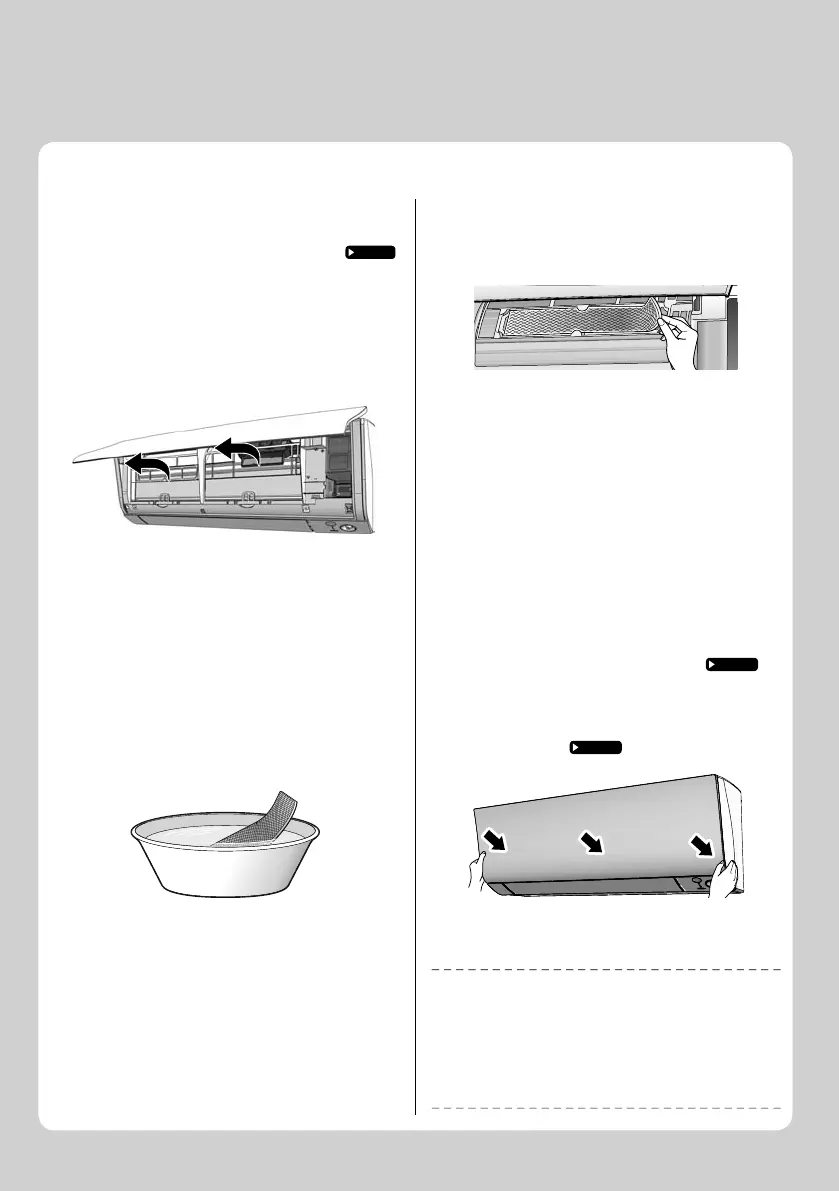
1. Open the front panel and
pull out the air fi lters.
Page 33
2. Take off the titanium
apatite photocatalytic air-
purifying fi lters.
• Remove the fi lters from the tabs.
3. Clean or replace the
titanium apatite
photocatalytic air-
purifying fi lters.
[Cleaning]
3-1 Vacuum dust, and soak in lukewarm
water or water for about 10 to
15 minutes if very dirty.
3-2 After washing, shake off remaining
water and let them dry in the shade.
• Do not wring out the fi lter to remove water from it.
[Replacement]
Remove the fi lter from the tabs
and prepare a new one.
• Dispose of the old fi lter as non-fl ammable waste.
4. Insert the titanium apatite
photocatalytic air-
purifying fi lters as they
were.
• When attaching the fi lter, check that the fi lter is
properly set in the tabs.
5. Reattach the fi lters.
Page 36
6. Close the front panel
slowly.
Page 36
NOTE
• Operation with dirty fi lters:
− cannot deodorize the air,
− cannot clean the air,
− results in poor heating or cooling,
− may cause odor.
• Dispose of old fi lters as non-fl ammable waste.
• To order a titanium apatite photocatalytic air-purifying fi lter, contact
the dealer where you bought the air conditioner.
CTXM15M2V1B/FTXM20M2V1B/FTXM25M2V1B/FTXM35M2V1B/FTXM42M2V1B



 To Next Page