4
NAMES AND FUNCTIONS OF OPERATING SECTION
(Fig. 1, 2)
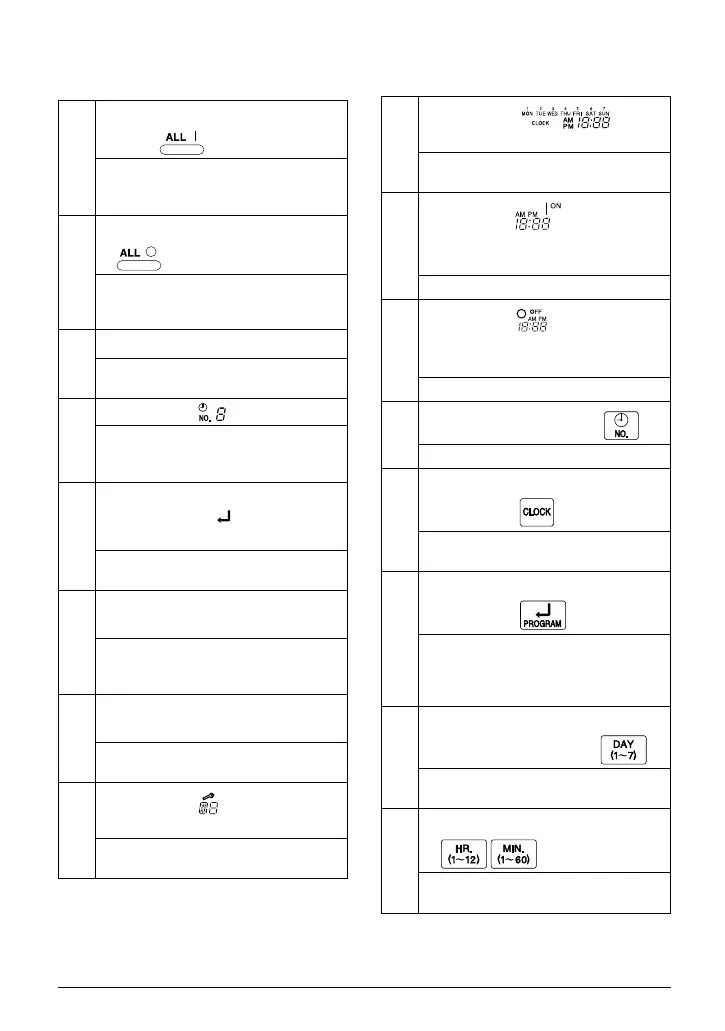
1
UNIFIED OPERATION BUT-
TON “ ”
Press this button to perform the unified
operation regardless of the No. of pro-
grammed time.
2
UNIFIED STOP BUTTON
“ ”
Press this button to perform the unified
stop regardless of the No. of pro-
grammed time.
3
OPERATION LAMP (RED)
The light turns on during the operation
of the indoor unit.
4
DISPLAY “ ” (TIME NO.)
Displays the time No. only when used
in conjunction with the central remote
controller.
5
DISPLAY
“PROGRAM START.”
(PROGRAMMING START)
The light turns on when the timer is
programmed.
6
DISPLAY “
OFF
” (HOLIDAY
SETTING)
Lights above the day of the week set
as holiday. The operation controlled by
timer is not available on that day.
7
DISPLAY “ — ” (SETTING
OF DAYS OF A WEEK)
Flashes below the day of the week pro-
grammed.
8
DISPLAY “ ” (MALFUNC-
TION CODE)
Displays the contents of malfunction
during the stop due to malfunction.
9
DISPLAY “ ”
(PRESENT TIME)
Displays the present day of the week
and time.
10
DISPLAY “ ” (PRO-
GRAMMED TIME OF SYSTEM
START)
Displays the time programmed to start.
11
DISPLAY “ ” (PRO-
GRAMMED TIME OF SYSTEM
OFF)
Displays the time programmed to stop.
12
TIME NO. BUTTON “ ”
See page 5–9.
13
CLOCK ADJUSTING
BUTTON “ ”
Press this button to set the present
time.
14
PROGRAMMING START
BUTTON “ ”
Press this button to set or check the
No. of programmed time. Press it
again after you are through with the
program.
15
BUTTON FOR SELECTING
DAYS OF A WEEK “ ”
Press this button to select the day of
the week.
16
HOUR/MINUTE BUTTON
“ ”
Press this button to adjust the present
time and the programmed time.
01_EN_3P124623-5C.fm Page 4 Wednesday, August 3, 2005 2:20 PM



 To Next Page