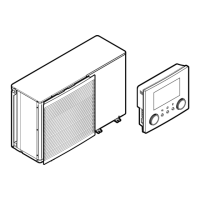
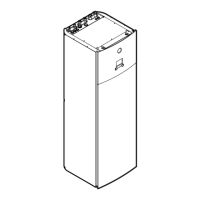
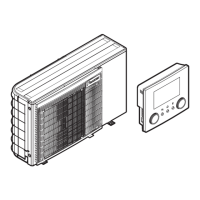
This document serves as the operation manual for Daikin Altherma air-to-water heat pump systems, specifically models EBHQ006BAV3, EBHQ008BAV3, EKCBX008BAV3, and EKCBH008BAV3. It provides comprehensive instructions for users on how to operate, maintain, and troubleshoot their units.
Function Description
The Daikin Altherma unit is an air-to-water heat pump system designed for both heating and cooling applications, depending on the specific model (EKCBX for heating/cooling, EKCBH for heating only). It can be integrated with various components such as Daikin fan coil units, floor heating systems, low-temperature radiators, and optional domestic hot water tanks and solar kits.
The system's core function is to provide a comfortable indoor climate with low energy consumption. It achieves this by heating or cooling water that circulates through the connected emitters. The unit also supports domestic hot water production, either through the heat pump itself or with the aid of an optional integrated electrical booster heater or solar kit.
A key feature is the digital controller, which offers full control over the installation. It allows users to:
- Turn the unit ON/OFF: This button starts or stops the heating or cooling function. Note that for domestic hot water heating, a separate button controls its operation.
- Change Operation Modes: Users can select between space heating, space cooling (if applicable), domestic water heating (if applicable), and quiet mode.
- Select Features: This includes quiet mode, which reduces outdoor unit noise by operating at reduced capacity, and weather-dependent control, which automatically adjusts the temperature set point based on outdoor ambient temperature.
- Adjust Temperature Set Points: Users can manually set desired water temperatures for space heating, space cooling, and domestic hot water. In weather-dependent mode, a "shift value" can be adjusted to fine-tune the calculated set point.
The unit incorporates a backup heater for additional heating capacity during cold outdoor temperatures, as well as for freeze protection of outdoor water piping in winter. The booster heater in the domestic hot water tank provides auxiliary heating for faster hot water production.
The system also includes several indicators and icons on the digital controller display to provide real-time information:
- Operation LED: Lights up during space heating or cooling, blinks for malfunctions, and is off when these operations are inactive.
- Operation Mode Icons: Display current modes like space heating, space cooling, domestic water heating, or quiet mode.
- External Control Icon: Indicates when an optional room thermostat is controlling the installation.
- Day of the Week Indicator and Clock Display: Shows current day and time, essential for schedule timer functions.
- Schedule Timer Icon: Indicates if the schedule timer is enabled.
- Action Icons: Show programmed actions for the schedule timer.
- OFF Icon: Indicates the OFF action in schedule timer programming.
- Inspection Required Icon: Alerts users when maintenance is needed.
- Set Temperature Display: Shows the current set temperature for heating/cooling.
- Not Available Icon: Appears when a non-installed option is addressed or a function is unavailable.
- Defrost/Startup Mode Icon: Indicates active defrost or startup mode.
- Compressor Icon: Shows when the outdoor unit compressor is active.
- Backup Heater Step Icons: Indicate backup heater operation at low or high capacity.
- Booster Heater Icon: Shows when the domestic hot water tank booster heater is active.
- Pump Icon: Indicates when the circulation pump is active.
- Outdoor Temperature Display: Shows the outdoor ambient temperature.
- Weather Dependent Set Point Icon: Indicates automatic temperature set point adjustment.
- Temperature Icon: Displayed when showing water outlet, outdoor ambient, or domestic hot water tank temperatures.
- Test Operation Icon: Indicates the unit is in test mode.
- Field Set Code and Error Code: For installation and service purposes.
Usage Features
The operation manual emphasizes user interaction through the digital controller.
- Initial Setup: After installation, users must set the clock and day of the week to enable the schedule timer.
- Manual Operation: Users can manually control settings, which remain active until changed or overruled by the schedule timer.
- Schedule Timer Function: This allows users to program daily or weekly operation schedules for space heating, space cooling, and domestic hot water. This feature is crucial for optimizing energy consumption by aligning unit operation with user needs and electricity tariffs. The manual provides detailed steps for programming actions, setting times, and selecting modes.
- Programming Actions: For space heating/cooling, users can program actions like ON/OFF, setting specific temperatures, or selecting automatic temperature calculation (weather-dependent mode). For quiet mode, booster heating, or domestic water heating, similar programming options are available.
- Copying and Deleting Programs: The manual explains how to copy programmed actions from one day to the next and how to delete specific programmed actions or entire modes/days.
- Weather Dependent Control: This intelligent feature automatically adjusts the water temperature set point based on the outdoor temperature, ensuring efficient operation. Users can adjust a "shift value" to fine-tune this control.
- Quiet Mode: Users can activate quiet mode to reduce the outdoor unit's sound, useful during specific times or for noise-sensitive environments, though this reduces heating/cooling capacity.
- Domestic Hot Water Disinfection Function: This optional feature periodically heats the domestic hot water tank to a high temperature to disinfect it.
- Auto Restart: After a power supply failure, the auto restart function reapplies the user interface settings. It is recommended to keep this enabled.
- Field Settings: These advanced settings, typically configured by the installer, allow customization of the unit's operation to match the installation environment and user preferences. The manual provides a table of field settings and their ranges, along with a detailed description of each. Users with appropriate permission levels can modify these settings.
Maintenance Features
The manual outlines essential maintenance activities to ensure optimal unit availability and longevity.
- Regular Inspections: Annual checks and inspections of the unit and field wiring by a local Daikin technician are recommended.
- Operator Maintenance: Users are advised to:
- Keep the remote controller clean with a soft, damp cloth.
- Check that the water pressure indicated on the manometer is above 1 bar.
- Domestic Hot Water Tank Maintenance (Optional): For units with a domestic hot water tank, a critical maintenance task is to check the pressure relief valve every 6 months. This involves actuating the lever slowly and smoothly to prevent mineral deposit accumulation and ensure the valve and discharge pipe are not blocked. Failure to do so could lead to the water heater exploding. Continuous leakage from the discharge pipe may indicate a problem.
- Refrigerant Information: The product uses R410A refrigerant, a fluorinated greenhouse gas. Periodical inspections for refrigerant leaks may be required based on local legislation.
- Standstill Precautions: During long periods of non-operation (e.g., summer for heating-only units), it is crucial NOT to switch off the power supply to the unit. This allows automatic motor movements to prevent jamming. If the system lacks glycol and power is cut, the system should be drained to prevent freezing and damage.
- Troubleshooting Guidelines: The manual provides a basic troubleshooting guide for common issues like a blank remote controller display, error codes, or incorrect schedule timer operation. It advises consulting the installer for complex problems.
- Disposal Requirements: The manual emphasizes that dismantling, refrigerant treatment, and disposal of parts must be done by qualified installers in accordance with local and national legislation, ensuring proper recycling and environmental protection.


 To Next Page


 General