Operation manual
3
EHBH/X04+08+16CA + EHVH/X04S18CA+EHVH/X08+16S18+26CA
Daikin Altherma - Low Temperature Split
4P313773-1 – 2012.05
3 Operation
3.3 Space heating/cooling control
3.3.1 Setting the space operation mode
To set the space operation mode
1 Go to [4]: > Operation mode.
2 Select one of the following and press :
To restrict when automatic changeover is possible
1 Go to [7.5]: > User settings > Allowed operation mode.
2 Select a month and press .
3 Select Heating only, Cooling only or Heating/Cooling, and press
.
3.3.2 Using the room temperature home page
Typical room temperature home pages
Depending on the user profile, you can do more or less on the home
page.
To read out the actual and desired room temperature
1 Go to the room temperature home page (Room).
Result: You can read out the actual temperature.
2 Press .
Result: You can read out the desired temperature.
To temporarily overrule the room temperature schedule
1 Go to the room temperature home page (Room).
2 Use or to adjust the temperature.
To change the mode from scheduled to preset value
Prerequisite: User profile = Detailed.
1 Go to the room temperature home page (Room).
2 Press or to select a preset value ( or ).
To set the overrule period
1 Go to [7.2]: > User settings > Temperature lock.
2 Select a value and press :
Result: This overrule period (Temperature lock) remains valid until
you change it again.
3.3.3 Using the leaving water temperature home
pages (main + additional)
For more information about the leaving water temperature, see the
user reference guide.
3.4 Domestic hot water control
3.4.1 Reheat mode
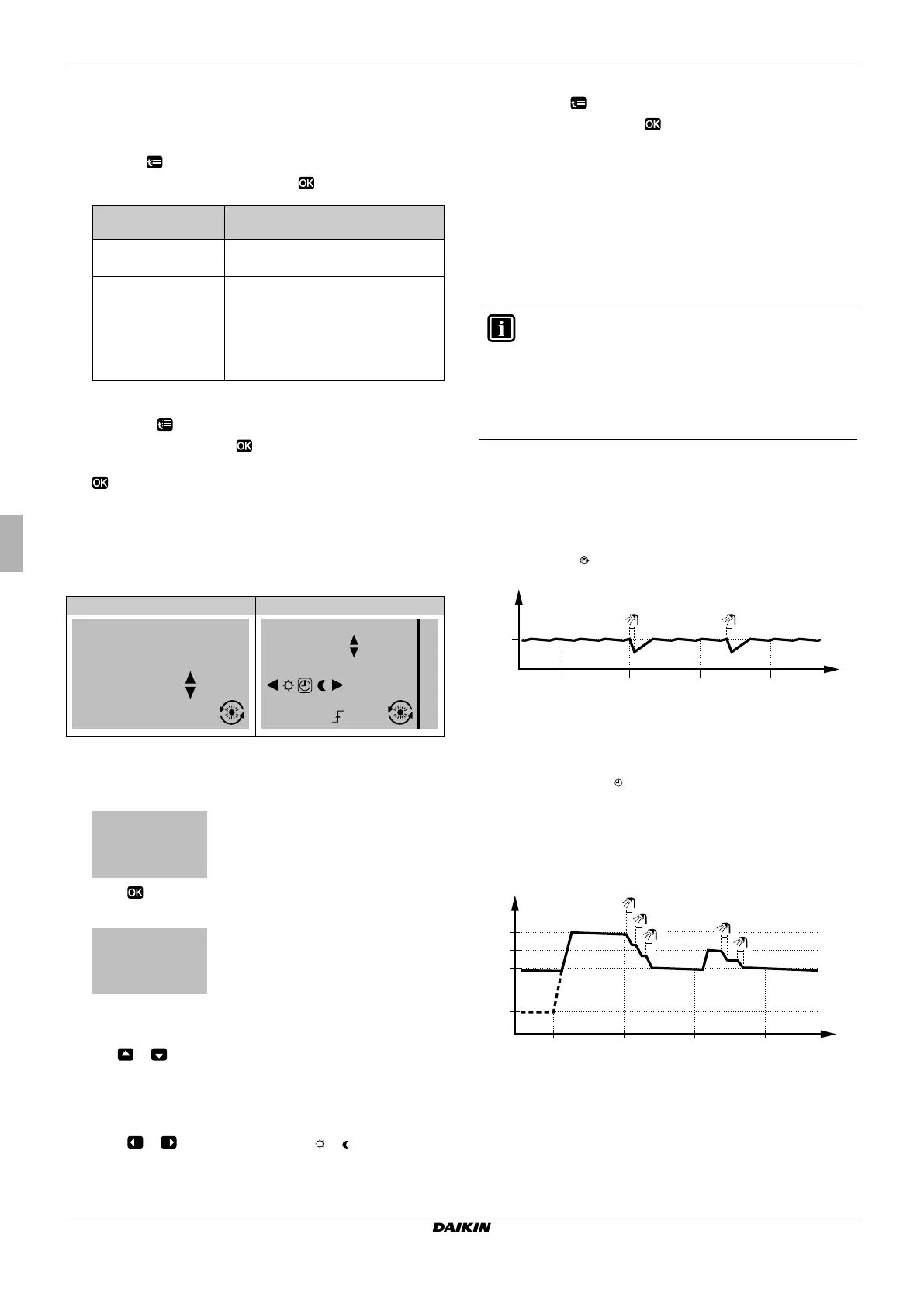
In reheat mode ( ), the DHW tank continuously heats up to the
desired temperature (example: 50°C).
Q T
t
: DHW tank temperature
Q t: Time
3.4.2 Scheduled mode
In scheduled mode ( ), the DHW tank produces hot water
corresponding to a schedule. The best time to produce hot water is
during the night, because (possibly):
Q Space heating demand is lower
Q Electric tariffs are lower
Example:
Q T
t
: DHW tank temperature
Q t: Time
If you select…
Then the space operation mode
is…
Heating
Always heating mode.
Cooling
Always cooling mode.
Automatic
Automatically changed by the software
based on the outdoor temperature
(and depending on installer settings
also the indoor temperature), and
takes monthly restrictions into account.
Note: Automatic changeover is only
possible under certain conditions.
User profile = Basic
User profile = Detailed
20.0°C
15:20
Actual temperature
Mon
Room
20.0°C
15:20
17:30
Actual temperature
Scheduled
Tue
Mon
Room
22.0°C
Desired temperature
Q Permanent
Q 2 hours
Q 4 hours
Q 6 hours
Q 8 hours
INFORMATION
The leaving water is the water that is sent to the heat
emitters. The desired leaving water temperature is set by
your installer in accordance with the heat emitter type.
Example: Under floor heating is designed for lower leaving
water temperature than radiators and heat pump convectors.
You only have to adjust leaving water temperature settings in
case of problems.
t
T
t
50°C
00:00 07:00 14:00 21:00
1 2
t
60°C
00:00 07:00
50°C
15°C
40°C
14:00 21:00
1
2
3
4
5
T
t
4P313773-1_offset.book Page 3 Monday, June 4, 2012 7:18 AM



 To Next Page