3 Operation
Operation manual
3
EWAQ+EWYQ006+008BAVP
Packaged air-cooled water chillers and packaged air to water heat
pumps
4P478611-1 – 2017.02
3 Operation
3.1 Overview: Operation
You can operate the system via the user interface. This part
describes how to use the user interface:
Part Description
At a glance ▪ Buttons
▪ Status icons
Space heating/cooling
control
How to control space heating/cooling:
▪ Setting the space operation mode
▪ Controlling the temperature
Schedules How to select and program schedules
Menu structure Overview of menu structure
Installer settings table Overview of installer settings
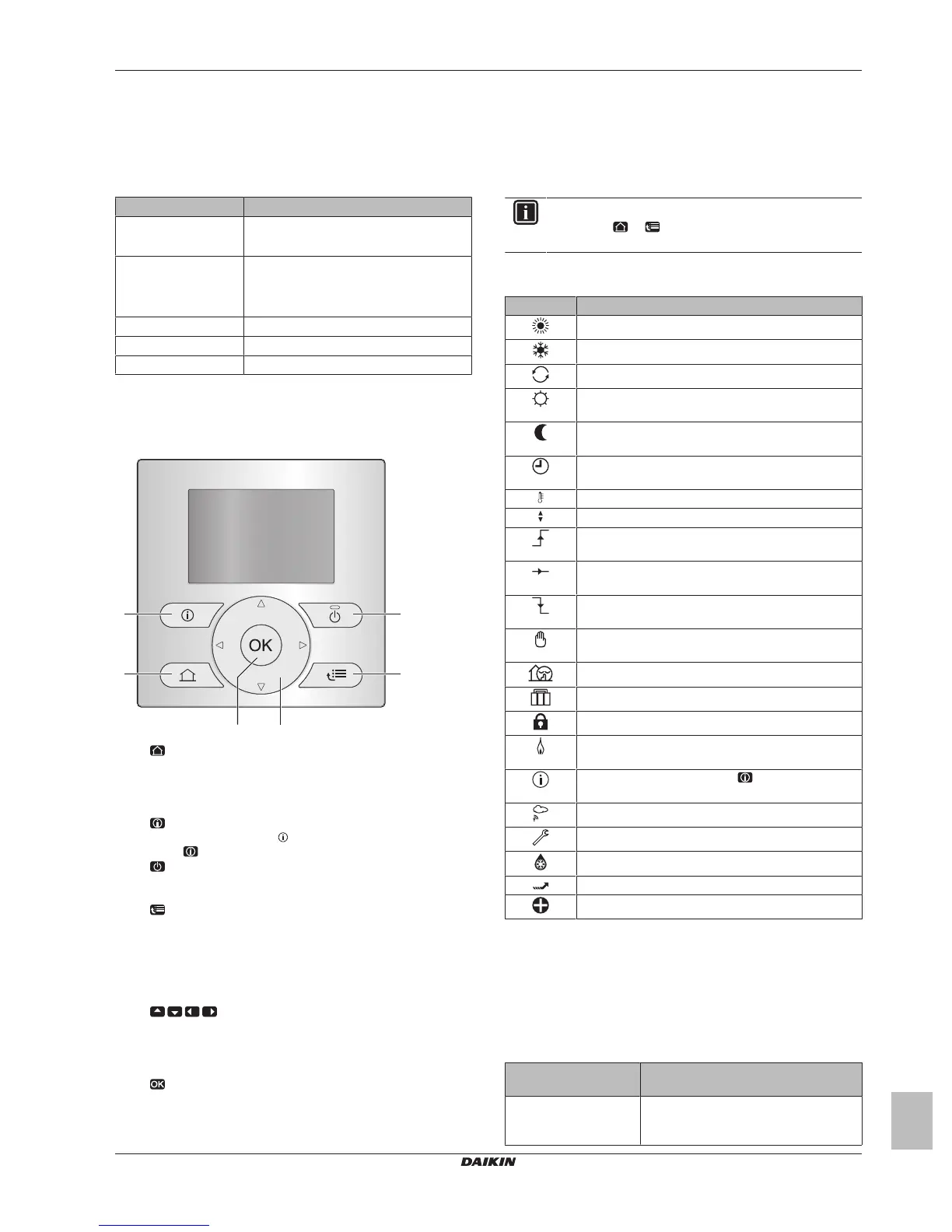
3.2 The user interface at a glance
3.2.1 Buttons
a
HOME PAGES
▪ Switches between home pages (when you are on a home
page).
▪ Goes to the default home page (when you are in the menu
structure).
b
MALFUNCTION INFORMATION
If a malfunction occurs, is displayed on the home pages.
Press to display more information about the malfunction.
c
ON/OFF
Turns ON or OFF one of the controls (room temperature,
leaving water temperature).
d
MENU STRUCTURE/BACK
▪ Opens the menu structure (when you are on a home
page).
▪ Goes up a level (when you are navigating through the
menu structure).
▪ Goes back 1step (example: when you are programming a
schedule in the menu structure).
e
NAVIGATING/CHANGING SETTINGS
▪ Navigates the cursor on the display.
▪ Navigates through the menu structure.
▪ Changes settings.
▪ Selects a mode.
f
OK
▪ Confirms a selection.
▪ Enters a submenu in the menu structure.
▪ Switches between displaying actual and desired values, or
between displaying actual and offset values (if applicable)
on the home pages.
▪ Goes to the next step (when you are programming a
schedule in the menu structure).
INFORMATION
If you press or while changing settings, the changes
will NOT be applied.
3.2.2 Status icons
Icon Description
Space operation mode = Heating.
Space operation mode = Cooling.
Unit is operating.
Desired room temperature = preset value (Comfort;
daytime).
Desired room temperature = preset value (Eco;
nighttime).
On the room temperature home page: Desired room
temperature = according to the selected schedule.
Actual temperature.
Desired temperature.
At the next scheduled action, the desired temperature
will increase.
At the next scheduled action, the desired temperature
will NOT change.
At the next scheduled action, the desired temperature
will decrease.
The preset value (Comfort or Eco) or scheduled value
is temporarily overruled.
Quiet mode is active.
Holiday mode is active or ready to be activated.
Button lock mode and/or function lock mode is active.
An external heat source is active. Example: Gas
burner.
A malfunction occurred. Press to display more
information about the malfunction.
Weather-dependent mode is active.
User permission level = Installer.
Defrost/oil return mode is active.
Hot start mode is active.
Emergency operation is active.
3.3 Space heating/cooling control
3.3.1 Setting the space operation mode
About space operation modes
Depending on your heat pump model, you have to tell the system
which space operation mode to use: heating or cooling.
If a… heatpump model
is installed
Then…
Heating/cooling The system can heat up and cool down a
space. You have to tell the system which
space operation mode to use.





 To Next Page