5 Installation
Installation manual
11
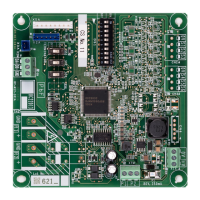
EKMBPP1
Modbus adapter
4P720139-1B – 2023.09
INFORMATION
Also read the maximum cable length requirements set out in
"5.4.1 Overview of electrical connections" [4 14].
5.3 To install the Modbus adapter
Install the EKMBPP1 inside the indoor unit, in the space foreseen for
the option PCB. See the installer reference guide of the indoor unit for
more information.
In case of KRP1BC101 installation box, follow the procedure in "5.3.1
To install the Modbus adapter with the KRP1BC101 installation box" [4
11] and the KRP1BC101 installation manual.
In case of field supplied casing, follow the procedure in "5.3.2 To install
the Modbus adapter PCB with field supplied casing" [4 13] and the
installation manual of that casing.
5.3.1 To install the Modbus adapter with the
KRP1BC101 installation box
The steps below only describe the procedure for the KRP1BC101
installation box.
1 Open the KRP1BC101 installation box.
2 Replace the left black cable entry ring on the KRP1BC101 installation
box with the cable gland and locknut (M20×1.5) provided in the
EKMBPP1 kit.
3 Replace the right black cable entry ring on the KRP1BC101
installation box with the blinding bush provided in the KRP1BC101
kit.
4 Insert the PCB clamps into the mounting holes of the PCB.
5 Prepare the wiring while the PCB is still outside the installation box.
The KRP1BC101 installation box is a tight space. It is recommended
to prepare the wiring before installing the PCB inside the installation
box.


 To Next Page