EasyManua.ls Logo

Daikin Enfinity CCW - User Manual

Daikin Enfinity CCW
48 pages
Print Icon
To Next Page IconTo Next Page
Loading...
Installation and Maintenance Manual IM 1049-9
Group: WSHP
Part Number: 910258820
Date: December 2018
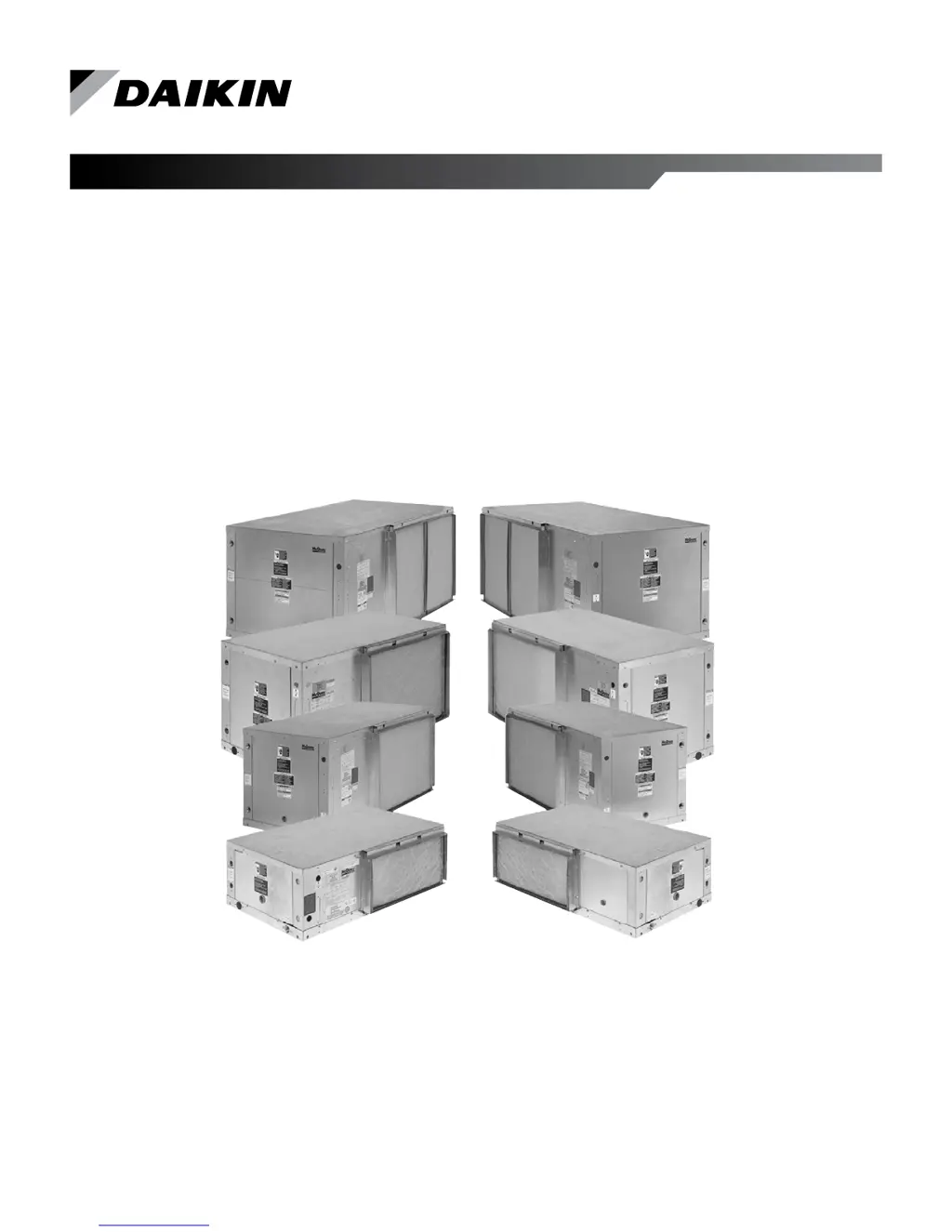
Daikin Ennity™ Horizontal Water Source Heat Pumps
R-410A Refrigerant
Model CCH, CCW Unit Sizes 007 – 070

Questions and Answers

  • C
    Cheryl BrownAug 15, 2025
    Why is my Daikin Enfinity CCW not working due to low voltage brownout?
    • M
      Michael BarronAug 15, 2025
      If your Daikin Heat Pump is experiencing a low voltage brownout, verify that the E terminal is not connected to common. If it is, remove the wire; the LED should then change to solid green only. Also, confirm that the low voltage supply is between 19-32VAC at the H1 terminal of the main board. If the low voltage supply is out of range, verify that the unit supply voltage matches the nameplate voltage and that the correct transformer primary wire has been selected.
  • R
    Rebecca LangAug 18, 2025
    What does it mean if my Daikin Enfinity CCW Heat Pump shows 'Low Entering Water Temp'?
    • C
      cheryl99Aug 18, 2025
      If your Daikin Heat Pump shows 'Low Entering Water Temp' (with No Display in Boilerless EH), it indicates a low entering water temperature, specifically below 35°F in the standard range or 13.5°F in the extended range.
  • K
    kstevensAug 21, 2025
    What to do if my Daikin Heat Pump has compressor high pressure?
    • A
      alisongrantAug 21, 2025
      If your Daikin Heat Pump is showing compressor high pressure, verify the high pressure switch is connected to terminal H3 on the main board. Also, check the continuity of the high pressure switch. Make sure to check the water flow if it’s in cooling operation, or check the airflow if it’s in heating operation. Finally, ensure that the entering water and air temperatures are within the operating limits.
  • R
    Ryan OrozcoAug 25, 2025
    What causes a Daikin Enfinity CCW Heat Pump to have compressor low pressure?
    • D
      Diane JacksonAug 25, 2025
      A Daikin Heat Pump may experience compressor low pressure due to a loose wire connection on the low pressure circuit, a failed low pressure switch, or the unit being low on charge. Check these components to resolve the issue.
  • J
    Jake PetersonAug 27, 2025
    How to fix a Daikin Enfinity CCW Heat Pump with compressor low suction temp?
    • J
      Jeffrey WeissAug 27, 2025
      To address a Daikin Heat Pump experiencing compressor low suction temperature, check the water flow if the unit is in heating operation, or check the airflow if it’s in cooling operation. Also, ensure that the entering water and air temperatures are within the operating limits.
  • M
    Mr. Darrell Harris Jr.Aug 30, 2025
    What to do if my Daikin Heat Pump displays 'Compressor Suction Temp Sensor Fail'?
    • R
      Rhonda BarberAug 30, 2025
      If your Daikin Heat Pump displays 'Compressor Suction Temp Sensor Fail,' check the connection of the low suction temperature sensor on terminal H6 pins 2 and 3. Also, check the resistance of the low suction temperature sensor, leaving water temperature sensor, and room sensor or return air sensor; all sensors should measure 10kohm thermistor @77°F. Ensure that the return air sensor and room sensor are not connected simultaneously.
  • J
    john23Sep 2, 2025
    Why does my Daikin Heat Pump show 'Unoccupied Mode'?
    • G
      Grace AllenSep 2, 2025
      Your Daikin Heat Pump might show 'Unoccupied Mode' because terminal U on the main control board is connected to common from an external source, or the network is overriding the occupancy mode.
  • D
    Destiny RodriguezSep 5, 2025
    What does it mean when my Daikin Enfinity CCW is in 'Occupied, Bypass Mode, Standby or Tenant Override Modes'?
    • F
      fmilesSep 6, 2025
      When your Daikin Heat Pump is in 'Occupied, Bypass Mode, Standby, or Tenant Override Modes,' it means the unit is operating normally. It may currently have a control signal or be ready to operate when a control signal is active.
  • M
    Michael MorrisSep 8, 2025
    What causes 'Condensate Overflow' in my Daikin Heat Pump?
    • L
      Laura PowellSep 8, 2025
      A 'Condensate Overflow' in your Daikin Heat Pump (in Cooling & Dehumidification Modes Only) is caused by poor condensate drain. Check the resistance to ground on the condensate wire; it should be open if there is no water in the pan.
  • S
    Sandra LynchSep 12, 2025
    What does it mean if my Daikin Heat Pump displays 'Service Test Mode Enabled'?
    • I
      ibushSep 12, 2025
      If your Daikin Heat Pump displays 'Service Test Mode Enabled,' it means that jumper JP1 is shorted for service test mode operation. Note that this mode is used only for testing purposes, and control timing may damage actual hardware.

Summary

Model Nomenclature

Prior To Installing

Receiving and Storage

Guidance on handling and storing the heat pump unit upon receipt.

Pre-Installation Checks

Steps and checks required before starting the unit installation process.

Unit Location and Hanger Brackets

Hanger Bracket Dimensions

Detailed table of hanger bracket dimensions for various unit sizes.

Filter Access and Air Discharge Conversion

Filter Access

Details on accessing and removing the unit's filter for cleaning or replacement.

Air Discharge Conversion

Instructions for changing the unit's airflow direction from straight to end discharge.

Ductwork and Attenuation

Ductwork Design Recommendations

Recommendations for supply and return ductwork design and sound attenuation.

Ventilation Air

Ventilation Air Guidelines

Guidelines for incorporating and controlling ventilation air within the system.

Electrical Specifications

Electrical Data and Fan Assembly

Details on electrical data, wiring, fan motor types, and housing requirements.

Unit Installation and Piping

Piping Requirements

Instructions for connecting supply and return piping, including material and configuration.

Cleaning and Flushing System

System Cleaning Procedure

Procedure for cleaning and flushing the water circulating system before operation.

Start-Up Procedures

Unit Start-Up Steps

Step-by-step guide for initiating unit operation and verifying performance.

Operating Limits and Environment

Temperature Limits and Design Data

Design temperatures and operational limits for continuous duty and start-up.

Unit Type and Environmental Factors

Details on unit types, environmental considerations, and power supply requirements.

Controls Overview

MicroTech III Unit Controller

Overview of the MicroTech III unit controller's features, functions, and safety interlocks.

Remote Reset of Lockouts

Methods for remotely resetting automatic lockouts on the unit controller.

Controls Details

Terminal Locations and Jumper Settings

Detailed descriptions of MicroTech III controller terminals and jumper configuration.

Status LEDs and Expansion Module

Explanation of status LEDs and configuration for I/O Expansion Modules.

Controller Terminal Diagrams

Diagrams illustrating terminal locations and configuration jumpers on the unit controller.

LONWORKS Communication Module

Information on installing and operating the LONWORKS communication module for network control.

BACnet Communication Module

Details for installing and operating the BACnet MS/TP communication module for BAS integration.

Prior to Start-Up Adjustments

Changing PSC Fan Motor Speed

Instructions on how to change the fan motor speed for various unit sizes.

Optional EC Motor Information

Information on the optional EC motor, its capabilities, and contact for alternate airflow settings.

Unit Start-Up Procedures

Unit Start-Up Steps

Step-by-step guide for initiating unit operation and verifying performance.

Typical Wiring Diagrams

PSC Motor Wiring Diagrams

Wiring diagrams for MicroTech III controller with PSC motor units (Sizes 015-060).

EC Motor Wiring Diagrams

Wiring diagrams for MicroTech III controller with EC motor units (Sizes 024-070).

EC Motor with Communication Module Wiring

Wiring diagrams for EC motor units with communication module (Sizes 024-070).

Thermostats and Wall Sensors

Thermostat Connection Examples

Diagrams showing typical wiring connections for various thermostats to the unit controller.

Standalone Sensor Operation

Information on using thermostats and remote sensors for standalone unit operation.

Building Automation System Sensors

Diagrams for sensors used with MicroTech III for building automation system operation.

Room Sensor Wiring Details

Wiring details for basic and temperature-adjustable room sensors, including noise suppression.

Additional Accessories

Motorized Valve, Pump Relay, and Multi-Unit Control

Information on accessories like isolation valves, pump restart relays, and multiple unit control boards.

Maintenance and Refrigerant

R-410 A Refrigerant Information

Details on R-410A refrigerant properties, handling, and charging requirements.

General Maintenance Procedures

Guidelines for routine maintenance tasks, including filter changes and system checks.

Troubleshooting Unit Faults

MicroTech III Controller LED Faults

Explanation of LED fault codes for the MicroTech III unit controller.

I;O Expansion Module LED Faults

Description of LED fault indicators for the I/O Expansion Module.

Refrigeration Circuit Troubleshooting

Guide to diagnosing refrigeration circuit issues based on system symptoms and pressures.

Unit Operation Troubleshooting Guide

Flowchart to help diagnose common unit operational problems and their causes.

Typical Refrigeration Cycles

Cooling and Heating Cycles

Explanation of the refrigerant flow and process during cooling and heating operations.

General Use and Information

MicroTech III Controller Inputs

Information on using MicroTech III unit controller's drive terminals and control inputs.

Equipment Check, Test, and Start Form

Essential System Checks

List of essential system checks required for proper installation and operation.

Unit Data Collection

Equipment Data Measurements

Guidance on measuring and recording flow rate, temperature, and pressure data.

Commercial Check, Test, and Start Worksheet

Equipment Measurements Worksheet

Worksheet for recording equipment measurements during check, test, and start-up.

Daikin Applied Support and Information

Training and Development

Information on training programs and resources for Daikin HVAC products.

Warranty Information

Details regarding Daikin equipment warranty and how to obtain it.

Aftermarket Services

Information on finding local parts and service offices for Daikin equipment.

Daikin Enfinity CCW Specifications

General IconGeneral
BrandDaikin
ModelEnfinity CCW
CategoryHeat Pump
LanguageEnglish

Related product manuals