5 English
Operate in the following order.
•
The timer is operated in the following two ways.
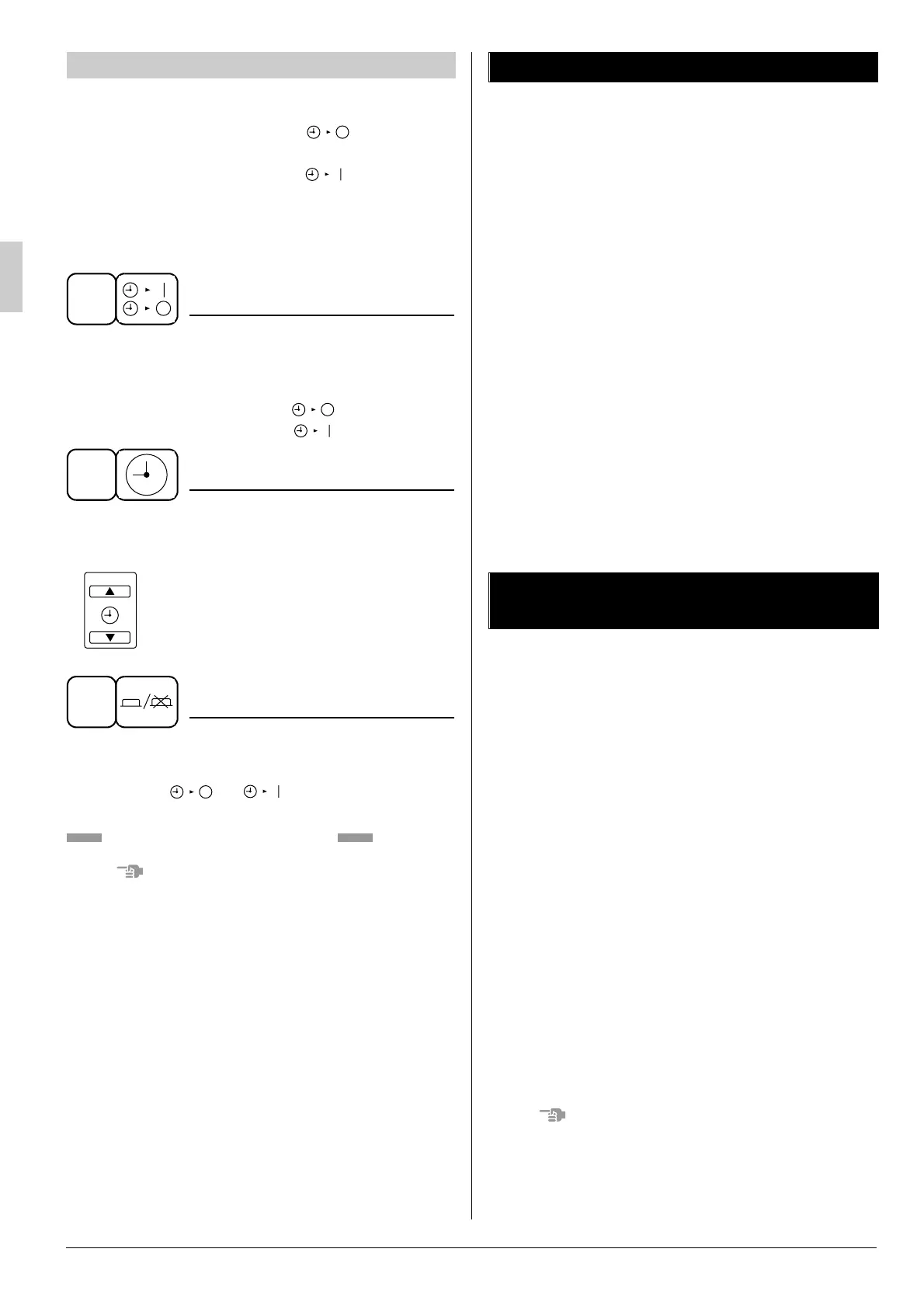
Programming the stop time ( ) ....
The system stops operating after the set time has elapsed.
Programming the start time ( ) ....
The system starts operating after the set time has elapsed.
•
The timer can be programmed a maximum of 72 hours.
•
The start and the stop time can be simultaneously
programmed.
TIMER MODE START/STO
P
Press the TIMER MODE START/STOP button sev-
eral times and select the mode on the display.
The display flashes.
For setting the timer stop .... “”
For setting the timer start .... “”
PROGRAMMING TIME
Press the PROGRAMMING TIME button and set
the time for stopping or starting the system.
When this button is pressed, the time
advances by 1 hour.
When this button is pressed, the time
goes backward by 1 hour.
TIMER ON/OFF
Press the TIMER ON/OFF button.
The timer setting procedure ends.
The display “ or ” changes from flash-
ing light to a constant light.
Refer to figure 3 on page [1]
NOTE
•
When setting the timer Off and On at the same time,
repeat the above procedure from to once again.
When the timer is programmed to stop the system
after 3 hours and start the system after 4 hours, the
system will stop after 3 hours and then 1 hour later
the system will start.
•
After the timer is programmed, the display shows
the remaining time.
•
Press the TIMER ON/OFF button once again to
cancel programming. The display vanishes.
PROGRAM TIMER OPERATION
1
2
3
1
3
Observe the following precautions to ensure the
system operates properly.
•
Adjust the air outlet properly and avoid direct air
flow to room inhabitants.
•
Adjust the room temperature properly for a comfort-
able environment. Avoid excessive heating or cooling.
•
Prevent direct sunlight from entering a room dur-
ing cooling operation by using curtains or blinds.
•
Keep doors and windows closed. If the doors and
windows remain open, room air will flow out and
decrease the effect of cooling and heating.
•
Never place objects near the air inlet and the air
outlet of the unit. It may retard effectiveness or
cause operation to stop.
•
Turn off the main power supply switch when not
using for long periods of time. Electricity is con-
sumed as long as the switch is on. Turn off the main
power supply switch in order to save energy. Turn
on the main power supply switch 6 hours before
restarting operation in order to ensure smooth
operation. (Refer to MAINTENANCE)
ONLY A QUALIFIED SERVICE PERSON IS
ALLOWED TO PERFORM MAINTENANCE
IMPORTANT!
• BEFORE OBTAINING ACCESS TO TERMINAL
DEVICES, ALL POWER SUPPLY CIRCUITS
MUST BE INTERRUPTED
•
To clean the air conditioner, be sure to stop oper-
ation, and turn the power switch off. Otherwise, an
electric shock and injury may result.
•
Do not wash the air conditioner with water
Doing so may result in an electric shock.
•
Be careful with a scaffold or staging
Caution must be exercised because of work at a
high place.
CLEANING THE AIR FILTER
•
Be sure always to clean the unit before use at the
beginning of summer and winter. (Dirt and dust
caught in the air filter cause a drop in airflow,
which leads to a decline in performance.)
•
When using the unit in a location where dirt may
easily accumulate, clean the unit more frequently.
Once every 2 weeks is recommended.
NOTE
•
The air filter and the suction grille are commer-
cially available.
•
Ask your DAIKIN dealer how to clean them.
7. OPTIMUM OPERATION
8. MAINTENANCE
(FOR SERVICE PERSONNEL)



 To Next Page