6
■
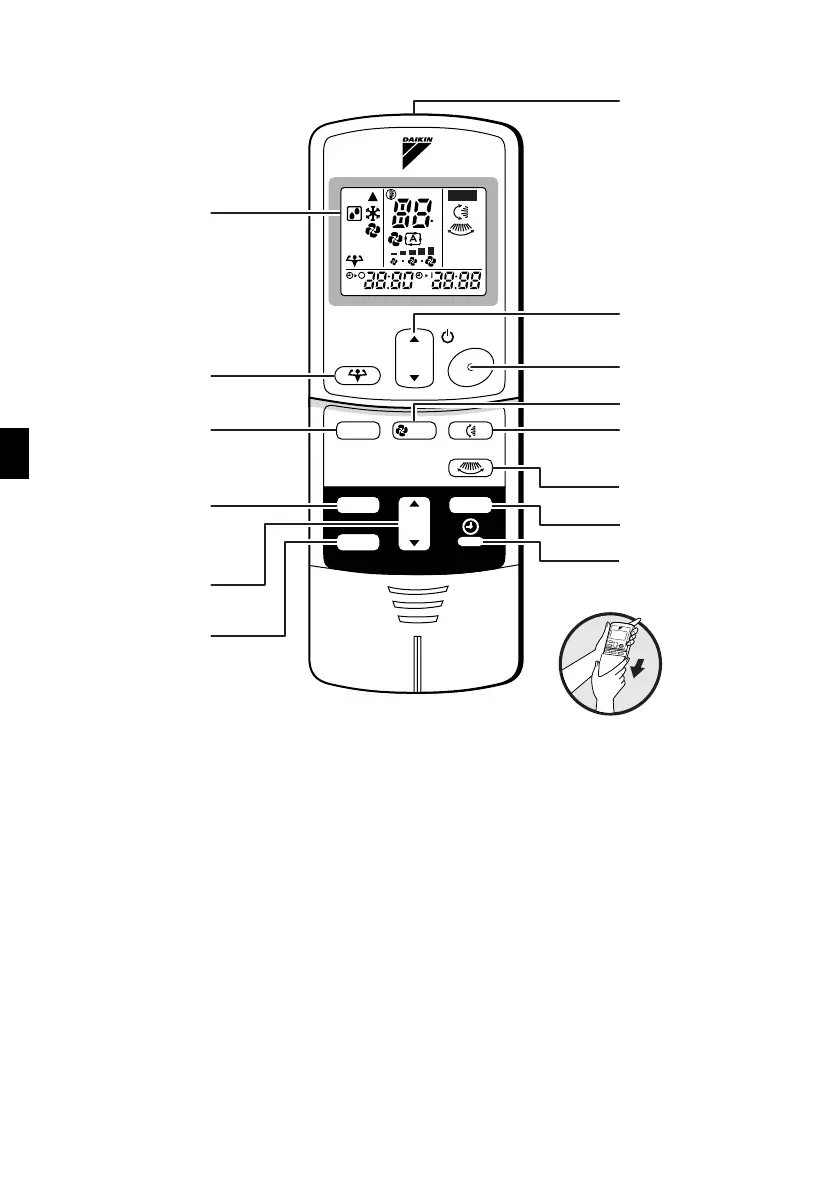
Remote Controller
1. Signal transmitter:
•
It sends signals to the indoor unit.
2. Display:
• It displays the current settings.
(In this illustration, each section is shown
with all its displays ON for the purpose of
explanation.)
3. POWERFUL button:
for POWERFUL operation (page 14.)
4. TEMPERATURE adjustment buttons:
• It changes the temperature setting.
5. ON/OFF button:
•
Press this button once to start operation.
Press once again to stop it.
6. MODE selector button:
• It selects the operation mode.
(DRY/COOL/FAN) (page 10.)
7. FAN setting button:
• It selects the air flow rate setting.
8. SWING button: (page 12.)
•
Flap (Horizontal blade)
9. SWING button:
(page 12.) (18, 24 class only)
•
Louver (Vertical blades)
10. ON TIMER button: (page 16.)
11. OFF TIMER button: (page 15.)
12. TIMER Setting button:
• It changes the time setting.
13. TIMER CANCEL button:
• It cancels the timer setting.
14. CLOCK button: (page 9.)
C
ON
TEMP
ON/OFF
POWERFUL
MODE
TIMER
FAN
SWING
ON
CANCEL
OFF
1
2
4
5
7
8
9
13
14
10
12
11
<
ARC433A24, A26
>
3
6



 To Next Page