9
DRY • COOL • FAN
Operation
Adjusting the Air
Flow Direction
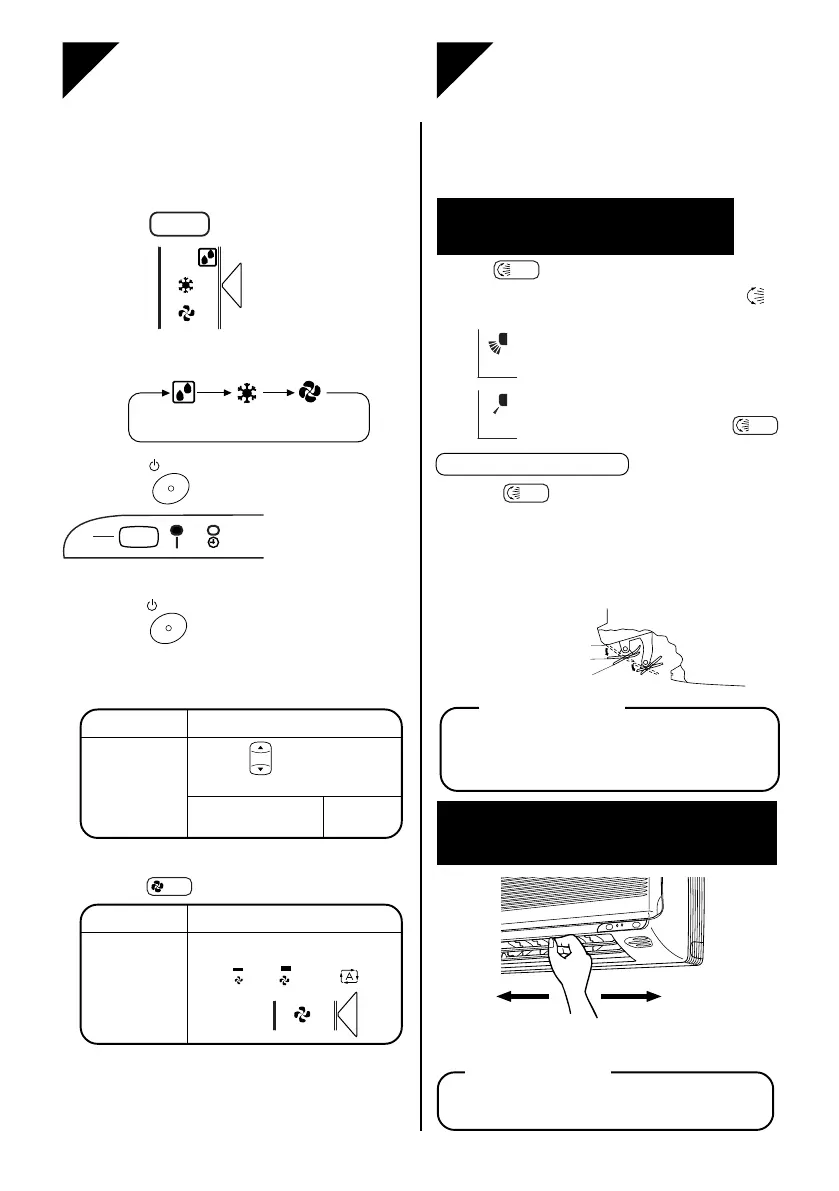
The air conditioner operates with the settings of your choice.
From the next time on, the air conditioner will operate with the
same settings.
Press
MODE
and select a mode.
● Each pressing of the button advances the
mode setting in sequence.
Press
ON/OFF
.
Then OPERATION
lamp lights up.
■■
■■
■ To stop:
Press
ON/OFF
once again.
Then OPERATION lamp goes off.
■■
■■
■
To change the temperature setting:
■■
■■
■ To change the air flow direction:
(See page 9.)
●
At smaller air flow rates, cooling or heating
effect is also smallwer.
1
2
COOL mode
Press
to raise / lower the temperature.
Set to the temperature
you like
.
DRY or FAN mode
The temperature
setting is not
variable.
■■
■■
■
To change the air flow rate setting:
COOL mode
Five levels of air flow rate setting
from “
” to “ ” plus “ ” are
available.
DRY or FAN mode
The air flow rate
setting is not
variable.
Press
FAN
.
You can adjust the air flow direction to increase
your comfort.
Adjusting the horizontal
blade (flap)
....... To stop the flap at an
angle you like, press
SWING
.
● When
SWING
is selected, the flap swinging
range depends on the operation mode. (See
the figure.)
● The real flap angles are differ from the
display of remote controller.
Press
SWING
.
● Every time the button is pressed, “ ”
appears or disappears.
....... The flap automatically
swings up and down.
ATTENTION
● Always use a remote controller to adjust
the flap angle. If you attempt to move it
forcibly with hand when it is swinging,
the mechanism may be broken.
ATTENTION
Hold the knob and move the louvre.
(You will find a knob on the left-side and the right-side blades.)
Notes on flap angles
● Be careful when adjusting the louvre. Inside
the air outlet, a fan is rotating at a high speed.
Adjusting the vertical blade
(louvre)
Display
ON
OFF
TEMP
Display
In FAN mode or COOL mode
When stop operation
Upper limit in cooling
Lower limit in cooling
0˚
25˚



 To Next Page