OPERATION
ATTENTION
In the following cases, set the timer again.
• After a breaker has turned OFF.
• After a power failure.
• After replacing batteries in the remote controller.
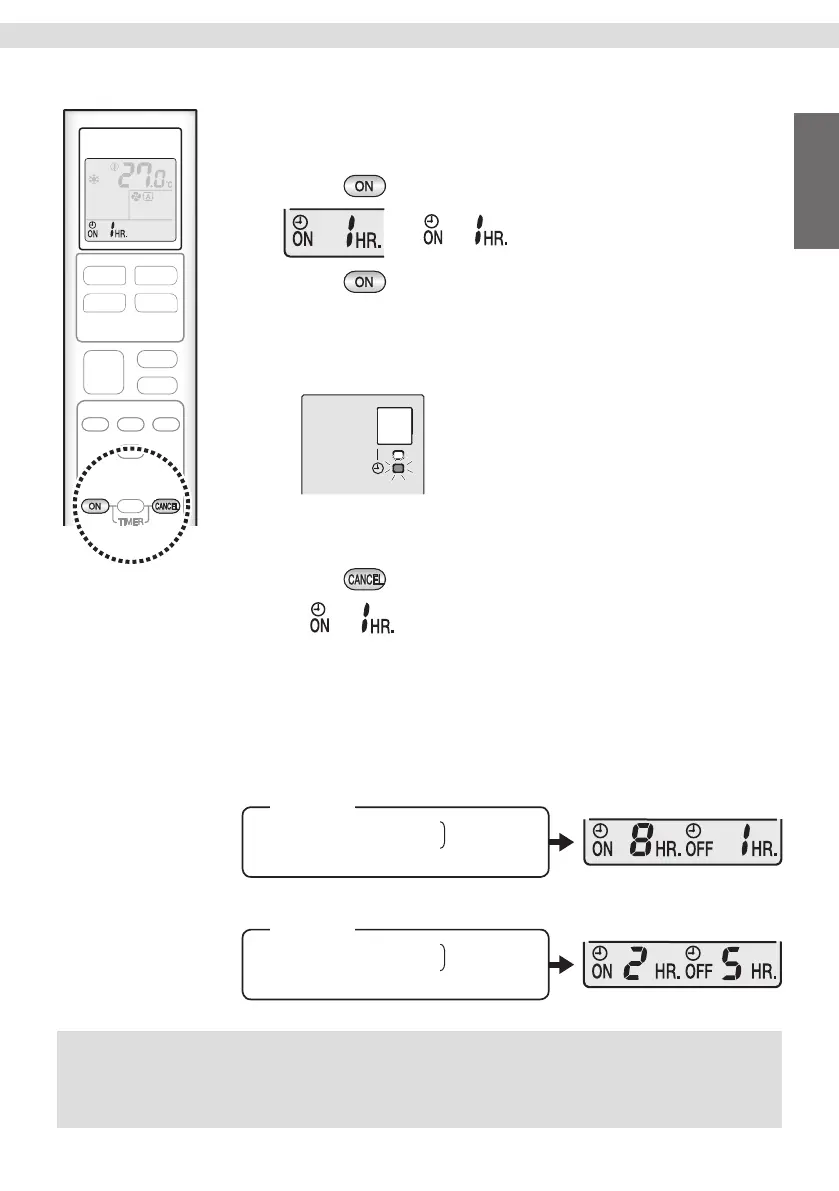
[ON TIMER operation]
To set
1. Press .
• “ ” appears on the LCD.
2. Press until the time setting reaches the point
you like.
• Each pressing of button increases the time setting by 1 hour.
• Setting time can be increased to 12 hours maximum.
• The TIMER lamp lights orange.
Display
To cancel
3. Press .
• “ ” disappears from the LCD.
• The TIMER lamp goes off.
[ON/OFF TIMER combination]
To combine ON TIMER and OFF TIMER
• A sample setting for combining the 2 timers is shown below.
- When setting while unit is operating.
(Example)
Turn off unit in the next 1 hr.
Turn on unit in the next 8 hr.
(7 hr. after turn off)
Combined
- When setting while unit is stopped.
(Example)
Turn on unit in the next 2 hr.
Turn off unit in the next 5 hr.
(3 hr. after turn on)
Combined
17
English


 To Next Page