Si04-306 Check
Service Diagnosis 125
5. Check
5.1 How to Check
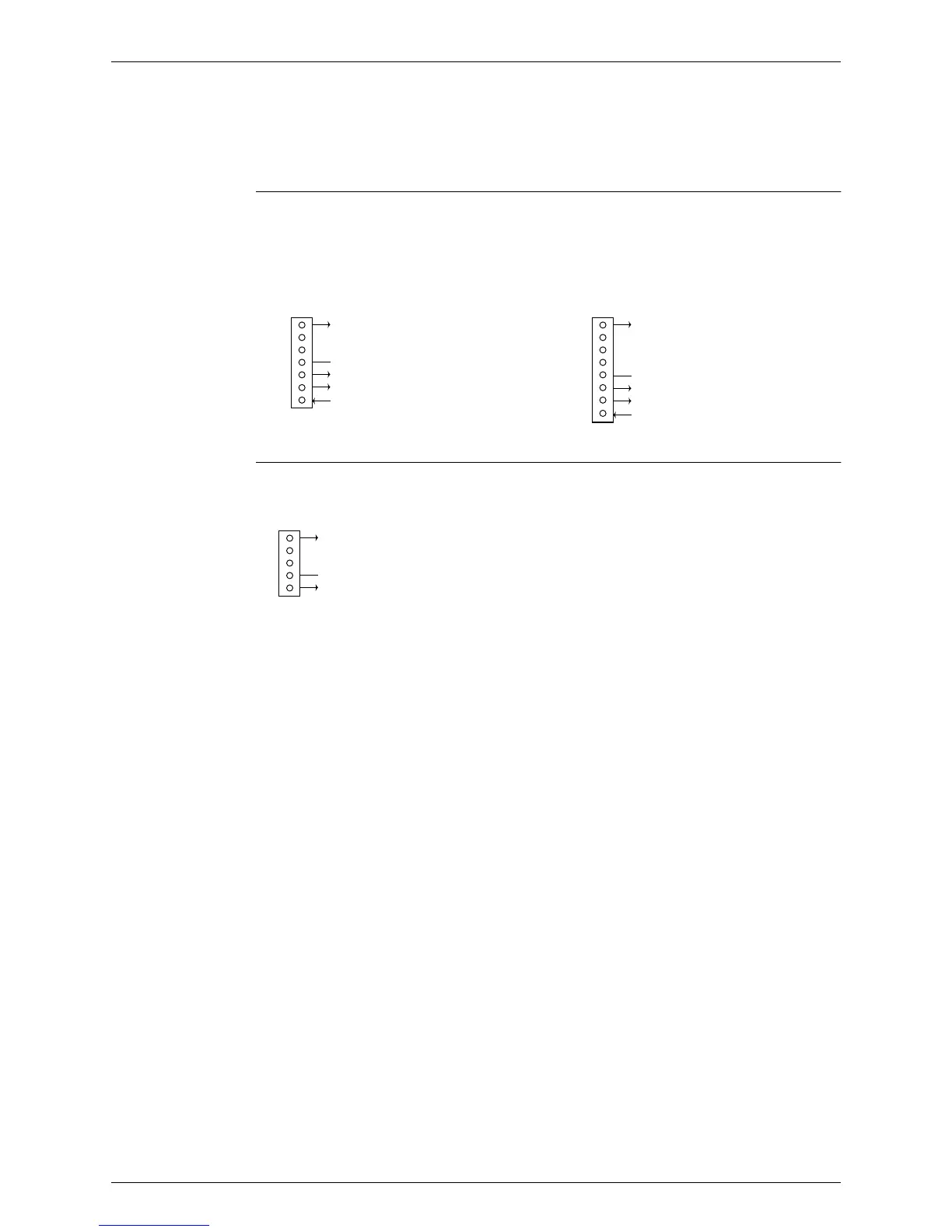
5.1.1 Fan Motor Connector Output Check
Check No.01 1. Check connector connection.
2. Check motor power supply voltage output (pins 4-7 and 4-8).
3. Check motor control voltage (pins 4-3).
4. Check rotation command voltage output (pins 4-2).
5. Check rotation pulse input (pins 4-1).
Check No.02 1. Check connector connection.
2. Check motor control voltage output (pins 2-1).
7
6
5
4
3
2
1
Motor power supply voltage
Unused
Unused
P.0V (reference potential)
Motor control voltage (15 VDC)
Rotation command voltage (1~ 5 VDC)
Rotation pulse input
Upper fan connector
8
7
6
5
4
3
2
1
Motor power supply voltage
Unused
Unused
Unused
P.0V (reference potential)
Motor control voltage (15 VDC)
Rotation command voltage (1 to 5 VDC)
Rotation pulse input
Lower fan connector
(R1224)
5
4
3
2
1
Motor power supply voltage
Unused
Unused
P.0V (reference potential)
Motor control power supply
S202
(R1073)



 To Next Page