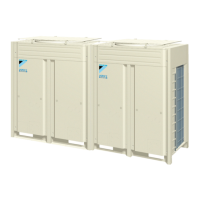
This document is an operation manual for the Daikin VRV System Air Conditioner, covering models such as RSUYQ4AVM, RSUYQ5AVM, RSUYQ6AVM, RSUYQ4AVMA, RSUYQ5AVMA, RSUYQ6AVMA, RSUYQ7AYM, and RSUYQ8AYM. It provides essential information for users to operate and maintain their air conditioning system properly.
Function Description
The Daikin VRV System Air Conditioner is designed for both heating and cooling applications, depending on the specific outdoor unit series. The system supports various operation modes, including:
- Cooling and Heating (air to air): This is the primary function, allowing users to adjust the room temperature for comfort.
- Fan only operation (air to air): This mode circulates air without heating or cooling, useful for ventilation.
- Dry operation: This program is designed to decrease room humidity with minimal temperature reduction, making it suitable for humid environments where excessive cooling is not desired. The microcomputer automatically determines temperature and fan speed in this mode.
- Automatic operation: This mode allows the system to automatically select the appropriate heating or cooling mode based on the room temperature.
The system can be controlled via a user interface, which may be a wired or wireless remote controller, depending on the indoor unit type. The user interface allows for selection of operation mode, temperature setting, fan speed adjustment, and air flow direction.
For systems with multiple indoor units, a master user interface can be designated to control the operation mode for all connected slave units, ensuring synchronized operation. In mixed systems with VRV and RA indoor units, the master allocation might default to the RA indoor unit's user interface.
Advanced energy-saving functionalities are integrated into the system, allowing for optimization between energy consumption and comfort levels. Users can consult their installer or dealer to modify parameters to suit their specific building needs.
Usage Features
The manual outlines several key usage features to ensure safe and effective operation:
- Temperature and Humidity Ranges: The system operates within specific outdoor and indoor temperature and humidity ranges. For instance, outdoor temperatures can range from -5°C to 52°C DB, and indoor temperatures from 21°C to 32°C DB. Operating outside these conditions may activate safety devices or impair performance.
- Starting and Stopping: To start the system, users select the desired operation mode (Cooling, Heating, Fan only, Dry, or Automatic) and press the ON/OFF button. The operation lamp illuminates, indicating the system is active. To stop, the ON/OFF button is pressed again, and the lamp turns off. A 5-minute waiting period after stopping is recommended to allow the drain pump to complete its residual operation and prevent water leakage.
- Temperature Adjustment: Users can adjust the desired temperature using dedicated buttons on the user interface, typically in 1°C increments. Temperature setting is not available in fan-only mode.
- Fan Speed Control: The fan speed can be adjusted to preference using the fan speed control button on the user interface.
- Air Flow Direction Adjustment: The air flow direction can be set to automatic swing or fixed at a desired position. For certain indoor unit types (double-flow, multi-flow, corner, ceiling-suspended, and wall-mounted), the air flow flap adjusts its position. A microcomputer may control the air flow direction, overriding the display, under specific conditions like low room temperature during cooling or high room temperature during heating, or during defrost operation.
- Hot Start Function: To prevent cold air from blowing out at the start of heating, the indoor fan is automatically stopped, and the user interface displays " ". The fan will start after a short delay, which is normal.
- Defrost Operation: During heating, if the outdoor unit's coil freezes, the system enters defrost operation. The indoor unit fan stops, and the refrigerant cycle reverses to defrost the outdoor coil. The indoor unit display will show " " during this time.
- Group Control and Two User Interface Control: The system supports group control, where one user interface manages up to 16 indoor units, and two user interface control, where two interfaces control one indoor unit or a group of indoor units.
Maintenance Features
The manual provides guidelines for maintenance to ensure the longevity and optimal performance of the air conditioner:
- Regular Cleaning: Users are advised to clean air filters and casings of indoor units. Details on how to perform this cleaning are provided in the operation manual supplied with the indoor units.
- Maintenance After Long Stop Periods (Beginning of Season): Before resuming operation after a long stop, users should check and remove any obstructions from the inlet and outlet vents of both indoor and outdoor units. The main power switch should be turned on at least 6 hours before operating the unit to ensure smooth startup.
- Maintenance Before Long Stop Periods (End of Season): Before extended periods of inactivity, it is recommended to run the indoor units in fan-only operation for about half a day to dry their interiors. Afterward, the main power should be turned off, and air filters and casings should be cleaned.
- Professional Maintenance and Inspection Contract: Due to dust accumulation over time, which can degrade performance, Daikin recommends entering into a maintenance and inspection contract with a qualified service company. This ensures proper cleaning of internal parts, which requires technical expertise.
- Recommended Inspection and Maintenance Cycles: The manual includes tables outlining recommended inspection and maintenance cycles for various components, such as electric motors, PCB boards, heat exchangers, sensors, user interfaces, drain pans, expansion valves, and electromagnetic valves. These cycles are based on normal use (10 hours/day, 2,500 hours/year, and not starting/stopping more than 6 times/hour).
- Shortening of Maintenance and Replacement Cycles: In certain conditions, such as high heat and humidity fluctuations, frequent power fluctuations, vibrations, presence of dust, salt, harmful gas, or oil mist, or continuous 24-hour operation, maintenance and replacement cycles may need to be shortened.
- Troubleshooting: The manual lists common symptoms that are not indicative of a malfunction, such as delays in startup, fan speed not matching settings, or white mist from the unit. It also provides troubleshooting steps for actual malfunctions, advising users to contact their dealer if problems persist.
- Warranty and After-Sales Service: The product comes with a warranty card that should be kept safe. For repairs within the warranty period or for any after-sales service, users should contact their dealer, providing the model name, manufacturing number, installation date, and details of the defect.
- Disposal: When discarding the unit, users must contact their dealer, as it contains hydrofluorocarbon refrigerant that must be collected, transported, and discarded according to legal regulations.

 Need help?
 General

 To Next Page