SiUS071735EB Main Functions
Functions and Control 24
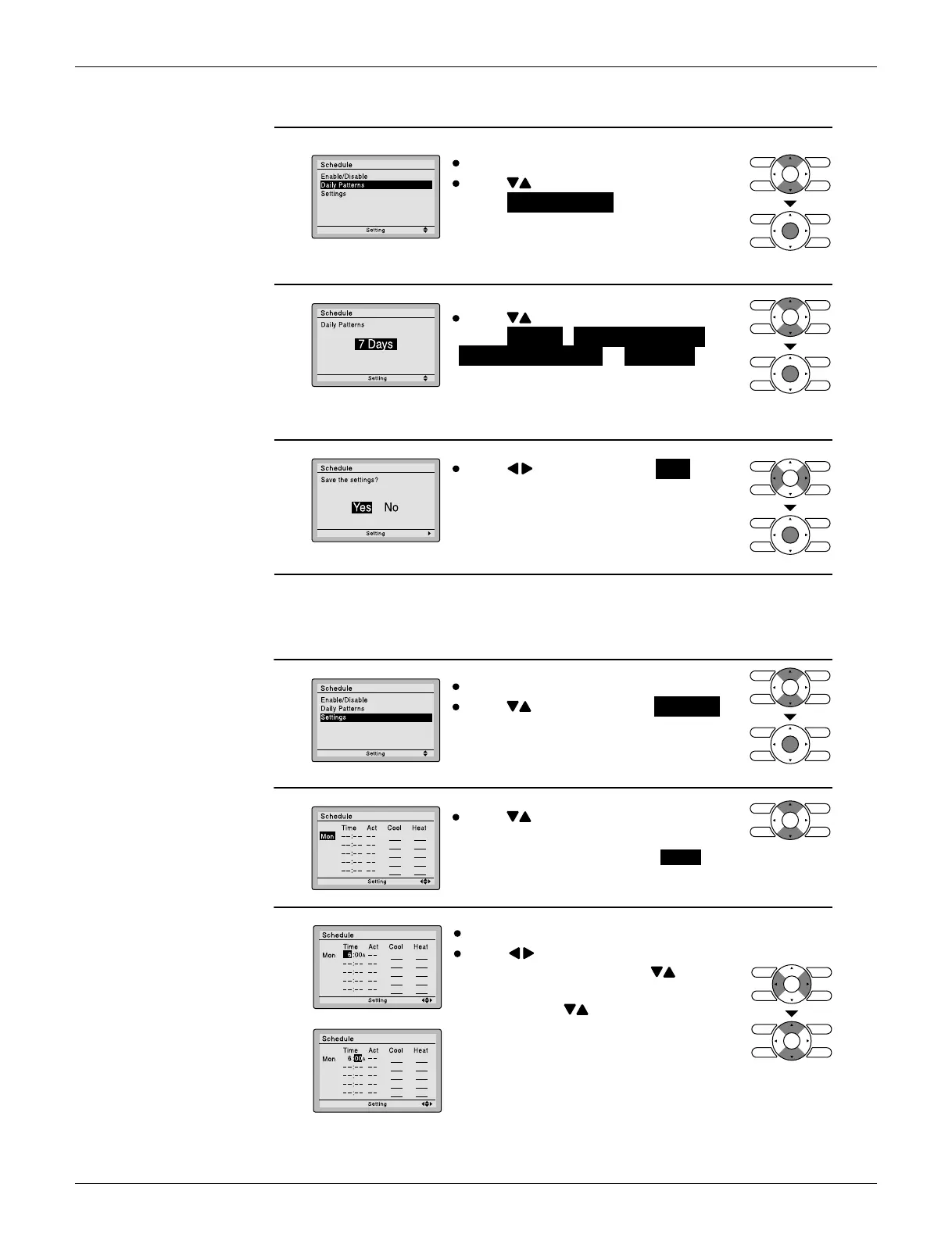
Daily Patterns
Settings
1
The schedule screen will appear.
2
Press buttons to
select Daily Patterns on the schedule
screen.
The daily patter
ns screen will appear
when Menu/OK button is pressed.
Press buttons to
select 7 Days , Weekday/Sat/Sun ,
Weekday/Weekend or Everyday on
the daily patter
ns screen.
The confirmation screen will appear
when Menu/OK button is pressed.
3
Press buttons to select Yes on the
confirmation screen.
Pressing Menu/OK button enters the
daily patterns in the schedule and takes
you back to the main menu screen.
(R24074)
1
The schedule screen will appear.
Press buttons to select Settings
on the schedule screen.
The settings screen will appear when
Menu/OK button is pressed.
2
Press buttons to select the day to
be set.
* It cannot be selected in the case of EVDY .
3
Input the time for the selected day.
Press buttons to move the
highlighted item and press buttons
to input the desired operation start time.
Each press of buttons moves the
numbers by 1 hour or 1 minute.


 To Next Page