Need help?
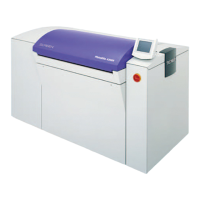
Do you have a question about the DAINIPPON SCREEN PT-R4300 and is the answer not in the manual?
Key safety rules to follow for operating the PT-R and preventing accidents.
Precautions concerning the power supply and handling of power cables and hoses.
Explanation and location of warning and caution labels attached to the PT-R unit.
Details on the PT-R's interlock system for operator safety and its function.
Procedure for installation and moving, emphasizing professional service.
Guidelines for selecting an appropriate installation location to prevent failures.
Detailed steps for turning the PT-R and peripheral devices on and off safely.
Methods for exposing images in online mode using host computer instructions.
Structure and navigation of the PT-R's offline mode for settings.
Detailed steps for setting media type information, including comments and thickness.
Steps for configuring printing machine information, including grip and centering.
Overview of the user maintenance mode for plate loading, test exposure, and settings.
Navigation for user settings like date, time, language, and laser calibration.
Procedure for selecting negative/positive type, entering comments, and copying preset data.
Procedure for registering plate information, including size and comments.
Configuring printing machine parameters like grip, centering, and offset.
Guide to performing test exposures for adjusting laser power, drum rpm, focus, and zoom.
Information on service call errors (A/B types) and procedures for error recovery.
Procedure for removing jammed plates, distinguishing between plate lengths.
 General
| Brand | DAINIPPON SCREEN |
|---|---|
| Model | PT-R4300 |
| Category | Printer |
| Language | English |


 To Next Page