Wired Controller CDV-46
55
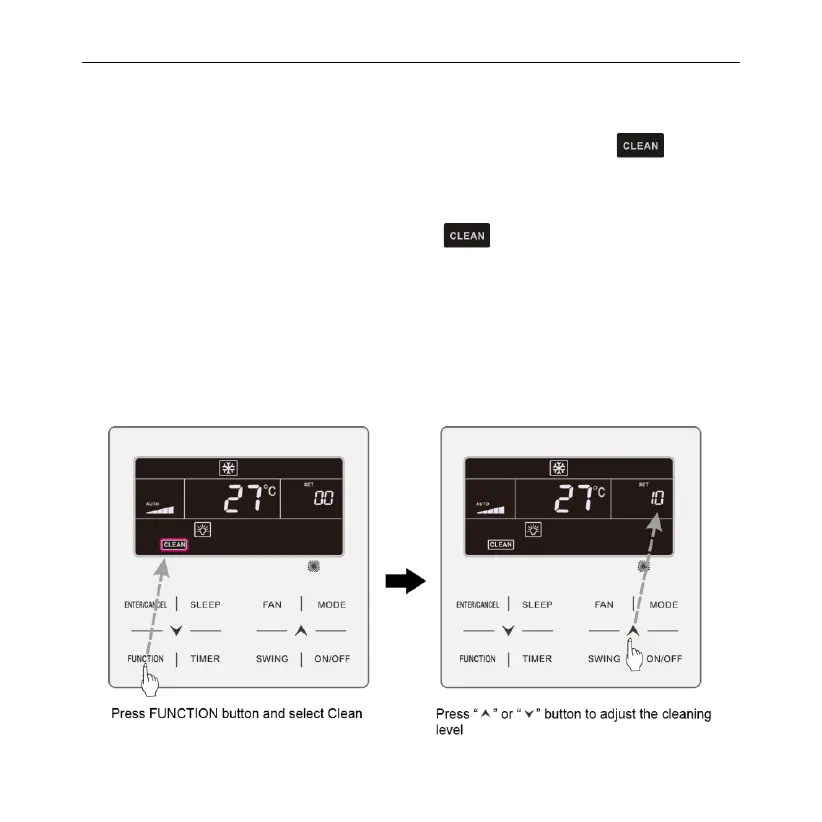
ENTER/CANCEL to turn on this function
Turn off Filter Clean Reminder Function: When unit is on and this function has
been turned on, press FUNCTION button and select Clean. Then “ ” icon will
blink. Set the cleaning level as 00 and press ENTER/CANCEL function to cancel
this setting.
When Filter Clean Reminder time is up, “ ” icon will light up to remind you
to clean the filer. Press FUNCTION button to turn to Filter Clean Reminder
Function, then press SWING/ENTER to cancel reminding, and it will retime
according to the original cleaning level. The clean reminding can be cancel only
when you didn’t reset the cleaning level under the setting of Filter Clean Reminder
Function.
Fig.6.15 or 6.16 Shows how to turn on Filter Clean Reminder function:



 To Next Page