OPERATION
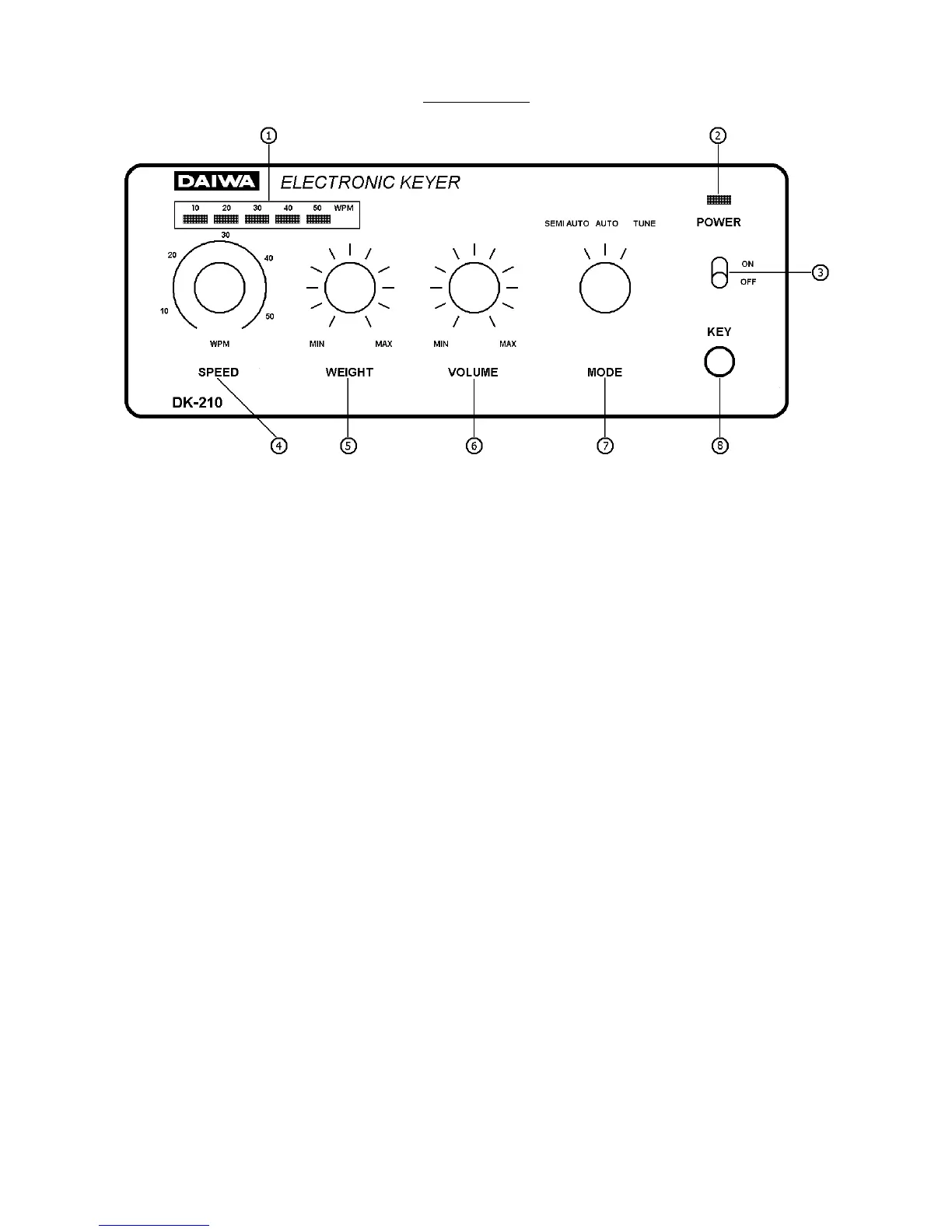
1. Speed indicator: The LED indicates the speed of code transmitted in WPM.
2. Pilot LED: The pilot LED glows when the LINE switch is on.
3. LINE Switch: The LINE Switch supplies power to the DK-200/DK-210.
4. Speed control: The speed of keying is indicated by turning the Control.
5. Weight Control: Ratio of DASH/DOT and SPACE is adjusted with this Control. Setting the con-
trol knob at the fully clockwise position produces a perfect 1:3:1 DOT/DASH/
SPACE ratio. Turning the knob counter-clockwise will decrease the ratio.
6. Monitor Volume: Audio level of side-tone oscillator can be adjusted. The knob at fully counter-
clockwise position is minimum output. Turning the knob clockwise increases
audio output.
7. Mode Switch: Three modes can be selected:
AUTO: The keyer works as fully automatic keyer.
SEMI AUTO: The keyer works as semi automatic keyer or "Bug Key"; DOTS
are generated automatically while DASHES are controlled
manually.
TUNE: The keying output is shorted whenever the Mode Switch
turned to the TUNE position.
8. Key Jack: Solder a two conductor shielded cable to the phone jack supplied as shown
in fig. 3. Insert the wired plug into the socket.


 To Next Page