4
SETTING UP YOUR RECEIVER
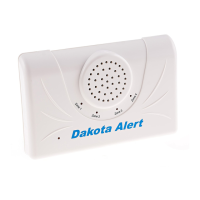
“Basic Setup” lets you choose the tune and LED settings you want for Dakota Alert 4000 Series
transmitters. In addition to tune and LED settings, “Advanced Setup” lets you set up exterior
sensors using the Relay 1, Relay 2, and the 12 VDC terminals.
BASIC SETUP
Note: You can connect up to 16 Dakota Alert 4000 Series transmitters to your receiver.
1. Place your receiver and transmitter(s) next to each other.
Note: Be careful not to activate your transmitter until you select the tune you want. If you do
accidentally activate the transmitter on the wrong tune, reselect a tune and reactivate the transmitter.
2. Press and hold the MODE button for three seconds until all LEDs ash and start blinking
slowly.
3. Press the (volume) button repeatedly until you nd the tune you want to sound when a
transmitter is activated.
1 Ding Dong (high) 5 Alarm/Siren 9 William Tell 13 Beep (high)
2 Ding Dong (low) 6 Coo Coo Clock 10 Canon in D 14 Beep (low)
3 Westminster 7 Bird Chirping 11 Morning 15 Beep, Beep
4 Fur Elise 8 Twinkle
Twinkle
12 Toreador
March
16 Beep, Beep,
Beep, Beep


 To Next Page