
 Need help?
Do you have a question about the Dali DT8 and is the answer not in the manual?
Explains the basic operation and features of the push button controller, including on/off and brightness control.
Details how to set the DALI group number using the rotary switch for device control.
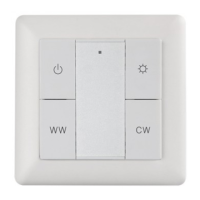
This document describes a Push Button Tunable White DALI DT8 Controller, designed for controlling DALI DT8 CCT (Correlated Color Temperature) lighting systems. It features a sleek, ultra-slim, and luxurious design, with the option for customized material and finishing colors to match various interior aesthetics. A notable design element is its backlighting, which enhances visibility and ease of use, even in dark environments.
The controller operates as a DALI DT8 CCT controller, specifically designed for color type Tc. It enables users to send dimming commands and DT8 commands to a single group of devices on a DALI circuit. The device is powered directly by the DALI bus, eliminating the need for an external power supply, which simplifies installation and wiring. Multiple controllers can be installed on each channel of a DALI bus, offering flexibility in system design.
A key feature of this controller is its ability to select and control one DALI group from a total of 16 available DALI groups (0-15). This selection is made via a rotary switch located on the back of the device. When the rotary switch is set to position '0', the controller broadcasts commands to all devices on the DALI circuit, effectively controlling them simultaneously. If the rotary switch is set to any position from '1' to '15', the controller will control devices within the corresponding DALI group (e.g., position '1' controls Group 0, position '15' controls Group 14). This group assignment must be performed beforehand using a DALI master controller.
The front panel of the controller features intuitive push buttons for various functions. Users can click a button to switch a group on or off. There are also dedicated buttons to set the color temperature to 100% Warm White (WW) and 0% Cool White (CW), or vice versa (100% CW and 0% WW). Pressing and holding these buttons allows for continuous adjustment, increasing WW and decreasing CW, or increasing CW and decreasing WW, respectively. Another button allows users to press and hold to turn the brightness of the selected group up or down, providing precise control over light intensity.
The controller is designed for straightforward operation and integration into DALI lighting systems. Installation is made easy with a mounting bracket, and the device boasts an IP20 waterproof grade, indicating protection against solid objects larger than 12.5mm, but no protection against liquids.
To begin operation, users must first ensure that the wiring is correctly connected according to the provided connection diagram. Following this, the desired DALI group number (0-15) needs to be set using the rotary switch on the back of the controller. It is crucial to assign the devices on the DALI circuit to a specific DALI group (0-15) using a DALI master controller before attempting to control them with this device.
The push-button interface on the front is designed for ease of use. A simple click can toggle the selected lighting group on or off. For color temperature adjustments, specific buttons allow for quick transitions between 100% Warm White and 0% Cool White, or 100% Cool White and 0% Warm White. Holding these buttons enables smooth, continuous adjustment of the color temperature mix. Similarly, holding another button allows for gradual adjustment of the group's brightness, providing a comfortable user experience for setting the desired lighting level. The backlighting ensures that the controls are visible and accessible even in low-light conditions.
The device is designed for durability and reliability, requiring minimal maintenance. However, certain precautions are necessary to ensure its longevity and safe operation.
It is critically important to NOT install the device with power applied to the system. This is a standard safety measure to prevent electrical shock and damage to the device or other components in the DALI circuit. Always ensure that the power supply to the DALI bus is disconnected before performing any installation or wiring tasks.
Furthermore, the device should NOT be exposed to moisture. While it has an IP20 rating, which offers some protection against solid objects, it is not designed to withstand water ingress. Exposure to moisture can lead to internal damage, short circuits, or malfunction, potentially compromising the device's performance and safety. Therefore, it should be installed in dry environments and protected from any sources of liquid.
Regular inspection of the wiring connections is recommended to ensure they remain secure and free from damage. Any loose connections or signs of wear should be addressed promptly by a qualified technician. As the device is powered by the DALI bus, ensuring the stability and correct voltage of the DALI bus is also important for its consistent operation. No specific user-serviceable parts are mentioned, suggesting that any internal issues would require professional attention. Adhering to these simple guidelines will help maintain the controller's functionality and extend its operational life.
 General
| DALI Type | DT8 |
|---|---|
| Protection Class | IP20 |
| Protocol | DALI |
| Communication Interface | DALI |
| Dimming Range | 0.1% to 100% |
| Output Voltage | N/A (DALI signal) |
| Max Load per Channel | N/A (DALI signal) |

 To Next Page