15
ENGLISH
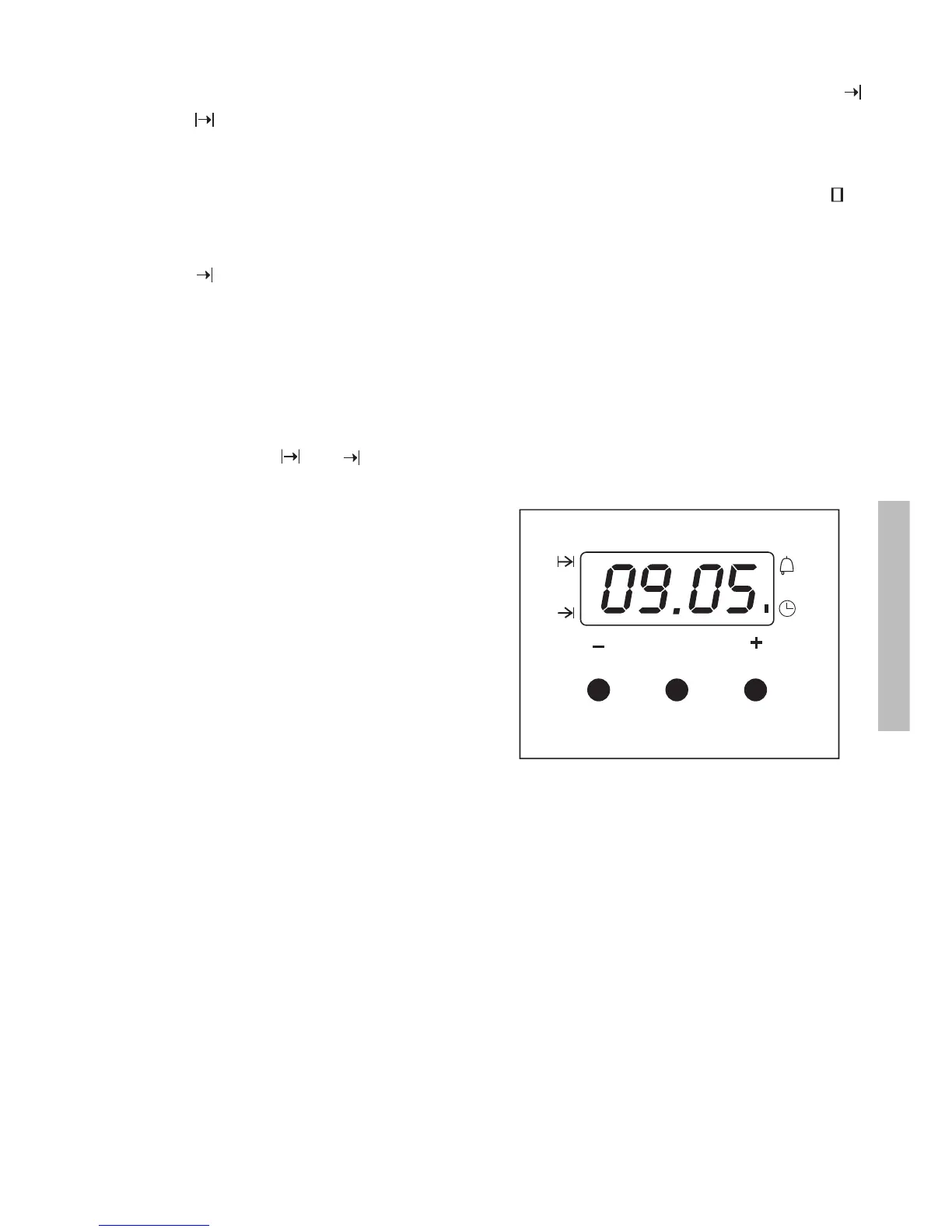
Programming the duration and automatic
stop
1 Press the MODE button until the indicator
above the symbol begins to flash.
2 Select the length of cooking time pressing
the “+” or “-“ buttons.
3 Subsequently, the indicator that was
flashing will remain lit.
4 Press the mode button until the indicator
above the symbol begins to flash.
5 Select the time that cooking should finish
pressing the “+” or “-“ buttons.
6 Subsequently, the indicator that was
flashing will remain lit.
7 Select a function and cooking temperature.
8 The oven will remain disconnected with the
indicators above the and symbols lit.
Your oven is programmed.
9 When the time to begin cooking is reached,
the oven will switch itself on and will
continue cooking during the programmed
time.
10
When the programmed finishing time is
reached, the oven will disconnect, an alarm
will sound and the light above the
symbol will begin to flash.
11
Press any button to switch off the alarm
and the oven will reconnect.
12
Set the controls to the position to
switch of the oven.
Caution
Pressing the MODE button the display on the
screen shows any function programmed. It can
be changed by pressing the “+” or “-“ buttons.
On selecting the desired function, the indicator
above the corresponding signal will light.
In the event of a power cut, all the
programming of the electronic clock will be
erased. The correct time has to be reset and
the watch reprogrammed.
MODE


 To Next Page