EasyManua.ls Logo

Danaher Motion S200-VTS - User Manual

Danaher Motion S200-VTS
140 pages
Print Icon
To Next Page IconTo Next Page
Loading...
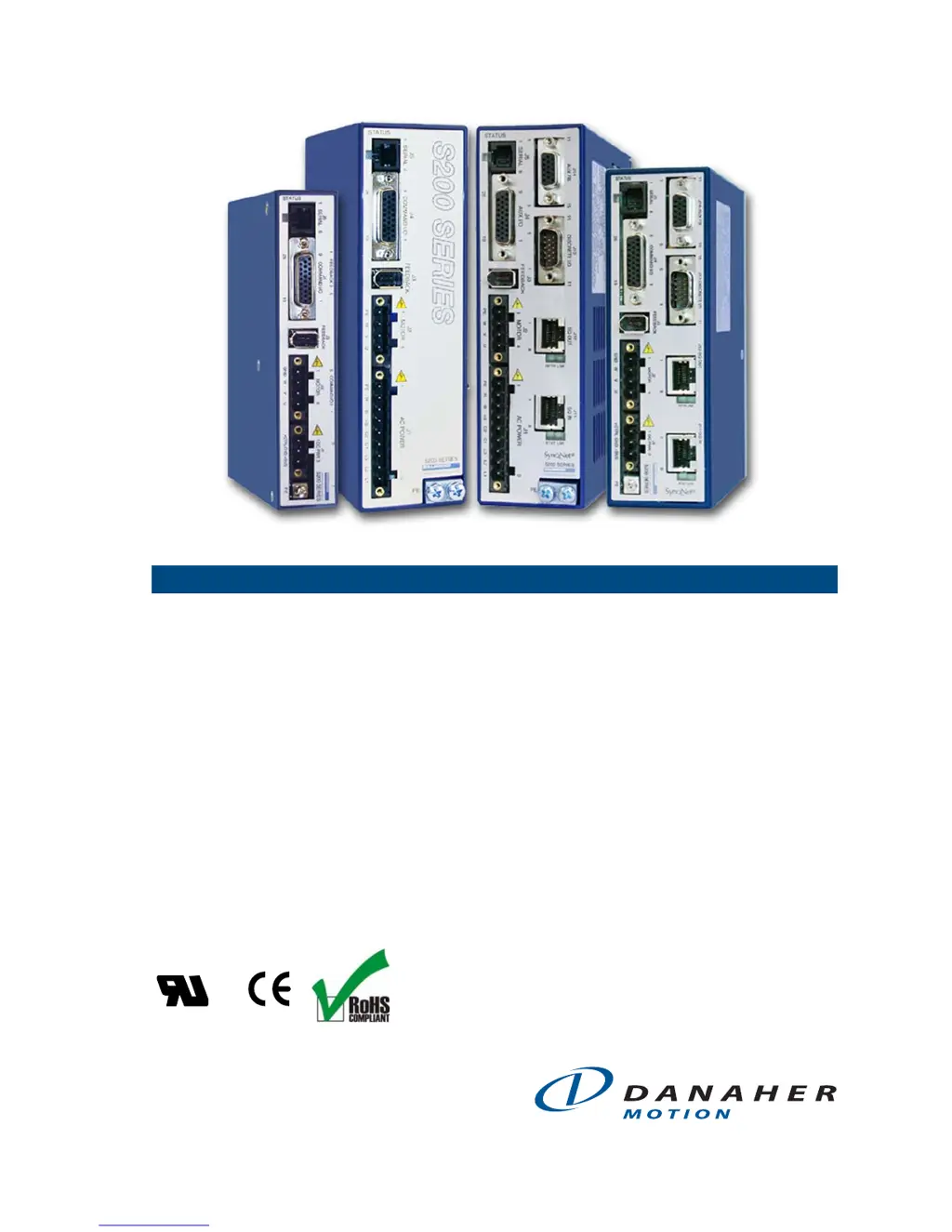
S200-VTS Product Manual
Base & SynqNet Hardware Installation Manual
Control Logic Version 3.0 or Higher
Revision C1 May 08,2008
Keep all product manuals as a product
component during the life span of the
servo amplifier. Pass all product manuals
to future users/owners of the servo amplifier.
C
®
US

Table of Contents

Questions and Answers

Summary

S200-VTS Product Manual

Base & SynqNet Hardware Installation Manual

Covers installation of base and SynqNet hardware for the S200 drives.

Safety Symbols

WARNING

Alerts users to potential physical danger or harm.

CAUTION

Directs attention to general precautions for safety.

NOTE

Highlights information critical to understanding or use.

S200 Series Drives

Manual Scope

Details the scope of the S200 base drives and SynqNet option card.

Model Number

Explains the structure and components of the S200 drive model numbers.

Drive Model Numbers and Descriptions

Lists and describes the various S200 Series Drive models.

Before You Begin

Safety

Provides critical safety instructions before operating the drive.

Unpacking and Inspecting

Instructions for safely unpacking and inspecting the drive components.

Specifications

Drive Family Power

Details power specifications for the S200 drive family.

AC Input Drives - Control and Power

Specifies control and power details for AC input drives.

DC Input Drives - Control and Power

Specifies control and power details for DC input drives.

Motor Current Control

Details specifications for motor current control.

Velocity Loop

Specifies parameters for the velocity loop.

Command I;O

Details specifications for command input/output interfaces.

Mechanical

Provides mechanical dimensions and mounting information.

Environmental

Specifies environmental operating conditions.

Smart Feedback Device (SFD)

Details specifications for the Smart Feedback Device (SFD).

Quick Start Guides

S200 Base Unit Drive

Guide for quickly setting up the S200 Base Unit Drive.

S200 Tools Software Installation

Instructions for installing the S200 Tools software.

S200 SynqNet Drive

Hardware Setup

Procedure for setting up hardware for SynqNet drives.

SynqNet Configuration

Steps for configuring the SynqNet drive parameters.

Motor Feedback Configuration

Configuration steps for motor feedback on SynqNet drives.

Mounting the Drive

Mounting Dimensions

Provides detailed mounting dimensions for S200 drives.

Mechanical Outline Drawings

Illustrates mechanical outline drawings for various S200 drives.

Wiring the Drive

J1 - AC Input Drive Power

Details wiring for the AC Input Drive Power connector (J1).

J3 - Feedback Connector

Explains the wiring for the Feedback Connector (J3).

J4 - Command I;O Connector

Details wiring for the Command I/O Connector (J4).

J5 - Serial Port Connector

Explains the wiring for the Serial Port Connector (J5).

Basic Configuration

Switch Settings

Details the function of S1 and S2 switches for basic configuration.

S1 - Rotary Setup Switch

Explains the function of the S1 rotary switch based on feedback mode.

Configuring for Brush Motors

Procedure for configuring the S200 to drive brush motors.

Configuring with 6-Step (Hall) Feedback

Steps for configuring the drive with 6-Step Hall feedback.

Configuring with SFD Feedback

Procedure for configuring the drive with SFD feedback.

Reversing Motion Direction

Instructions on how to reverse motion direction of the drive.

Advanced Configuration

Base Drive Torque;Velocity Control Block Diagram

Block diagram for base drive torque/velocity control.

Parameters and Variables

Details S200 parameter types, storage, and related variables.

Appendix A - DC Power Supply Design

Single Power Supply Operation

Considerations for single power supply operation for DC drives.

Two Power Supply Operation

Guidelines for using two separate power supplies for drive operation.

Appendix B - Cables

Custom Composite Cables

Guidelines for custom composite cable development.

Appendix C - Danaher Motion Linear Motor Wiring

Appendix D - Process to Setup Non-Danaher Motors

Detailed Drive Motor Wiring Discovery Procedure

Procedure for discovering and documenting motor wiring.

Appendix E - Voltage Sag Standard - Semi F47, F42

Appendix F - Using a Voltage Doubler Mode Drive

S2 xx50 AC Line Voltage Doubling Drive Power Specifications

Power specifications for 120 VAC voltage doubling operation.

Appendix G - Regulatory Information

Conformance Requirements

Details requirements for product conformance to standards.

CE Approval

Confirms S200 drives satisfy CE Directives requirements.

CE EMC Compliance

Guidelines for achieving CE EMC compliance in machine design.

Declaration of Conformity

Affirms compliance with Low Voltage and EMC Directives.

Installation and Commissioning

Requirements for qualified personnel and reading the manual.

Safety requirements

User responsibility for determining product suitability for applications.

European Compliance

Lists relevant German standards for power installations.

Low Voltage Directive and EN50178

Ensures compliance with Low Voltage Directive and EN50178.

UL and cUL Conformance

Details UL and cUL recognition and installation requirements.

Additional Safety Precautions

Provides essential safety guidelines for operation and handling.

EMC Compliance with EN61800-3

Guidance on EMC performance in domestic environments.

AC Mains Conducted Emissions

Requirements for AC mains conducted emissions filtering.

Regen Resistor

Information on Regen resistor wiring for AC drives.

Sales and Service

Europe

Contact information for Danaher Motion Customer Support Europe.

North America

Contact information for Danaher Motion Customer Support North America.

Danaher Motion S200-VTS Specifications

General IconGeneral
Control ModeTorque, Velocity, Position
CommunicationCANopen
FeedbackEncoder
Protection FeaturesOvercurrent, Overvoltage, Undervoltage, Overtemperature, Short Circuit
Operating Temperature0°C to 40°C
Storage Temperature-20°C to 70°C
Humidity5 - 85% non-condensing

Related product manuals