EasyManua.ls Logo

Danalogic i-FIT 71 - User Manual

Danalogic i-FIT 71
48 pages
Print Icon
To Next Page IconTo Next Page
Loading...
User Guide
Behind-the-ear (BTE) models:
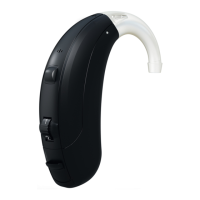
Danalogic i-FIT 71, 81
and Receiver-in-the-ear (RIE)

Questions and Answers

  • A
    andrewbrownAug 2, 2025
    Why Danalogic i-FIT 71 Hearing Aid has no sound?
    • G
      Gabriela PowersAug 2, 2025
      Your Danalogic Hearing Aid may not be producing sound for several reasons. First, ensure the device is turned on by closing the battery door. If that doesn't work, the battery may be dead and needs replacing. Also, check if the battery is inserted properly, allowing the battery door to close. The earmould or tube might be blocked, requiring cleaning. Finally, the wax filter could be blocked, in which case you should replace it.
  • M
    Michael SawyerAug 12, 2025
    What to do if Danalogic Hearing Aid is whistling?
    • M
      Mariah GregoryAug 12, 2025
      If your Danalogic Hearing Aid is producing excessive whistling or feedback, it could be due to incorrect earmould placement; try re-inserting it carefully. Another cause might be incorrect dome placement, so ensure that the dome is properly re-inserted.
  • M
    Monica RichardAug 21, 2025
    How to make Danalogic i-FIT 71 louder?
    • M
      Marcus JonesAug 22, 2025
      If your Danalogic Hearing Aid isn't loud enough, start by reinserting the earmould to ensure correct placement. Also, check for blockages in the earmould or dome, and clean the earmould or replace the dome or filter if necessary. Finally, check the volume control and increase it if available.

Summary

Introduction to Danalogic i-FIT Hearing Instruments

Description of BTE Hearing Instruments

BTE Instrument Components

Identifies and describes the various parts of the Danalogic i-FIT BTE hearing instruments.

Description of RIE Hearing Instruments

RIE Instrument Components

Identifies and describes the various parts of the Danalogic i-FIT RIE hearing instruments.

Getting Started with Your Hearing Instruments

On;Off Function

Explains how to turn hearing instruments on and off using the battery door.

SmartStart Feature

Describes the SmartStart function for delayed activation and reduced whistling.

Inserting and Replacing Batteries

Wearing and Operating Your Hearing Instruments

Low Battery Indicator

Explains the low battery warning signal and its behavior.

Inserting Custom Earmoulds

Provides step-by-step guidance for inserting custom earmoulds into the ear canal.

Inserting Domes into the Ear Canal

Removing Earmoulds and Domes

Adjusting Volume Control

Using the Programme Button

Activating the Stand-by Function

Tips for Telephone Use

Telecoil and Tele-loop System Usage

Direct Audio Input (DAI) Connection

Connecting Audio Boots

Step-by-step guide for connecting audio boots to the hearing instrument.

Care and Maintenance Guidelines

Proper Handling and Daily Cleaning

Covers general handling precautions and daily cleaning using a soft cloth or tissue.

Cleaning Earmoulds and Tubing

Cleaning Thin Tubes and Domes

Cleaning Receiver Tubing and Applying Domes

How to Apply Domes

Instructions for securely fastening and inserting standard domes onto the thin tube.

Applying Tulip Domes

Replacing the Wax Filter (RIE Models)

General Precautions for Use

General Warnings and Safety Advice

Battery Warning Information

Troubleshooting Common Issues

Technical Data for Hearing Instruments

Warranty and Repair Information

Danalogic i-FIT 71 Specifications

General IconGeneral
BrandDanalogic
Modeli-FIT 71
CategoryHearing Aid
LanguageEnglish

Related product manuals