5
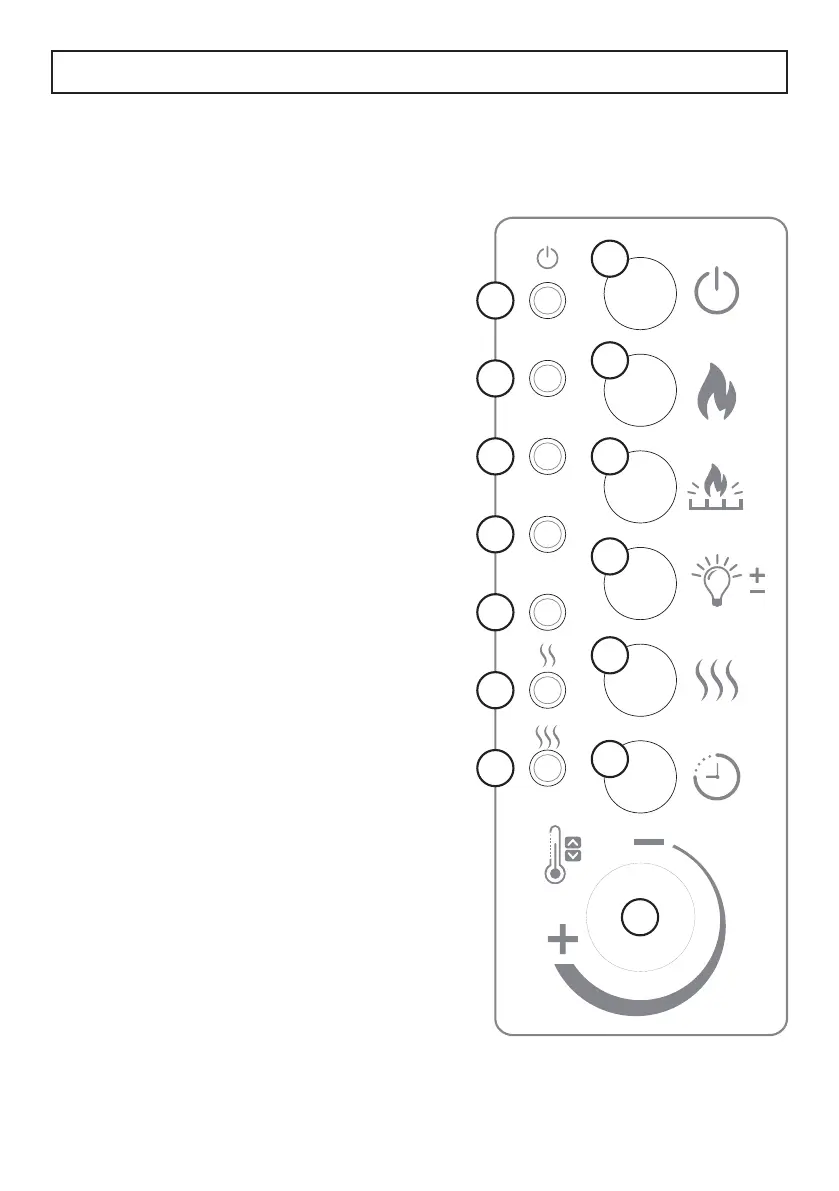
CONTROL PANEL
1. Power indicator light: Illuminates to
show the fi replace is turned on.
2. 1/2 hour timer indicator light
3. 1 hour timer indicator light
4. 2 hour timer indicator light
5. 4 hour timer indicator light
6. Low heat indicator light: Illuminates
when low heat mode is set.
7. High heat indicator light: Illuminates
when high heat mode is set.
8. Power button: Press to turn the
fi replace on or off.
9. Flame button: Press to turn the fl ame
on or off and to change the fl ame
colour. There are 10 fl ame colours.
Press and hold for 5 seconds to set
the colours to cycle continuously.
10. Ember bed button: Press to turn
the carbon bed on or off and to
change the colour. There are 10
ember colours. Press and hold for
5 seconds to set the colours to cycle
continuously.
11. Light button: Press to adjust the fl ame
brightness. There are 5 brightness
levels.
12. Heater button: Press repeatedly to
select low or high heat mode. The
adjacent indicator light will illuminate
to display the chosen mode.
13. Timer button: Press repeatedly to
set the timer. The timer will turn
the fi replace off after the chosen
time. The timer can be set in 1/2
hour increments up to 7.5 hours.
The adjacent indicator lights will
illuminate to display the chosen
setting.
14. Thermostat button: Turn to set the
temperature. The thermostat can only
be set from the control panel on the
fi replace.
1/2H
1H
2H
4H
1
2
3
4
5
6
7
8
9
10
11
12
13
14
OPERATING INSTRUCTIONS


 To Next Page