EasyManua.ls Logo

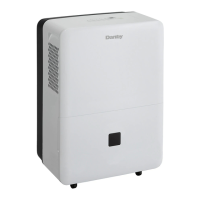
Danby DDR30B2GDB - User Manual

Danby DDR30B2GDB
40 pages
Print Icon
To Next Page IconTo Next Page
Loading...
Model M odèle Modelo
OWNER’S USE AND CARE GUIDE
GUIDE D’UTILISATION ET SOINS DE PROPRIÈTAIRE
GUÍA DE UTILIZACIÓN Y CUIDADO PARA EL PROPIETARIO
MODEL • MODÈLE • MODELO
DANBY PRODUCTS LIMITED, ONTARIO, CANADA N1H 6Z9
DANBY PRODUCTS INC., FINDLAY, OHIO, USA 45840
V1.10.13.NK
PORTABLE DEHUMIDIFIER
DESHUMIDIFICATEUR PORTATIF
DESHUMIDIFICADOR PORTÁTIL
DDR30B2GDB

Questions and Answers

  • P
    Paul PatrickJul 30, 2025
    Why won't my Danby DDR30B2GDB turn on?
    • T
      Taylor MercadoJul 30, 2025
      Your Danby Dehumidifier might not start due to several reasons. First, ensure the dehumidifier is properly plugged into the outlet. Check your house's fuse or circuit breaker and replace the fuse or reset the breaker if needed. If the dehumidifier has reached its preset level or the bucket is full, it will automatically turn off; change to a lower setting or empty the bucket. Make sure the bucket is correctly placed. Finally, note that there is a protective time delay of up to 3 minutes to prevent compressor overload after being turned back on.
  • P
    paigebutlerAug 3, 2025
    Why is there frost on the coils of my Danby DDR30B2GDB?
    • M
      Mark WhiteAug 3, 2025
      If you notice frost on the coils of your Danby Dehumidifier, especially soon after turning it on or if the room temperature is below 41°F (5°C), this is generally normal. The frost should disappear within about an hour.
  • O
    ogriffinAug 7, 2025
    Why can't I set the controls on my Danby DDR30B2GDB?
    • G
      gilmoremaryAug 7, 2025
      If you are unable to set the controls on your Danby Dehumidifier, it may be because the compressor turns off, but the fan continues to run for about 3 minutes at a fixed setting. This is normal operation. Wait approximately 3 minutes before attempting to set the fan as desired.
  • R
    Regina LopezAug 12, 2025
    Why is my Danby DDR30B2GDB not removing enough moisture?
    • C
      Caleb MyersAug 12, 2025
      If your Danby Dehumidifier isn't drying the air effectively, several factors could be at play. First, allow at least 24 hours for the unit to reach the desired dryness, especially after initial setup. Check for any obstructions like curtains or furniture blocking airflow to the front or back of the unit. A dirty filter can also reduce performance. Ensure the humidity control is set low enough; for drier air, set it to a lower percentage or continuous operation. Verify that all doors and windows are tightly closed, and ensure a clothes dryer isn't blowing moisture into the room, and if so, vent the dryer to the outside. Finally, remember that lower room temperatures reduce moisture removal, and these dehumidifiers are designed to operate above 41°F (5°C).
  • L
    Laura GoodmanAug 16, 2025
    Why does my Danby DDR30B2GDB Dehumidifier run constantly?
    • L
      Lauren GreeneAug 16, 2025
      Your Danby Dehumidifier might run constantly if the area it's dehumidifying is too large for its capacity. Also, check that all doors and windows are closed to prevent outside air from entering the space.
  • S
    Susan JamesAug 20, 2025
    What to do if I see water on the floor near my Danby Dehumidifier?
    • K
      kyle35Aug 20, 2025
      If you find water on the floor near your Danby Dehumidifier, first check the hose connection to ensure it is secure. If you intend to use the bucket to collect water, make sure the hose is disconnected.
  • M
    Mr. John HarrisonAug 25, 2025
    Why is my Danby DDR30B2GDB Dehumidifier making fan noise?
    • S
      Sara McguireAug 25, 2025
      The fan noise from your Danby Dehumidifier is normal, as it indicates air is moving through the unit.

Summary

Grounding Method

Welcome

Important Safety Information

Electrical Requirements

Details electrical standards and customer responsibilities for safe operation.

Grounding Instructions

Guidelines for proper grounding to prevent electrical shock and ensure safety.

Safety Precautions

Installation Instructions

Location

Guidance on selecting an optimal location for the dehumidifier's placement.

Features

Lists the key features and specifications of the portable dehumidifier.

Operation Instructions

Control Panel Overview

Explains the function of each button and indicator on the control panel.

Controls

Details how to use the buttons like Power, Fan, Timer, and Humidity settings.

Error Codes

Lists and explains error codes displayed by the dehumidifier.

Indicator Light Functions

Describes the meaning of various indicator lights on the unit.

Timer Functions

Explains how to set Auto-On and Auto-Off timer features.

Water Tank Operation

Describes how the water tank functions and its safety switch.

Dehumidifying Mode Instructions

Guides on selecting dehumidifying modes and fan speeds.

Air Filter

Instructions for cleaning and maintaining the removable air filter.

Removing Collected Water

Details methods for emptying the water tank or setting up continuous draining.

Care and Maintenance

Troubleshooting Guide

Limited Appliance Warranty

Danby DDR30B2GDB Specifications

General IconGeneral
BrandDanby
ModelDDR30B2GDB
CategoryDehumidifier
LanguageEnglish

Related product manuals