INSTALLATION INSTRUCTIONS
3
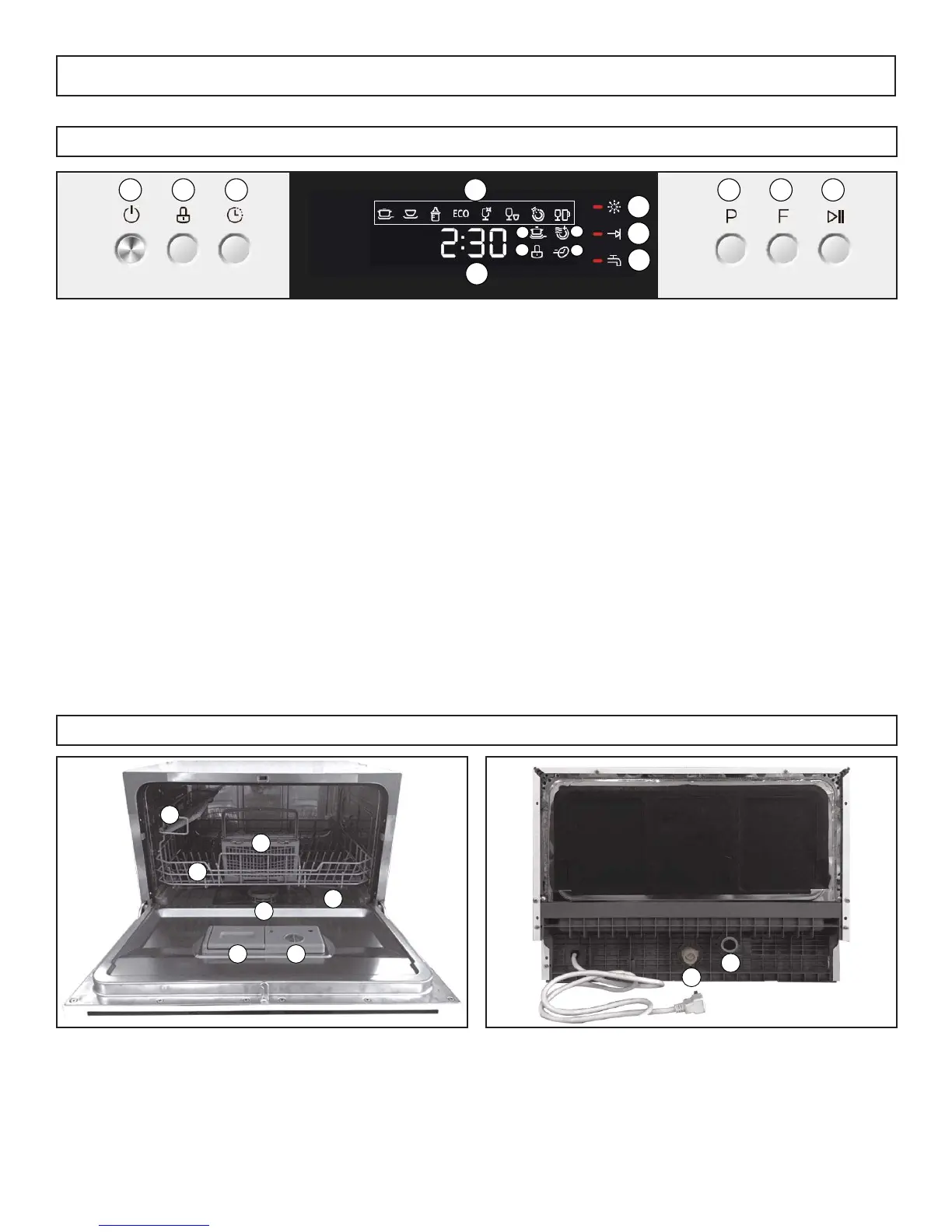
CONTROL PANEL
1. Power Button: Press to turn the appliance on or off
2. Lock Button: Press and hold for 5 seconds to lock or unlock the buttons on the control panel
3. Delay Button: Press to delay the start of the chosen program
4. Program Indicator: Illuminates to show which program is running
5. Time Display: Shows how much time is remaining or how much time until delayed start
6. Extra Cleaning Indicator: Illuminates if extra cleaning program is chosen
7. Lock Indicator: Illuminates if control panel lock is engaged
8. Extra Drying Indicator: Illuminates if extra drying program is chosen
9. Express Indicator: Illuminates if express program is chosen
10. Rinse Aid Warning Light: Illuminates when the rinse aid dispenser is empty
11. Program Ending Indicator: Illuminates when a program has fi nished
12. Water Indicator: Illuminates when an issue arises with the water supply
13. Program Selector Button: Press to chose a program
14. Function Button: Press to select additional functions, extra drying, extra cleaning or express
15. Star t/Pause Button: Press to begin the chosen program or to pause a program that is running
1 2 3 4
5
6
7
8
9
10
11
12
13 14 15
FEATURES
1. Cup Shelf
2. Basket
3. Cutlery Basket
4. Filter Assembly
5. Spray Arms
6. Detergent Dispenser
7. Rinse Aid Dispenser
1
2
3
4
5
6 7
8
9
8. Inlet Hose Connection
9. Drain Hose Connection



 To Next Page