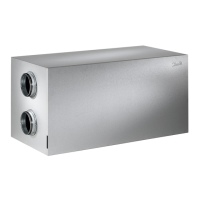
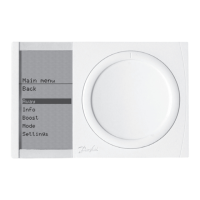
The Danfoss Air system is an advanced, efficient, and quiet ventilation system with heat recovery, designed to provide modern living conditions. It utilizes Z-Wave wireless technology for seamless control and offers various features to customize ventilation according to user needs. The system is Passive House certified by The Passive House Institute in Darmstadt, ensuring high energy efficiency and performance.
Function Description
The core function of the Danfoss Air system is to provide balanced ventilation with heat recovery. It continuously exchanges indoor air with fresh outdoor air while recovering heat from the exhaust air, minimizing energy loss. The system's operation is managed through the Danfoss Air Dial, a central control panel that allows users to adjust settings and monitor the system's status.
Main Functions:
- Away Mode: This function is activated when users leave their house for an extended period. It reduces the air volume to an absolute minimum within a defined interval, conserving energy. If an optional heating surface is installed, it is turned off during Away mode for financial reasons.
- Bypass Function (not available on w¹ units): This cooling function opens a passage parallel to the heat exchanger, stopping the heat exchange process and leading outdoor air directly into the house. It can be activated manually for a set duration (default 3 hours) or automatically when outdoor and room temperatures exceed selected levels. The bypass will not activate if the outdoor temperature is below +5°C.
- Info Mode: Provides a comprehensive list of the unit's current status, including measured temperatures, fan steps, relative humidity, and other relevant information.
- Boost Function: Designed for situations requiring higher air volume, such as parties, cooking with strong odors, or smoking. It is timer-based (default 3 hours, adjustable) and runs the unit at 100% speed. The maximum boost step can be adjusted in settings.
- Autoboost: An automatic feature that increases airflow when sudden humidity arises (e.g., bathing or cooking). It remains active for one hour after activation before returning to the original airflow. Autoboost can be switched on or off in the settings.
- Operating Modes: The system offers different operating modes to suit various preferences:
- Manual Mode: Maintains a constant air volume at a user-selected fan step (1 to 10). Automatic bypass and Autoboost functions can be switched off in this mode if not desired.
- Demand Mode: Utilizes a built-in humidity sensor to regulate air volume. It automatically reduces air volume at low outdoor temperatures to prevent excessive dryness indoors and increases air change when indoor humidity is high, adapting to seasonal changes.
- Program Mode: Allows selection of pre-defined family profiles that adjust ventilation rates based on occupancy patterns (higher during occupied periods, lower when empty) and activities like bathing or cooking. Users can also create custom profiles using a PC tool.
- Night Cooling: An automatic bypass function for summertime use. It activates if it was a warm day, running from midnight until 6 am, allowing supply air to be +10°C or higher. It automatically stops if outdoor air is colder than +10°C or if extract air temperature drops below +18°C.
- Time & Date: Allows adjustment of the system's time and date.
- Restore Defaults: Resets all user settings to factory default values.
Heating Surfaces (Optional):
- Electric Preheating Surface: Protects the system from icing at low outdoor temperatures by heating incoming air to -2°C. It ensures a permanent balance between supply and extraction air with 100% stepless adjustment for minimal power consumption. No user settings are required.
- Electric Afterheating Surface: Ensures a minimum supply air temperature before air is blown into the room. It provides a small lift to the supply temperature, with 100% stepless adjustment for optimal power consumption. The required supply temperature can be set via the Air Dial.
- Water-based Afterheating Surface: Similar to the electric afterheating surface, it ensures a minimum supply temperature. It uses a built-in motor valve for 100% stepless control. This can also be used as total heating in passive or 0-energy houses if dimensioned accordingly, allowing the user to set the required room temperature.
- Geothermal Preheating/Cooling: Utilizes a buried ground pipe with 'anti-freeze' (brine) to preheat or precool outdoor air depending on the season. It automatically controls operation, preventing frost protection mode in winter and providing additional cooling in summer. When cooling, the system's bypass automatically opens.
Usage Features
The Danfoss Air system is designed for user-friendly operation, primarily through the Danfoss Air Dial.
- Intuitive Control: The Air Dial allows users to control the entire system by rolling and pushing the dial, with all necessary information displayed on its screen.
- Customizable Settings: Users can access a wide range of settings to tailor the system to their specific demands, including weekly programs, boost duration, and bypass conditions.
- PC Control (Optional): The system can be controlled from a PC screen via Ethernet (standard for all Danfoss Air units). This allows for:
- Creating customized weekly programs with a user-friendly editor.
- Monitoring all temperatures and relative humidity in the house in a single screenshot.
- Viewing trend curves for the last 14 days, with hourly logging of all relevant sensors.
- Easy access to advanced settings with clear descriptions.
- Wireless Technology: The use of Z-Wave wireless technology enables flexible placement of the Air Dial and seamless communication within the system.
Maintenance Features
The Danfoss Air system is designed for minimal maintenance, primarily focusing on filter replacement and periodic cleaning.
- Filter Replacement:
- Filters should be replaced 1-2 times a year, depending on air volume and pollution levels.
- The unit provides an audible filter alarm and a message on the Air Dial display when filters need changing.
- To replace filters: remove the front panel (no tools needed), pull out old filters, fit new ones, reattach foam covers, and press the filter reset button.
- Standard G4 class filters are used for supply and discharge air. Optional F7 class pollen filters are available for allergy sufferers and should be fitted in the right filter slot for outdoor air filtration.
- Air Dial Battery Replacement:
- The Air Dial indicates when batteries need replacement with an audible alarm.
- Lift the Air Dial off its wall bracket, remove old batteries, and insert 4 x AAA new batteries.
- Unit Cleaning:
- The inside of the unit should be cleaned every other year.
- Procedure:
- Disconnect power and remove the front panel.
- Unscrew six screws holding three metal rails (using a torx key).
- Remove the front foam panel.
- Access internal parts.
- Pull the thick round seal over the heat exchanger sideways.
- Carefully lift/pull the heat exchanger out of the core.
- Clean the heat exchanger by pouring a mild soapy solution through its four open sides, letting it soak for 5-10 minutes, then rinsing under running water. Dry the exterior and gently slide it back into the unit.
- When remounting the exchanger, insert the round seal last, locking in the two ends first.
- Clean interior surfaces with a wet sponge or cloth and mild soapy solution. Do not use solvents on foam parts.
- Avoid spraying water onto the main circuit board. If water spills, tap it lightly with a dry cloth and allow to air dry for at least 24 hours before reconnecting power.
- Reassemble in reverse order: install foam front panel, secure with metal rails, tighten torx screws, and reinstall the front panel.
This regular maintenance ensures the system's optimal performance and longevity.



 To Next Page

 General