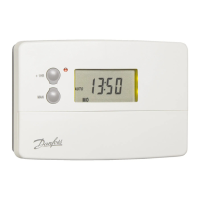
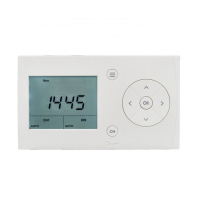
The Danfoss TS710 is a single-channel heating timer designed to provide efficient and flexible control over your heating system. This user guide outlines its functions, usage, and maintenance features, ensuring you can effectively manage your home's heating schedule.
Function Description
The TS710 timer allows users to set a heating schedule based on specific days, times, and periods, ensuring comfort while optimizing energy consumption. The device displays the current day, the active on/off period, and the heating status (active or inactive). It also shows the current channel mode (e.g., AUTO, +1HR, ON, OFF) and provides indicators for time and date setup.
Key functions include:
- Current Set Day: Indicates the active day of the week (Mon-Sun).
- Current On/Off Period: Shows the current heating period (1-6).
- Heating Active: An "SSS" symbol indicates when the heating system is currently active.
- Heating Channel 1 Current Mode: Displays the operational mode of the heating channel, such as AUTO, +1HR, ON, or OFF.
- Time and Date Setup: Allows for the adjustment of the year, month, day, hour, and minute.
- Schedule Setup: Provides access to program the heating schedule for different days and periods.
- Current Set Time / Parameter Setup: Used for setting the current time and configuring various operational parameters.
- Away Mode: A dedicated mode for when the user is away, potentially reducing heating to save energy.
Usage Features
The TS710 is designed for user-friendly operation with a clear display and intuitive button controls.
- Schedule Setup Button: Accesses the schedule setup menu. Press and hold for 3 seconds for additional features.
- OK Button: Confirms settings. When setting the date and time, pressing OK confirms each step.
- AV Buttons: Used for menu navigation and day selection.
- < > Buttons: Adjusts time and setting values, and selects channel modes.
- CH Button: Selects the heating channel and accesses holiday mode (press and hold for 3 seconds).
Setting Date & Time:
- Press and hold the OK button for 3 seconds until "Yr" flashes.
- Use the < or > buttons to adjust the year.
- Press OK again; "Mth" flashes. Use < or > to adjust the month.
- Press OK again; "Day" flashes. Use < or > to adjust the day of the month.
- Press OK again; "Hr" flashes. Use < or > to adjust the hour.
- Press OK again; "Min" flashes. Use < or > to adjust the minute.
- Press OK to exit. The device will automatically exit after 20 seconds if no buttons are pressed.
Timer Schedule Setup:
- Press the Schedule Setup button to access the schedule setup. "SET CH" flashes.
- Press OK to confirm.
- The display will show "Mo. Tu. We. Th. Fr." flashing. Press OK to accept or the right arrow to select "Sa. Su."
- For Period 1 (and subsequent periods):
- Use < or > to select the ON hour, then press OK to confirm.
- Use < or > to select the ON minute, then press OK to confirm.
- Use < or > to select the OFF hour, then press OK to confirm.
- Use < or > to select the OFF minute, then press OK to confirm.
- Repeat these steps for Period 2 (and Period 3 if configured).
- The display returns to the home screen, and the schedule is set.
The TS710 supports different scheduling options:
- 7-day schedule: Allows individual day selection for programming.
- 5/2-day schedule: Programs weekdays (Mon-Fri) and weekends (Sat-Sun) separately.
- 24hr mode: Programs all days together with a single schedule.
- Multiple Periods: Can be configured for 1, 2, or 3 periods (2, 4, or 6 events) per day, offering flexibility in heating times.
Default Program:
The timer comes with a default program if no custom schedule is created. For a 5/2 or 7-day setup with 3 periods, the default times are:
- Mon - Fri: ON 6:30, OFF 8:30; ON 11:30, OFF 13:30; ON 16:30, OFF 22:30
- Sat - Sun: ON 7:30, OFF 9:30; ON 11:30, OFF 13:30; ON 16:30, OFF 22:30
For 2 periods, default events 1, 2, 5 & 6 are used. For 1 period, default events 1 & 6 are used.
Select Away Mode:
- Press CH for 3 seconds to enter Away mode. The "Away" symbol will be displayed.
- Press CH again to exit Away mode.
Set Control Parameters:
- Press the Schedule Setup button for 6 seconds to enter parameter setting mode.
- Use the AV buttons for parameter selection.
- Use the < or > buttons to set the parameter range.
- To exit, press the Schedule Setup button. The device will automatically exit after 20 seconds if no buttons are pressed.
Configurable parameters include:
- P1 Working mode: Selects between 7-day, 5/2-day, or 24hr schedule timer.
- P2 Schedule periods: Sets the number of periods (1, 2, or 3) per day.
- P4 Timer display: Chooses between 24hr or 12hr time format.
- P5 Auto daylight saving: Enables or disables automatic daylight saving adjustments.
- P7 Service due setup: An installer-only setting.
- P8 Reset: Resets the device to factory defaults.
Maintenance Features
The TS710 is designed for minimal user maintenance.
- Default Schedule Reset: If parameters P1 or P2 (working mode or schedule periods) are changed, the schedule will revert to the default times. Users will need to reset their custom schedules after such changes.
- Parameter Reset (P8): The device offers a reset function (P8) to clear all user settings and return to the factory default configuration. This can be useful for troubleshooting or starting fresh with programming.
The Danfoss TS710 provides a reliable and adaptable solution for managing your heating system, offering a balance of comfort and energy efficiency through its comprehensive scheduling and control features.

 Need help?
 General

 To Next Page