Need help?
Do you have a question about the Danfoss 841 and is the answer not in the manual?
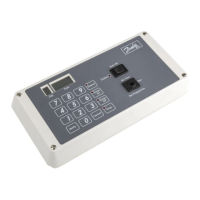
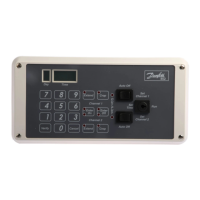
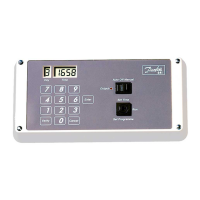
Details Model 841 (single channel) and Model 842 (two channel), common features like LCD display, keypads, and selector switch.
Warning about mains voltage operation and requirement for qualified engineers to open the unit after disconnection.
Instructions on setting the current day and time, including keypad usage and display indicators.
Steps to set a programme event, including day, time entry, and using the Enter key.
How to check the set programme sequence using the Verify key.
Procedure to clear all programmed events by holding the Cancel key.
The Danfoss Seven Day Pulsed Electronic Timeswitch, available in single-channel (Model 841) and two-channel (Model 842) versions, is a versatile device designed for controlling electrical circuits with precision. Both models share a core set of features, while the two-channel Model 842 offers independent programming for each channel, allowing for distinct operational schedules.
At its core, the timeswitch provides programmable control over electrical outputs, enabling users to define specific "on" and "off" events throughout a seven-day cycle. The device operates by receiving user-defined schedules and executing them automatically. The output can be configured to deliver either a pulsed output (from 1 to 15 seconds in half-second increments) or a continuous pulse (from 1 to 15 seconds). This flexibility allows the timeswitch to interface with various systems requiring either momentary or sustained activation.
The display, a liquid crystal display (LCD), shows the current day and time using five digits. The first digit, in a separate window labeled "Day," represents the day of the week, numerically from 1 to 7. Users can assign these numbers to specific days, with the common convention being Monday = 1 through Sunday = 7. The remaining four digits, in the "Time" window, display the time with a resolution of one minute, ranging from 0000 to 2359.
The timeswitch features a 3-position selector switch for each channel (on Model 842). This switch allows users to override the programmed schedule by setting it to "Off," follow the programmed schedule by setting it to "Auto," or manually activate the output continuously by holding the switch in the "Manual" position. An output status indicator light illuminates when the selector switch is in "Auto" and a programmed event occurs, or when the switch is held in the "Manual" position, providing visual feedback on the output status.
Setting up the timeswitch involves a series of intuitive steps, guided by the numeric and function keypads. A short "bleep" sound confirms each keypad press, and when a numeric keypad is pressed, the corresponding digit on the LCD will either blink or change, indicating user interaction.
Setting the Time of Day: To set the time, the mains electricity supply must be ON, the key inserted, and turned to the "Set Time" position. Upon initial connection or after a full battery discharge, the display will show dashes ("-----") in all five digit positions. Users first select the current day by pressing the corresponding number key, then input the time using four numeric keypads (e.g., 0830 for 8:30 a.m.). The unit incorporates error checking, preventing the entry of invalid days (e.g., day 8) or spurious times (e.g., 3600). An out-of-range key press will cause the LCD digit to blink but remain unchanged until a valid number is entered. Once the time is set, returning the key to the "Run" position saves the displayed time.
Setting Switching Times (Programming): Programming the timeswitch requires the mains supply to be ON and the key turned to either "Set Programme" (Model 841) or "Set Channel 1" (Model 842). Initially, the display will show "E EEEE," indicating an empty memory. The timeswitch can store up to 200 switching operations, and it is recommended to tabulate the desired program beforehand. The programming sequence involves pressing the number key for the desired day, then entering the time using four numeric keypads (0000 to 2359), and finally pressing "Enter" to save the event. Similar to time setting, the unit validates entries, preventing spurious day or time inputs. If the memory becomes full, the display will show "F FFFF." An "incorrect" key press can be corrected by pressing "Cancel" and re-commencing the sequence. For events that repeat at the same time on different days, users can simplify the process by entering the first event normally, then simply keying in the new day number and pressing "Enter" for subsequent days.
For the Model 842, after programming Channel 1, the key is turned to "Set Channel 2" to program the second channel independently. It's important to note that the 200 switching operations are shared between both channels, and a common event time for both channels counts as a single switching operation.
Verifying and Clearing Programs: The "Verify" key allows users to review the entire program chronologically. Each press of "Verify" advances the display to the next programmed event. To review a specific day's program, users key in the day number followed by "0000" and then "Verify." Unwanted events can be cleared by navigating to the event using "Verify" and then pressing "Cancel." To clear the entire program on both channels, the "Cancel" key can be pressed and held for approximately 3 seconds until "E EEEE" is displayed. After programming is complete, the key should be returned to the "Run" position, and the selector switch(es) set to "Auto" for automatic operation.
The timeswitch is designed for reliable operation with minimal maintenance. It does not rely on its internal battery for normal functioning when connected to the mains power supply. The battery's primary purpose is to retain the Time of Day and programmed switching times in the event of a power failure or disconnection of the mains supply.
Battery Reserve: Upon initial connection, the unit requires a minimum of 24 hours of mains power supply to fully charge the internal battery. Once charged, the battery automatically recharges as needed. In the event of a mains power loss, the display on the unit will go blank, but the battery will maintain the memory for up to 3 months. When mains power is restored, the unit will automatically switch on and resume its programmed schedule without requiring any resetting.
Security: To prevent unauthorized or accidental changes to the settings, it is recommended to remove the key from the keyswitch once programming is complete. The key can only be removed when the keyswitch is in the "Run" position.
Safety: The unit operates at mains voltage. For safety, it should only be opened by a qualified engineer after disconnection from the mains supply.
 General
| Type | Electronic Timer |
|---|---|
| Switching voltage | 250 V AC |
| Protection class | IP20 |
| Frequency | 50/60 Hz |
| Mounting | DIN Rail |
| Switching current | 16 A |
| Contact | SPDT (Single Pole Double Throw) |

 To Next Page