Multiconn SrlMulticonn Srl
4
99.1.1
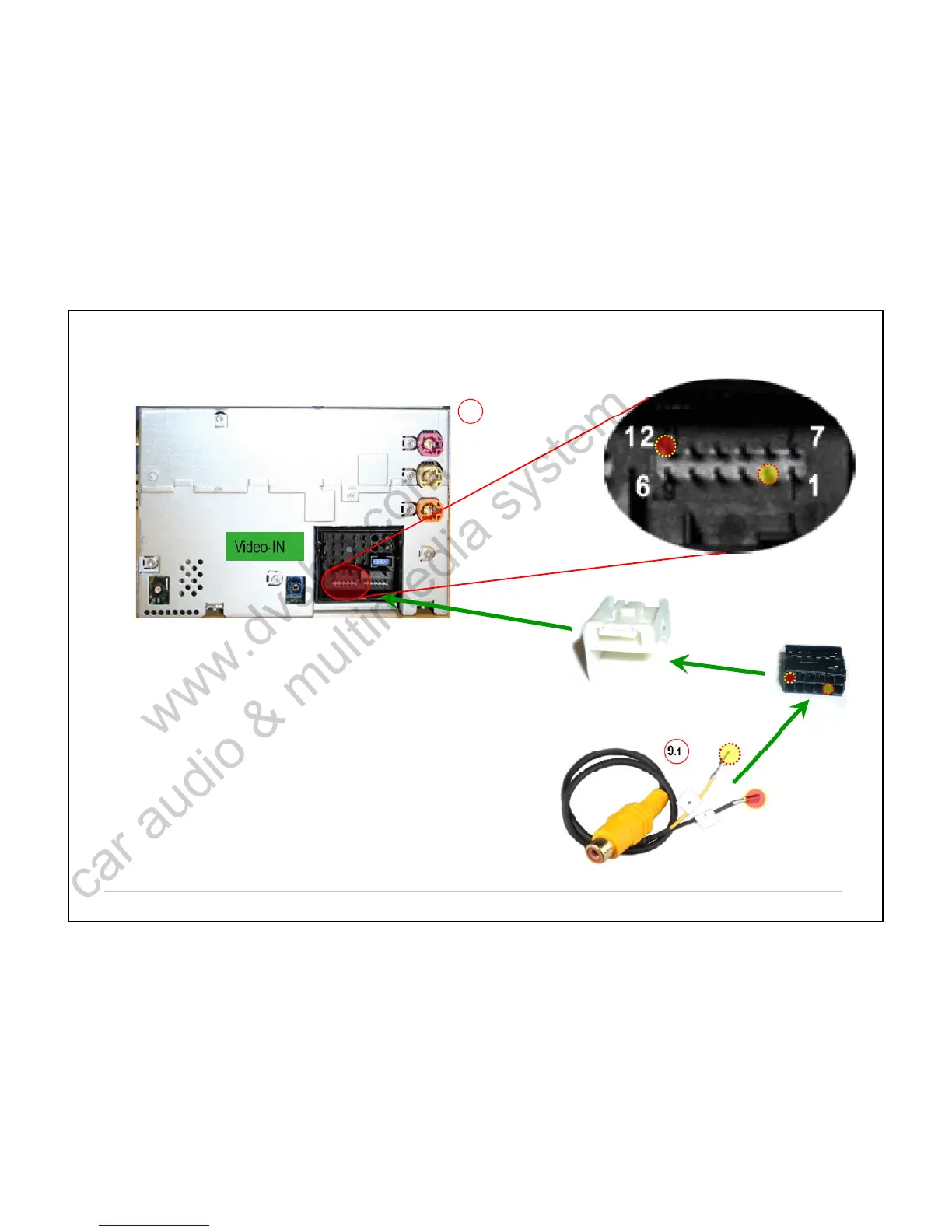
Insert the 2 female crimped pins of DASDAS cable (fig.9.1fig.9.1 DCABMQS-RCA) inside the
black 12P housing and then in white Fakra cover.
If the connectors are already available in the unit, just connect the pins in the pin-
out position recommended below.
Insert the wire with label ++ in pin 2pin 2 (positive signal).
Insert the wire with label -- inside the pin 12pin 12 (negative signal).
If the pin 2 and 12 are already used by the rear camera, disconnect them andand
connect to a yellow RCA to video-IN 1 on DASDAS receiver.
To shift automatically the signal from TV to REAR CAMERA, connect the greenTo shift automatically the signal from TV to REAR CAMERA, connect the green
wire of the power supply cable (refer to thewire of the power supply cable (refer to the DASDAS user manual) directly to the rearuser manual) directly to the rear
camera installed inside the vehicle.camera installed inside the vehicle.
BMWBMW –– CIC systemCIC system



 To Next Page