27
8.- APPENDIX. BRIDGE MODE OPERATION (E-8, E-12 and E-20
only )
Models E-2 and E-4 cannot be used in bridge mode. To operate an
E-8, E-12 or E-20 amplifier in bridge mode, follow these steps:
1. Switch off the amplifier.
2. Turn volume control potentiometers on the front panel to
minimum position (fully anticlockwise).
3. Connect input signal to channel A's XLR or
1
/
4
” phone connector.
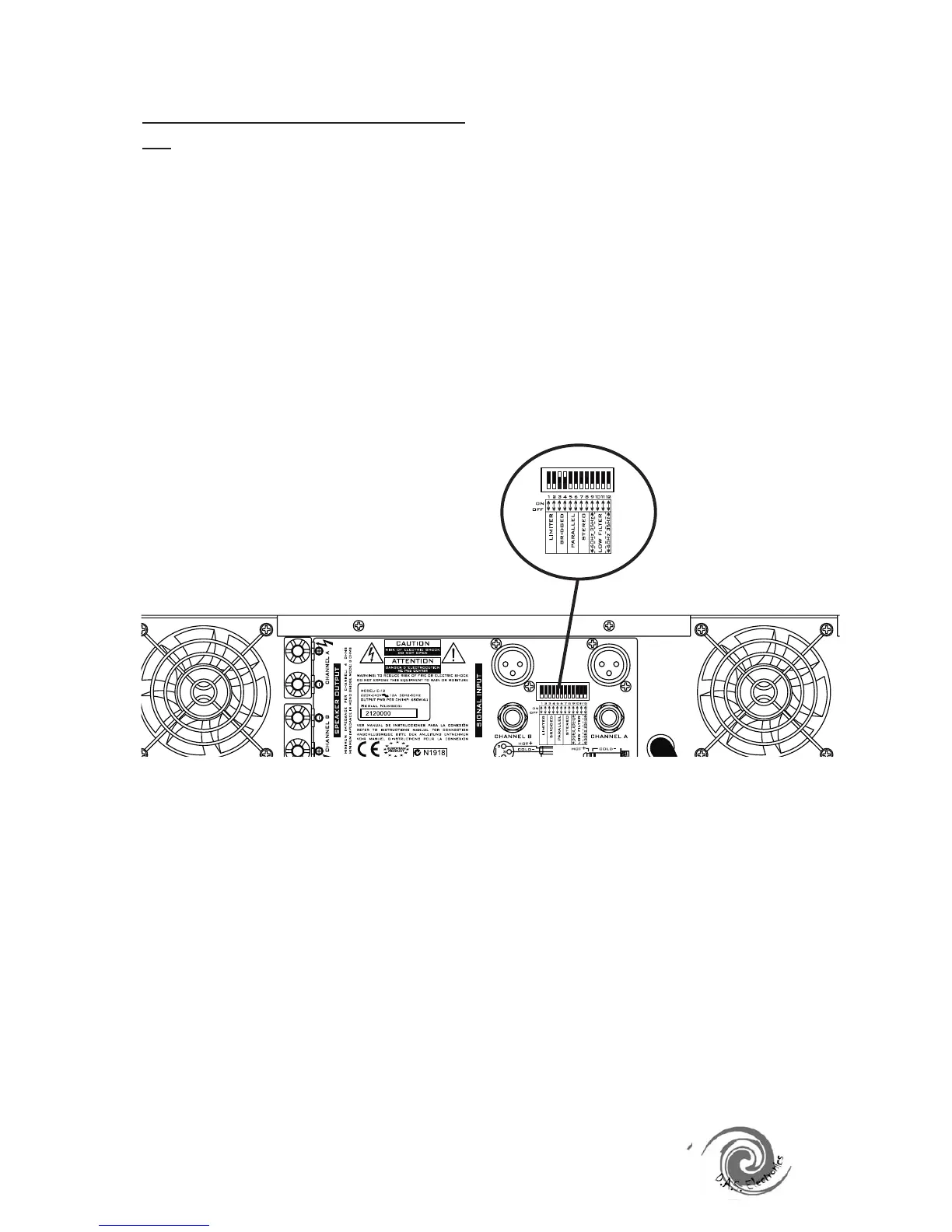
4. Activate (set to ON) DIP-switches 3 and 4, making sure that
switches 5,6,7 and 8 are down (deactivated or OFF).
5. Connect speakers as follows:
Connect (+) to red speaker terminal on channel A's output
terminals
Connect (-) to red speaker terminal on channel B's output terminals
6. Turn volume control potentiometers on the front panel to
maximum position (fully clockwise).
HIGH PERFORMANCE POWER AMPLIFIERS
7. Control volume levels from the mixer or pre-amp only.
Models E-2 and E-4 should not be used in bridge mode.
NOTE 1 : Models E-2 and E-4 should not be used in bridge mode.
NOTE 2 : We do not recommend using bridge mode with loads
lower than 8 ohms
Bridge Mode Connection


 To Next Page