The Dash Clear View Toaster (Model No.: DVTS501) is a modern kitchen appliance designed for toasting bread and other items with enhanced visibility and control. Its primary function is to toast bread, bagels, and waffles, offering specific settings for defrosting and reheating.
Function Description:
The toaster features a unique clear view glass panel that allows users to monitor the toasting process, ensuring desired browning levels and preventing burning. It is equipped with two wide toasting slots, accommodating various bread types and thicknesses. The appliance offers seven browning levels, controlled by a Browning Dial, providing precise control over the toast's crispness. Dedicated buttons for "Defrost," "Reheat," and "Bagel" functions simplify operation. The "Defrost" setting thoroughly toasts frozen bread with an extended cycle, while "Reheat" warms already toasted bread or bread that isn't browned enough. The "Bagel" function toasts bagels using only one side of the heating element, ensuring a perfectly toasted cut side and a gently warmed crust. A "Cancel" button allows users to stop the toasting process at any time. The Carriage Lever initiates the toasting cycle and can be lifted to raise smaller items for easier removal.
Important Technical Specifications:
- Model No.: DVTS501
- Adapter Voltage: 120V~60Hz
- Power Rating: 1100W
- Stock #: DVTS501_20170803_v5
- Toasting Slots: Two wide slots
- Browning Levels: Seven
- Special Functions: Defrost, Reheat, Bagel, Cancel
Usage Features:
- Clear View Glass Panel: The transparent glass panel is a standout feature, enabling users to visually inspect the toast as it browns, eliminating guesswork and ensuring perfect results every time.
- Seven Browning Levels: The Browning Dial offers a range of seven settings, from lightly warmed (level 1) to very dark and crispy (level 7), catering to individual preferences.
- Specialized Functions:
- Defrost Button: Ideal for toasting frozen bread, waffles, or pop tarts, extending the toasting cycle to account for the frozen state.
- Reheat Button: Convenient for warming up toast that has cooled or was not sufficiently browned without further drying it out.
- Bagel Button: Specifically designed to toast the cut side of bagels while gently warming the outer crust, preventing over-toasting.
- Carriage Lever: This lever lowers the bread into the toasting slots and locks into place to begin the cycle. It can also be lifted to raise smaller items, making them easier to retrieve without touching hot surfaces.
- Cancel Button: Provides immediate interruption of the toasting cycle, offering control and preventing over-toasting.
- Cord Storage: The power cord can be wound around hooks located on the bottom of the appliance for neat storage.
- Safety Precautions: The manual emphasizes not touching hot surfaces, using handles or knobs, and unplugging the appliance when not in use or before cleaning. It also warns against inserting oversized foods, utensils, or metal foil packages, or foods covered with butter, jelly, or frosting, to prevent fire or electric shock.
Maintenance Features:
- Slide-Out Crumb Tray: Located at the bottom of the toaster, this tray slides out easily for convenient cleaning of accumulated crumbs. Regular cleaning of the crumb tray is crucial to prevent fire hazards and lingering food odors. It should be washed with warm, soapy water, rinsed, and dried thoroughly.
- Cleaning the Glass Panel: The Glass Panel can be removed for thorough cleaning. To do this, the Slide-Out Crumb Tray must be empty. The toaster should be turned upside down or on its side, the Glass Panel Clamp gently pressed, and the panel slid out. It should be washed with warm, soapy water, rinsed, and dried thoroughly before being slid back into its grooves until the clamp locks into place.
- General Cleaning: The exterior of the toaster should be wiped down with a damp cloth. It is important not to submerge the unit in water. Abrasive scrubbers, sponges, or chemical cleaners should be avoided as they can damage the appliance.
- Storage: When not in use, the toaster should be stored in a clean, dry place, with the power cord neatly wound.
- Troubleshooting: If the Carriage Lever gets stuck or the toaster jams, users are advised to unplug the appliance, allow it to cool, and then clear the obstruction. For more complex issues or repairs, customers are directed to contact StoreBound Customer Service.
The Dash Clear View Toaster is designed for ease of use, safety, and precise toasting, making it a practical addition to any kitchen.

 Need help?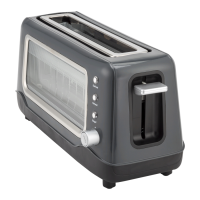

 To Next Page
 General