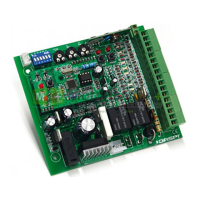
The DS113 RS WiFi is a control board designed for tubular motors, operating with a power supply of 110-240V AC. It integrates OPEN/STOP/CLOSE functions, making it suitable for controlling blinds or similar motorized systems. The device features Wi-Fi connectivity, allowing for remote control and integration with smart home ecosystems like Amazon Alexa and Google Home.
Function Description:
The primary function of the DS113 RS WiFi is to provide intelligent control over tubular motors. It enables users to open, stop, and close blinds or other motorized applications through a dedicated mobile application. The device supports both manual programming via physical buttons and remote control via Wi-Fi.
Programming a Route (Manual Operation):
To program the travel limits of the blind, the user needs to press the S2 button for 2 seconds. This initiates the blind's movement upwards, and the LED will blink red.
- To set the rising limit, press the limit switch. Once the limit is reached, the rising maneuver is finished.
- To set the lowering limit, press S2 again to start the lowering maneuver (the LED will blink red).
- Once the limit switch is reached, the lowering maneuver is finished.
Programming a Device (Smart Home Integration):
The DS113 RS WiFi can be integrated into smart home systems for enhanced control.
- Download the "DASPI" App: The first step is to download the "DASPI" application from either the Apple App Store or Google Play Store.
- Create a New Account: Users need to register for a new account within the DASPI app.
- Add a Device: Once logged in, click on the "Add Device" button.
- Select Device Type: Choose "RS DASPI" from the list of available devices to add. The list includes various DASPI devices such as RS BLIND, RS WIFI DASPI, INDUSTRIAL DASPI, SHUTTER DASPI, PASSAGE DASPI, ATICA DASPI, RX MULTI DASPI, PUERTA DASPI, and PUERTA DASPIX.
- Connect to Wi-Fi Network: The user's phone must be connected to the same Wi-Fi network that the receiver will use.
- Enter Wi-Fi Password: Within the app, select the Wi-Fi network and enter its password to connect the device. Press "Confirm" to proceed.
- Confirm Flash Light: The app will prompt the user to confirm that the device's light is flashing. This indicates that the device is ready for pairing. Press "Confirm flash light" in the app.
- Press S1 Button: Press and hold the "S1" button on the receiver for a few seconds until the red LED starts flashing. This puts the device into pairing mode.
- Device Added: Once successfully paired, the app will display a "Finished" message, indicating that the device has been added.
- Control from Smartphone: After adding the device, users can control the blind from their smartphone using the DASPI app. The app provides controls for "Open," "Close," and "Stop." It also displays "Lamp Time," "Working Status," and "Working Cycles."
Adding Another User (Device Sharing):
The DS113 RS WiFi allows for device sharing, enabling multiple users to control the same device.
- Select "Edit": From the main control screen, select the "Edit" option (represented by a pencil icon).
- Choose "Share Device": Scroll down and select "Share Device" from the options.
- Add Sharing: Click on "Add Sharing."
- Enter Phone Number: Enter the country/region and the phone number of the new user.
- Finalize: Select "Finalized" to complete the sharing process.
Important Technical Specifications:
- Power Supply: AC 110V-240V
- Frequency: AM433.92MHz (for RS-MULTI model, though the primary device is Wi-Fi enabled)
- Connectivity: Wi-Fi (2.4 GHz Wi-Fi networks are supported)
- Control Functions: Open, Stop, Close
- Indicators: LED for status and programming feedback.
- Buttons: S1 (for pairing/reset), S2 (for programming limits).
- Inputs/Outputs:
- L1, L2 (for power supply)
- S1, S2 (for limit switches)
- Power (input)
- U, V, W (motor connections: Common, Open, Close)
- OP, CL (Open/Close limit switch inputs)
- Antenna (for RF communication, if applicable to specific models)
- 220V Phase, 220V Neutral (power connections)
- Earth (ground connection)
- Tubular motor (output)
- Open switch, Closure switch (limit switch connections)
Usage Features:
- Remote Control: Control blinds from anywhere using the DASPI mobile app.
- Smart Home Integration: Compatible with Amazon Alexa and Google Home for voice control.
- Easy Programming: Simple two-button programming for setting travel limits.
- Device Sharing: Allows multiple users to control the same device.
- Status Feedback: The app provides real-time status of the blind (open, closed, stopped) and operational data like lamp time and working cycles.
- Offline Notification: The app includes an option for "Offline Notification," which can alert users if the device goes offline.
Maintenance Features:
- Firmware Updates: While not explicitly detailed, smart devices typically receive firmware updates through the app to improve functionality and security.
- Troubleshooting: The manual implies basic troubleshooting steps through LED indicators (e.g., flashing red for programming mode).
- Check Device Network: The app includes a "Check Device Network" option to help diagnose connectivity issues.
- FAQ & Feedback: The app provides sections for FAQ and feedback, which can be helpful for resolving common issues or reporting problems.
The DS113 RS WiFi is designed for ease of use and integration into modern smart homes, offering a convenient way to automate and control tubular motor-driven applications.

 Need help?
 General

 To Next Page