The DIB-C, or Digital Inserter Base - C, is a mailing system designed for processing and printing postage on mail pieces. It integrates with a PC and various peripherals to provide a comprehensive solution for mail handling, from setup and basic operation to postage printing and system maintenance.
Function Description:
The DIB-C system's primary function is to automate the process of applying postage to mail. It acts as a digital inserter base, working in conjunction with a personal computer (DIB-PC) and specialized software (eSmart-Mail) to manage mailing operations. The system allows users to select different mail classes, input mail piece details, and print postage directly onto envelopes or other mail items. It supports various print modes, including options for different mail classes like First Class and Priority Mail, and can handle both single pieces and batches of mail. The DIB-C is designed to be user-friendly, with a touchscreen interface for easy navigation and control.
Important Technical Specifications:
While specific technical specifications like dimensions, weight, and power consumption are not explicitly detailed in the provided manual, the system's components give an indication of its technical setup.
- Connectivity: The DIB-C connects to the DIB-PC via a serial cable (Com1), a USB print cable, and a USB cable for the PSD (Postage Data System). The DIB-PC, in turn, connects to a monitor/touchscreen via VGA and USB touchscreen cables. A wireless keyboard dongle is also used for input.
- Power: The system requires multiple power connections. The DIB-PC, PSD, and ELO Monitor/Touchscreen each have their own power cables, which are typically connected to an AC Power Strip.
- Components: The core components include the DIB-C unit itself, the DIB-PC, an ELO Monitor/Touchscreen, and an AMERICA2 PSD unit. The DIB-C houses the print cartridge and the mechanism for feeding mail.
- Software Integration: The system relies heavily on the eSmart-Mail application, which runs on the DIB-PC. This software provides the interface for all operational and maintenance tasks.
Usage Features:
The DIB-C system offers several features to streamline mail processing:
- Intuitive Interface: The eSmart-Mail software, accessed via the ELO Monitor/Touchscreen, provides a graphical user interface for easy navigation. Key functions like "Meter," "Transactions," "Reports," "Options," and "Help" are clearly labeled buttons.
- Mail Class Selection: Users can select various mail classes, such as First Class, Priority Mail, and others, directly from the "Meter" screen. This allows for accurate postage calculation based on the selected service.
- Weight and Quantity Input: The system allows for input of mail piece weight and quantity, which are crucial for calculating the correct postage.
- Postage Rate Display: The current postage rate is displayed on the screen, updating based on the selected mail class and weight.
- Record Keeping: The "Record" button on the "Meter" screen suggests a feature for logging or saving mail processing data.
- Batch Processing: The ability to input "Qty" (quantity) implies that the system can handle multiple mail pieces in a batch, although the manual primarily focuses on single-piece processing in the "Static" mode.
- Manual Feed: For printing postage, mail pieces are manually fed into the DIB-C from left to right.
- Print Mode Configuration: Users can configure the print mode (e.g., DMS Print Mode) through the "Options" and "General" settings in the eSmart-Mail software, allowing customization of how postage is applied.
- PSD Parameter Configuration: The system allows for setting PSD parameters, including the Base Serial Number, DMS Account Number, DMS Serial Number, and Origin Zip, which are essential for proper postage data management.
Maintenance Features:
The DIB-C system incorporates several features for maintenance and upkeep:
- Print Cartridge Management:
- New Ink Installation: The system guides users through the process of installing a new print cartridge. This involves lifting the front cover of the DIB-C, locating the Print Cartridge Pen Stall, lifting a lever, placing the cartridge, and pushing the lever to lock it.
- Cartridge Detection: After closing the cover, the system prompts the user to confirm if a new cartridge was installed, distinguishing between a new installation and re-inserting an existing one. This ensures proper tracking of ink levels and cartridge life.
- Ink Level Monitoring: The "Ink Level" indicator on the "Meter" screen provides a visual representation of the remaining ink, allowing users to anticipate when a cartridge replacement will be needed.
- System Updates: The "Updates" button in the eSmart-Mail software suggests a feature for applying software updates, which can include bug fixes, new features, or postage rate changes.
- Data Maintenance: A "Maintenance" option is available in the eSmart-Mail main screen, indicating features for managing system data and ensuring its integrity.
- Error Logging: The "Send Logs" button implies a capability to generate and send system logs, which can be useful for troubleshooting and support.
- Troubleshooting: The manual provides clear, step-by-step instructions for connecting cables and powering on the system, which are crucial for initial setup and basic troubleshooting. The cabling diagram is a key maintenance aid.
In summary, the DIB-C is a robust mailing system designed for efficiency and ease of use in applying postage. Its integration with a PC and touchscreen interface, combined with features for mail class selection, weight input, and detailed maintenance procedures, makes it a comprehensive tool for various mail processing needs.

 Need help?
 General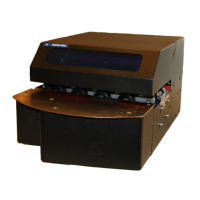

 To Next Page