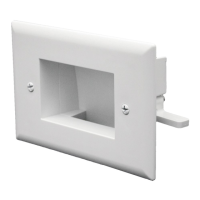
Installation Diagram – Front View
Installation Diagram – Back View
WARNING
DataComm Electronics’ products shall be installed and used only as indicated in DataComm Electronics’ product instruction sheets.
Instruction sheets are available online at www.datacommelectronics.com.
CAUTION
For shock protection, this device must be properly grounded.
Use copper wire only with this device.
IMPORTANT INSTRUCTIONS
Read and understand all instructions.
Follow all warnings and instructions marked on the product.
Do not use this product near water, for example near a bath tub, wash bowl, kitchen sink, laundry tub, in a wet basement, or near a
swimming pool.
SAVE THESE INSTRUCTIONS.
Instruction / Installation Sheet
Expandable Media Box
with Duplex Receptacle
Part # 45-0051-WH
DataComm Electronics, Inc.
6349 Peachtree Street
Norcross, GA 30071-1725
888.223.7977
770.662.8205
www.DataCommElectronics.com
Parts Included:
• Expandable Media Box with Expandable Cavity
• Old Work Electrical Box with four (4) Mounting Screws
• 15 Amp/125 Volt Tamper Resistant Duplex Receptacle
• Flexible Pass-Through Accessory Plate
•
Six (6) Port Keystone Accessory Plate
• Blank Accessory Plate
Tools Required:
• Drill with Phillips Bit or Phillips Head Screw Driver
• Pen or Pencil
• Sheetrock Saw or Utility Knife
•
6
ft. Tape Measure
Use the Expandable Media Box with Duplex Receptacle to install low voltage cables behind your HDTV or
other display device. The Media Box can be installed with the receptacle on the left or right side (see
Installation Diagram below).
Features of the Expandable Media Box with Duplex Receptacle include:
•
Compact size fits behind small and large TVs
• Expandable Cavity adds accessible storage space inside of the wall
• HDTV/display device plug recesses completely into the wall when plugged into the Media Box
• Flexible Pass-Through Accessory Plate conceals low voltage pass-through opening
Page 1 of 2
05/01/2014
Concealed Wiring
Hidden
Storage
Cavity
(hidden in wall)
Flat Screen TV
Flat Screen TV
Concealed Wiring
(hidden in wall)
Hidden
Storage
Cavity

 Need help?

 To Next Page
 General