Need help?
Do you have a question about the Datalogic Connection Box C-BOX 100 and is the answer not in the manual?
Details typical system layout, PC connection via 9-pin connector, and scanner connection to C-BOX 100.
Operation of the C-BOX 100 power switch and indication of correct/incorrect power polarity via LEDs.
Step-by-step guide for opening the device, preparing wires, and connecting system cables using spring clamps.
Specifies supply voltage range (10-30 Vdc), power consumption, and maximum current consumption.
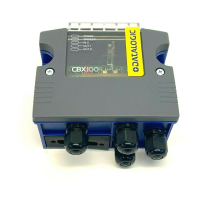
The Datalogic C-BOX 100 is a connection box designed as an accessory for various Datalogic family scanners, facilitating system connections.
The C-BOX 100 primarily serves as an interface for Datalogic scanners. It handles system cabling through internal spring clamp terminal blocks. The scanner itself connects to the C-BOX 100 via a 25-pin connector located on the left side of the housing. Additionally, a 9-pin connector inside the C-BOX 100 allows for connection to an external PC, enabling access to the scanner's auxiliary serial interface for configuration or data monitoring.
The device supports a range of Datalogic linear scanners (DS2100A, DS1100, DS2400A, DS2200) and 2D readers/cameras (DS4600A, DS6XXX, MATRIX-1XXX, DV9500, DX6XXX, MATRIX-2XXX, DS8100A). For DS1100 and DS2200 scanners, it is necessary to use 10-30 V versions.
Power is supplied to the C-BOX 100 through the pins on the spring clamp connector. An internal electronic circuit limits inrush current, provides short-circuit protection, and offers overcurrent protection with automatic retry. The power switch controls power for both the C-BOX 100 and the connected scanner.
The C-BOX 100 also features a chassis grounding selector, allowing the scanner chassis to be connected to earth ground, power supply ground (GND), or left floating, depending on the scanner family (1, 2, 4K, 6, 8K).
Physical Features:
Environmental Features:
Electrical Features:
Connections:
Supported Interfaces:
System Cabling and Wiring:
Powering from Scanner: To enable the C-BOX 100 to accept power from the scanner via the 25-pin connector, a solder bridge must be made at specific pads inside the device. This feature is useful for passing power to connected accessories like encoders or presence sensors from certain scanner models (e.g., DX8200A VAC).
Chassis Grounding: The chassis grounding method is selected by positioning a jumper. For 1, 2, or 4K scanners, the chassis can be connected to earth ground, power supply ground (GND), or left floating. For 6, 8K scanners, the chassis is internally connected to GND.
RS485 Bus Termination: A switch allows enabling or disabling the termination of the RS485 bus. In multi-drop configurations, only the first and last devices on the bus should have the termination enabled.
Auxiliary Serial Interface: The internal 9-pin connector provides access to the scanner's auxiliary serial interface, allowing for data monitoring or configuration via a PC. The signals are also available on the internal spring clamp connectors.
Opening the Device: To install or perform maintenance, the C-BOX 100 must be opened by unscrewing the four cover screws. It is crucial to disconnect the C-BOX 100 from the power supply before opening it.
Closing the Device: After verifying system functionality, close the C-BOX 100 by tightening the four cover screws, ensuring the rubber seal is correctly fitted between the housing parts.
Scanner Selection: A switch (S3) is used to select the scanner type (DS1100, DS2100, DS2200, DS2400) connected to the C-BOX 100. For other devices, S3 must be set to B.
 General
| Brand | Datalogic |
|---|---|
| Model | Connection Box C-BOX 100 |
| Category | Network Hardware |
| Language | English |

 To Next Page