21
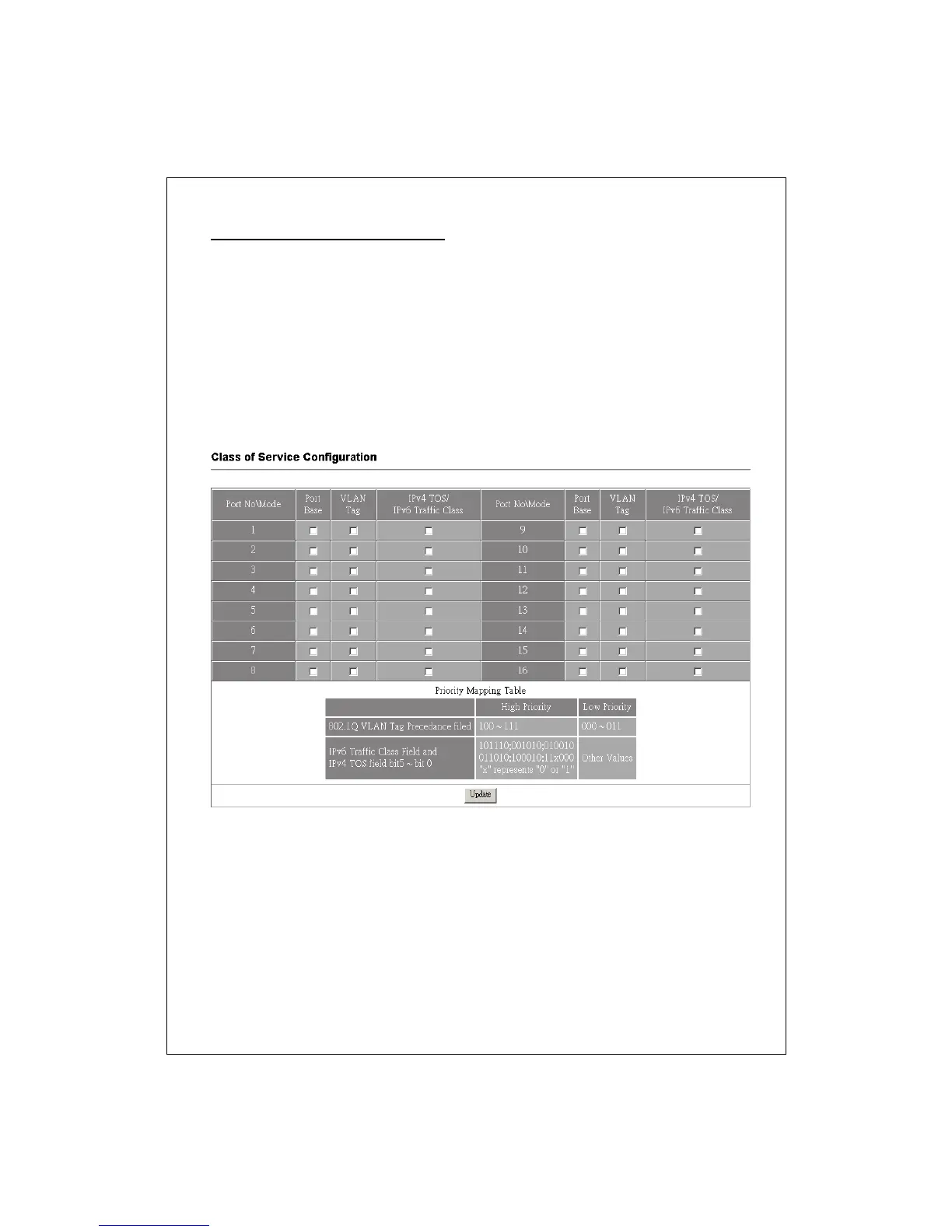
Class of Service Configuration
Use this page to configure the priority level for each port. To set the priority,
please mark the ports that you would like to set as high priority on the “Port
Base”, “VLAN Tag” or Ipv4 TOS/Ipv6 Traffic Class” checkbox.
Note:
1. “Port Base”, “VLAN Tag” and “Ipv4 TOS/Ipv6 Traffic Class” are
mechanisms to identify priorities.
2. While there are conflictions on the three modes, the system adapts the Port
Base mode first, then the VLAN tag mode and last with Ipv4 TOS/Ipv6 Traffic
Class mode.
MAC Address Configuration
This page allows users to configure access authority by MAC address. Only the
designated MAC addresses are allowed to access those configured ports.
To perform this function:
1. Select Enable in the Port Binding drop list
2. Select a port that you want to configure.
3. Fill in the MAC addresses that are allowed to access this port.
4. Click the Update button to activate.



 To Next Page