12
Operation Procedures
Providing Power
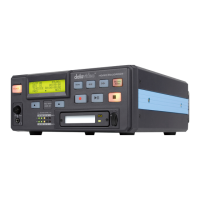
The DN-60 can be powered on by internal battery or external DC power
connected through the DC power connector at right side of the device. It
is recommended that you have a CF card inserted in the Bay before
power up. Not having one at this time, does not influence normal device
operation. Move the power switch to the ON position. The DN-60 will turn
on immediately into Home mode.
VTR MODE (Capturing or Play Back)
Formatting the CF card
The DN-60 will format a CF card to handle one of three signal types; HDV
(all frame rates), or NTSC DV, DVCPro or PAL DV, DVCPro. If an
unformatted CF card is inserted, the DN-60 will recognize it and suggest
it be formatted to its signal type. If an CF card is inserted and is formated
for a signal type different than that of the DN-60, the choice will be given
to either re-format the CF card or eject the CF card.
Organize your shoot
A recorded length of video between its start point and following pause or
stop point is called a clip. A clip can be as short as one frame or as long
as the whole storage capacity. Clips are stored in bins; a bin is analogous
to a tape. 99 bins are made available; Clips can be added to any bin at
any time as long as there is room available. The DN-60 always displays
the clip number as well as the bin number.


 To Next Page