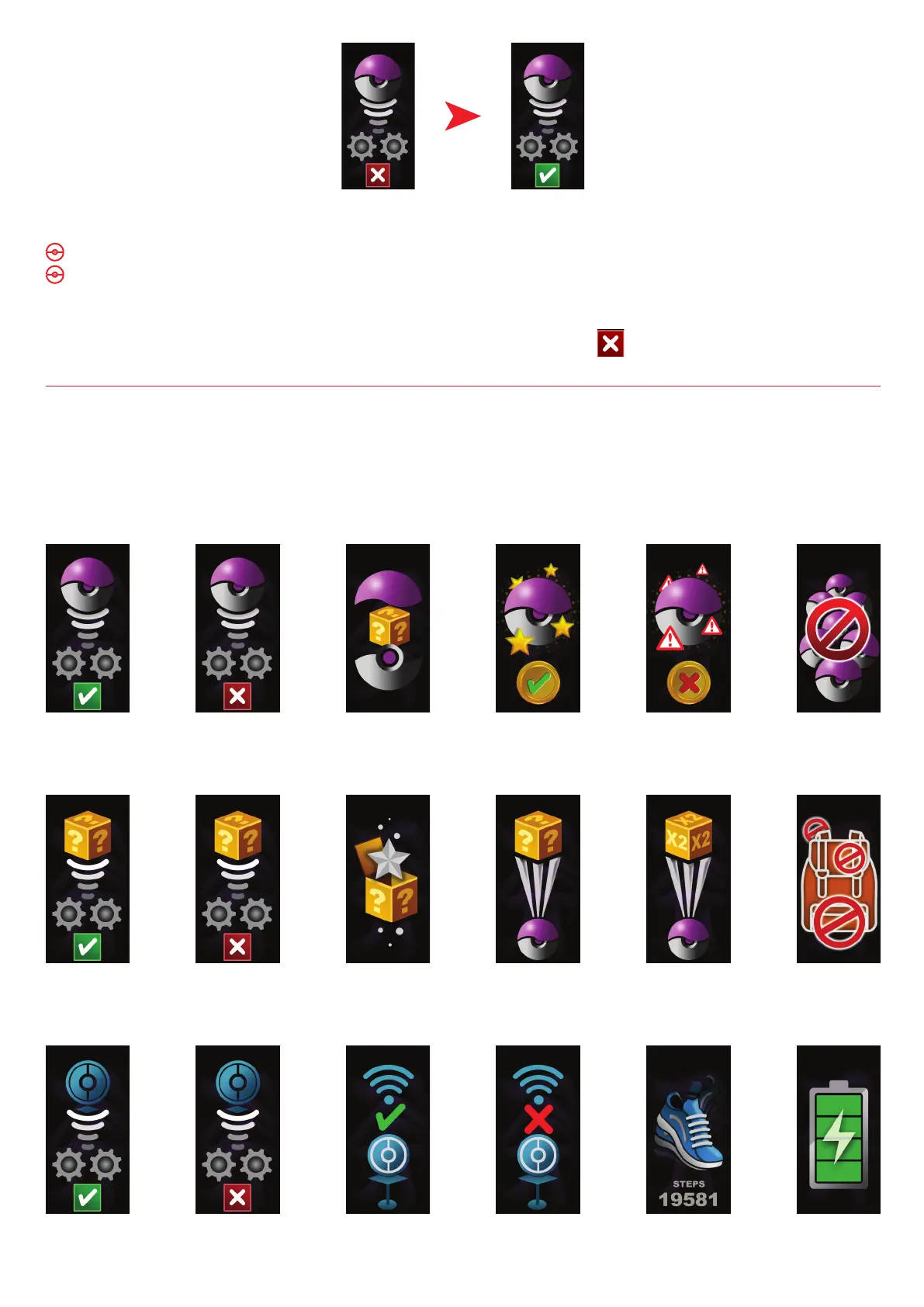
If you have Auto Catch on:
Go-tcha Evolve will vibrate and animate the screen to show a successful/unsuccessful catch.
Go-tcha Evolve will vibrate and animate the screen to show it has successfully/unsuccessfully
collected the items and how many items it has collected at a Pokéstop.
To turn ‘Auto-catch’ off, press and hold the Go-tcha button until the appears in the box.
Auto-catch
off
Auto-catch
on
Auto-catch
On
Auto-catch
Off
Unknown
Pokémon
Pokémon
Caught
Pokémon
Ran Away
Out of
Pokéballs
Auto-catch
Unknown
On
Bag
Full
Catch
Pokémon
Duplicate
Catch
Pokémon
Unknown
Mystery
Item
Auto-catch
Unknown
Off
Auto-Pokéstop
On
ChargingPedometerPokéstop
Out Of
Range
Pokéstop
In Range
Auto-Pokéstop
Off
Go-tcha Evolve Animation Screens
The Go-tcha Evolve has many colour animations to alert you. On the next page of the manual you
will find a full list of animation screens and their functions.


 To Next Page