12
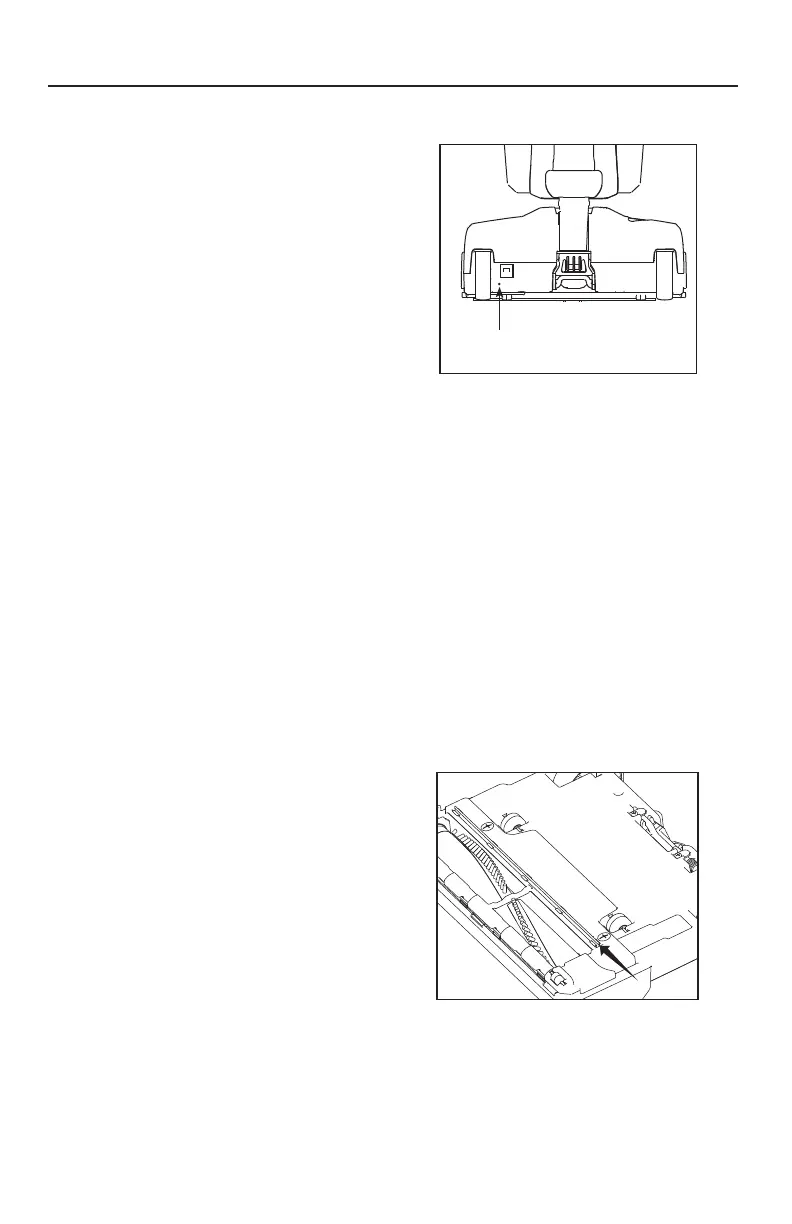
Resetting the Circuit Breaker
(Models S10S.DV and S10P.DV only)
WARNING! To Reduce the Risk
of Electrical Shock or Injury From
Moving Parts, Unplug Before Servicing
orCleaning.
Your vacuum features a circuit breaker
to protect the machine against damage
due to a surge in the electrical current.
Electrical surging can be a result
of, though not limited to, a jammed
motorfan.
Should your vacuum cleaner experience
a jammed brushroll with the circuit
breaker tripping, first turn the vacuum
off and unplug the unit. Inspect the
brushroll by removing the bottom plate
(see page 9) and remove any debris
that may be causing the jam. Reinstall
the bottom plate (see page 9) and
reset the circuit breaker by pressing the
Circuit Breaker Reset Button. Plug in the
power cord and turn on the vacuum.
If the vacuum fails to turn on, visit an
Authorized DAVID Vacuum Retailer for
assistance.
Replacing the Squeegee
If your squeegee splits or begins to look
worn, simply slide the worn squeegee
from its track and slide a new one into
the track. If you have trouble installing
the new squeegee, please visit an
Authorized DAVID Vacuum Retailer
forhelp.
Annual Checkup
To keep your vacuum in peak operating
condition, it is recommended you bring
it to an Authorized DAVID Vacuum
Retailer for an annual checkup. The
retailer will conduct a comprehensive
examination to ensure your vacuum is in
top operatingcondition.
MAINTENANCE AND CARE
Circuit Breaker
Reset Button



 To Next Page