6. When the time is set, it will begin to count down immediately. The display will
show the remaining time.
NOTE: There will be a red dot in the right bottom corner of power level indication
which indicating that zone is selected.
7. When cooking timer expires, the corresponding cooking zone will be switch
off automatically.
Note: Other cooking zones will keep operating if they are turned on previously.
If the timer is set on more than one zone:
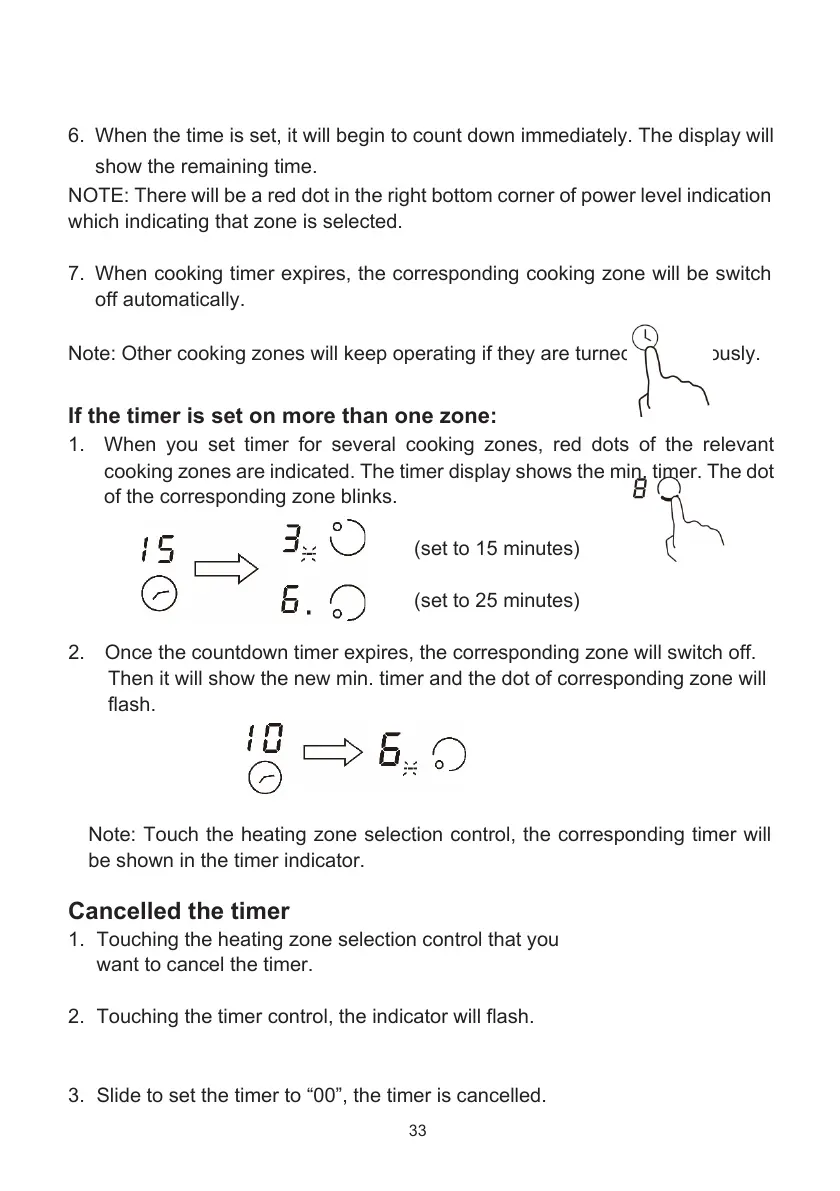
1. When you set timer for several cooking zones, red dots of the relevant
cooking zones are indicated. The timer display shows the min. timer. The dot
of the corresponding zone blinks.
(set to 15 minutes)
(set to 25 minutes)
2. Once the countdown timer expires, the corresponding zone will switch off.
Then it will show the new min. timer and the dot of corresponding zone will
flash.
Note: Touch the heating zone selection control, the corresponding timer will
be shown in the timer indicator.
Cancelled the timer
1. Touching the heating zone selection control that you
want to cancel the timer.
2. Touching the timer control, the indicator will flash.
3. Slide to set the timer to “00”, the timer is cancelled.
33
www.elektromarkabolt.hu


 To Next Page