EasyManua.ls Logo

Dawicontrol DC-154 RAID - User Manual

Dawicontrol DC-154 RAID
56 pages
Go to English
Print Icon
To Next Page IconTo Next Page
Loading...
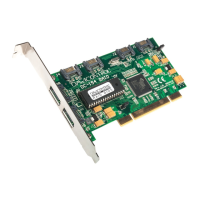
DC-154 RAID
4-Channel Serial ATA RAID Controller
DEUTSCH
WW
WW
W
indows 98indows 98
indows 98indows 98
indows 98
TMTM
TMTM
TM
/W/W
/W/W
/W
indows 2000indows 2000
indows 2000
TMTM
TMTM
TM
WW
WW
W
indows NTindows NT
indows NTindows NT
indows NT
TMTM
TMTM
TM
/W/W
/W/W
/W
indows MEindows ME
indows MEindows ME
indows ME
TMTM
TMTM
TM
/W/W
/W/W
/W
indows XPindows XP
indows XPindows XP
indows XP
TMTM
TMTM
TM
Wichtige Information zur Datensicherheit
Vor der Installation und bei Änderungen der Konfiguration des DC-154 RAID sollte unbedingt eine Daten-
sicherung durchgeführt werden. Dawicontrol übernimmt keinerlei Haftung für Datenverluste, die in Folge der Ver-
wendung, unterlassenen Verwendung oder Falschverwendung des DC-154 RAID zustande kommen.
Hinweis
Trotz sorgfältiger Prüfung durch Dawicontrol kann für die technische, typographische und generelle Rich-
tigkeit keine Haftung übernommen werden. Im Weiteren wird für Fehler bzw. direkte, indirekte, mittelbare Folge-
oder sonstige Schäden, einschließlich Datenverlusten und entgangenen Gewinn keinerlei Haftung seitens
Dawicontrol übernommen.
Important Information Concerning Data Security
Before installing or changing the configuration of the DC-154 RAID, it is imperative to make a backup copy of your
data. Dawicontrol is not legally liable for any loss of data due to DC-154 RAID use, misuse or failure to use.
Notice
Despite careful examination on the part of Dawicontrol, no legal liability can be accepted for technical, typographical or
general correctness. Furthermore, no legal liability is accepted by Dawicontrol for mistakes as well as direct, indirect or
resultant damage of any kind, including loss of data or loss of income.
Information Importante Concernant la Sécurité des Données
Avant l’installation et lors de changements de configuration du DC-154 RAID il faut absolument effectuer une
sauvegarde de vos fichiers. Dawicontrol n’assume aucune responsabilité pour des pertes de données qui
surviennent comme conséquences de l’utilisation, de l’inutilisation ou d’une utilisation fausse du DC-154 RAID.
Avertissement
Malgré un contrôle minutieux par Dawicontrol, aucune responsabilité ne peut être assumée pour la justesse
technique, typographique et générale. En outre, aucune responsabilité n’est assumée pour des erreurs et des
dommages ultérieurs directs et indirects ; y compris les pertes de données et les profits manqués.
DEUTSCH
ENGLISH
FRANÇAIS
Question and Answer IconNeed help?

Do you have a question about the Dawicontrol DC-154 RAID and is the answer not in the manual?

Dawicontrol DC-154 RAID Specifications

General IconGeneral
RAID Levels0, 1, 5, 10
Max Drives Supported4
Form FactorLow Profile
Number of Devices Supported4
Operating System SupportWindows, Linux
Data Transfer Rate6 Gbps

Summary

Important Information Concerning Data Security

Notice

Legal disclaimer regarding technical correctness and potential damages.

1. Introduction

1.1. Preface

Congratulates the user and introduces the manual's purpose.

1.2. The Serial ATA Standard

Explains the Serial ATA standard's development and benefits.

1.3. Description of the DC-154 RAID

Details the DC-154 RAID controller's functionality and use cases.

1.4. Features of the Controller

Lists the technical specifications and capabilities of the RAID controller.

1.5. Connecting Serial ATA Drives

Guides on connecting serial ATA drives to the controller ports.

1.6. RAID Levels

Explains fundamental RAID concepts and array configurations.

2. Installation

2.1. Reviewing Defaults

Advises verifying factory jumper settings before installation.

2.2. Installation

Provides instructions for physically installing the RAID controller into a PC.

2.3. BIOS Update

Explains how to download and perform a BIOS update for the controller.

2.4. RAID Level Configuration

Introduces the process of configuring RAID levels via the BIOS setup.

2.4.1. BIOS Setup Utility

Describes accessing and using the BIOS setup utility for configuration.

2.4.2. RAID BIOS Configuration

Details the RAID BIOS interface for managing RAID sets and drives.

2.4.2.1. F1 - Create RAID

Explains how to initiate new RAID set creation using the F1 key.

2. Creating a Stripe Set

Guides on creating a RAID 0 stripe set, including drive and block size selection.

3. Creating a Mirror-Stripe Set

Describes creating a RAID 10 mirror-stripe set using four drives.

4. Creating a Spare Drive

Details how to configure a drive as a spare for automatic RAID rebuilding.

2.4.2.2. F2 - delete RAID

Explains the process of dissolving existing RAID arrays and data loss implications.

2.4.2.3. F3 - repair RAID

Covers error handling functions like rebuilding, completing, and splitting RAID sets.

3. Installation of Drivers

3.1. Creating a Driver Disc

Instructions for creating a driver diskette for OS installations.

3.2. Installation under DOS

Notes that DOS driver installation is not necessary due to BIOS.

3.3. Installation under Windows 98;ME

Step-by-step guide for installing drivers in Windows 98/ME.

3.4. Installation under Windows NT

Instructions for installing drivers in Windows NT 4.0.

3.5. Installation under Windows 2000

Guide for installing drivers in Windows 2000.

3.6. Installation under Windows XP

Instructions for installing drivers in Windows XP.

4. The Graphical Silicon Image User Interface

5. Appendix

5.1. RAID Troubleshooting

Provides common troubleshooting steps and solutions for RAID issues.

RAID1 Rebuilding a Defective Mirrored Array

Details the procedure for rebuilding a failed mirrored RAID set.

5.2. Frequently Asked Questions

Answers common questions regarding controller usage and compatibility.