5
Important Noce
Seng username and password for camera to keep secure, if you forget
the password, please reset camera, Then the username and password will
set back to factory default.
Aer restoring to the factory default sengs, you need to delete the cam-
era from Yoosee APP, and then add it again.
If you can not connect to WI-FI, please opmize wireless router as below:
y
Keep the camera near with wireless router, it is beer in the same room.
y
The camera only supports 2.4G network, do not support 5G.
y
Turn o the AP isolaon of router and close the QOS of Advanced Sengs.
y
Turn o vising limit on wireless router. Turn on ARP bounding.
y
Do not use special accord, Chinese, spaces, a combinaon of numbers
and leers is recommended.
y
Turn o MAC address ltering on wireless.
y
Turn o WMM of Advanced Sengs .
y
The WIFI name needs to be in English and has a password.
y
Before re-install camera, please reset the camera.
COMPUTER CLIENT OPERATING GUIDE
CMS Client Downloads
Directly input http://www.yoosee.co in computer browser, click
download on computer and install it. The CMS support XP/Win7/Win8/
Win10, do not support Macbook.
CMS Client Account and Login
Use the Yoosee App account number and password you have registered
in the mobilephone to login.
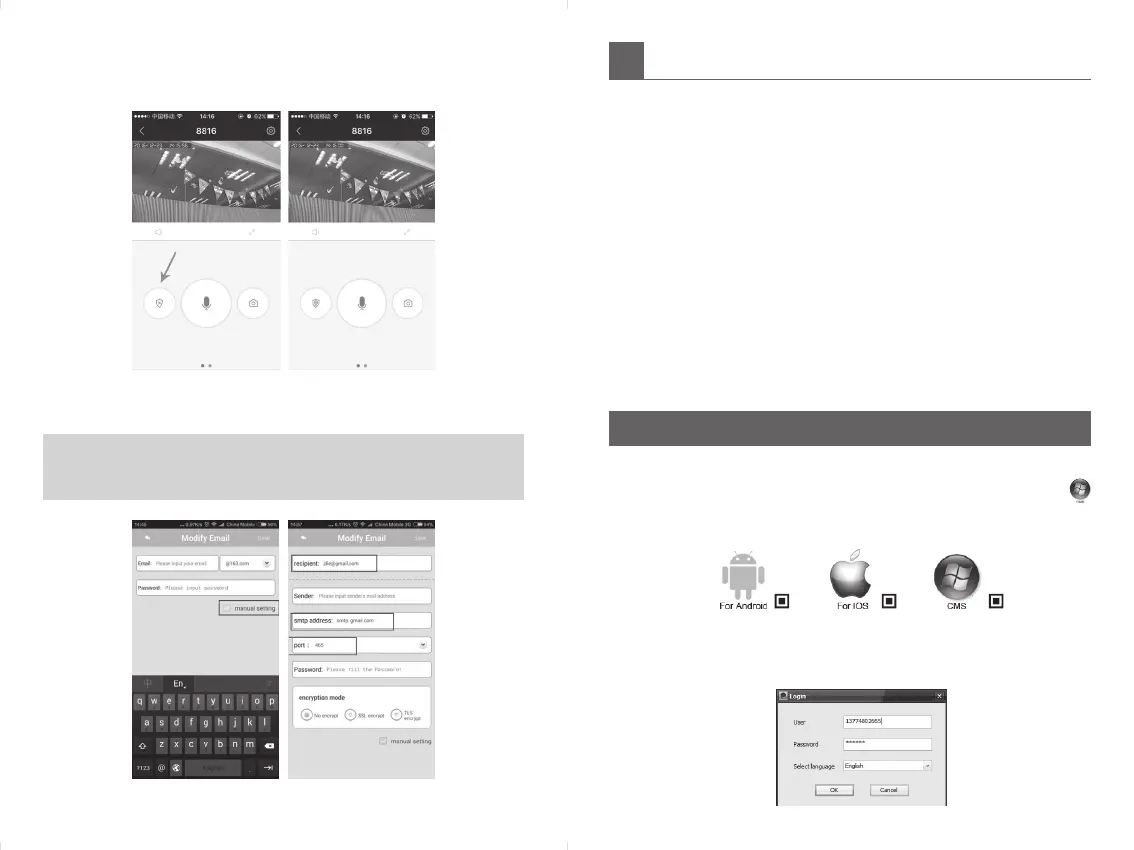
Moon Detecon Alarm: Click seng → Alarm Seng → turn on “Receive
alarm message” → “Moon Detecon” → “Buzzer”.
At the same me, click to arm the icon as the photos below.
Alarm push Email bound: click “manual setting” → input email ID and
Password → input recipient/smtp address/port/No encrypt.
NOTE:
y
Please remember to Login into your mailbox to turn the SMTP on, or
you may get invalid password error in the app.


 To Next Page
 Loading...