Connecting to a USB Hub
NOTE: When using a Microdrive concurrent with another media, the reader becomes a
high power device requiring direct connection to the host computer or self-powered hub.
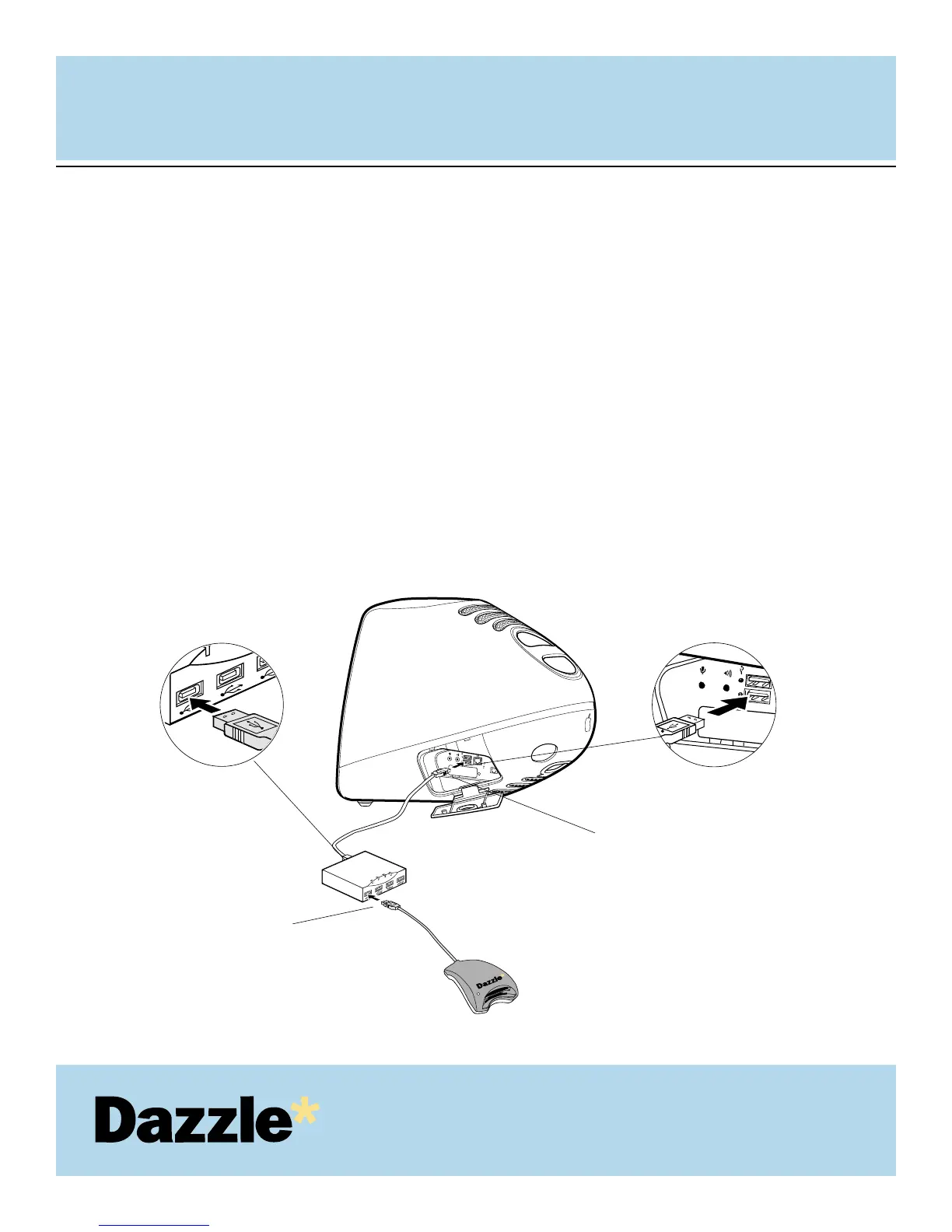
Connect the USB hub (purchased separately) to the USB port on your Macintosh.
Then connect the USB connector of the Dazzle card reader to a port on the USB
hub.
NOTE: The USB cable may be connected to the computer or USB hub while the
computer is running.
IMPORTANT: Make sure the cable ends are firmly connected. Be careful not to
confuse the upper and lower parts of the connector. Do not force connections, as this
may damage the computer or the card reader.
USER'S
MANUAL
USER'S
MANUAL
12
1.
2.
Attach the USB connector from the USB hub
to the USB port on your computer
Enlarged view
Attach the USB connector from
the Dazzle 6 in 1 Reader to the USB
port on the USB hub
Enlarged view



 To Next Page