EasyManua.ls Logo

DB Drive DBT300 User Manual

DB Drive DBT300
4 pages
To Next Page IconTo Next Page
Page #1 background imageLoading...
Page #1 background image
DBT300
MARINE / POWER SPORTS
AM/FM Bluetooth source unit
OPERATION MANUAL
Please read this user manual carefully before system connecon
USB
INPUT
HIGH
POWER
RCA
OUTPUTS AUDIO STREAMING
BLUETOOTH
Diagnostics & Trouble Shooting
DB Research L.L.P.
302 Hanmore Industrial Parkway - Harlingen, TX 78550
phone: 877.787.0101 - fax: 956.421.4513
www.hypnoticusa.com - support@dbdrive.net
No power
1 Incorrectwiring
2. Fuse is blown
3. The wiring harness
is not connected
1. Re-check wiring
2. Replace fuse
3. Re-check wiring
harness connecon
No sound
1. Volume is too low
2 Speaker
connecon loose or
wired incorrectly
1. Increase volume
2. Double check
connecon and
re-aach
No recepon
1. The antenna cable
is not connected
2 The signals are too
weak
1. Insert the antenna
cable securely
2. Select a staon
manually
USB sck not
reading
1. Music le is neither
MP3 0rWMAformat
1. Convert music le
format into MP3 0r
WMA format
Problem Cause Solution
8
Question and Answer IconNeed help?

Do you have a question about the DB Drive DBT300 and is the answer not in the manual?

DB Drive DBT300 Specifications

General IconGeneral
BrandDB Drive
ModelDBT300
CategoryReceiver
LanguageEnglish

Summary

Diagnostics & Troubleshooting

Introduction to the DBT300

Keep Your Sales Receipt

Instructions to attach the sales receipt for warranty service purposes.

Recommendation for Installation

Guidance on proper installation for optimal system performance.

Safety Precautions

Warnings regarding moisture, user serviceable parts, and electrical system safety.

General Information and Specifications

Wiring Connections

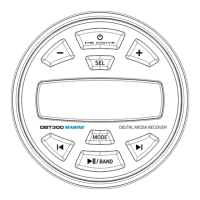
Control Panel Overview

Basic Operation Guide

Radio (AM/FM) Operation

Instructions for switching between AM/FM and seeking stations.

Apple Control/ USB / MP3 Operation

Steps for USB device insertion, playback, and file management.

Bluetooth Operation

Guide for connecting and streaming music via Bluetooth.

BT Audio Function

Control for skipping tracks during Bluetooth playback.

Clock Display & Adjustment

Procedure for displaying and adjusting the unit's clock.

Adjustment Menu

Equalization (EQ)

Options for selecting EQ presets like FLAT, CLASSIC, POP, or ROCK.

Area Tuning

Setting frequency spacing for USA or Europe locations.

Time Format

Switching between 12-hour (USA) and 24-hour (Europe) clock formats.

Bass Level

Adjusting the bass response from -7 to +7.

Treble Level

Adjusting the treble response from -7 to +7.

Balance Control

Adjusting the audio balance between left and right speakers.

Fader Control

Adjusting the audio balance between front and rear speakers.

Loud Control

Enabling or disabling the loudness feature.

Beep Control

Enabling or disabling the unit's beep sound.